




Here's how it works



How to use or fill out children claiming SSI benefits with our platform

- Click ‘Get Form’ to open it in the editor.
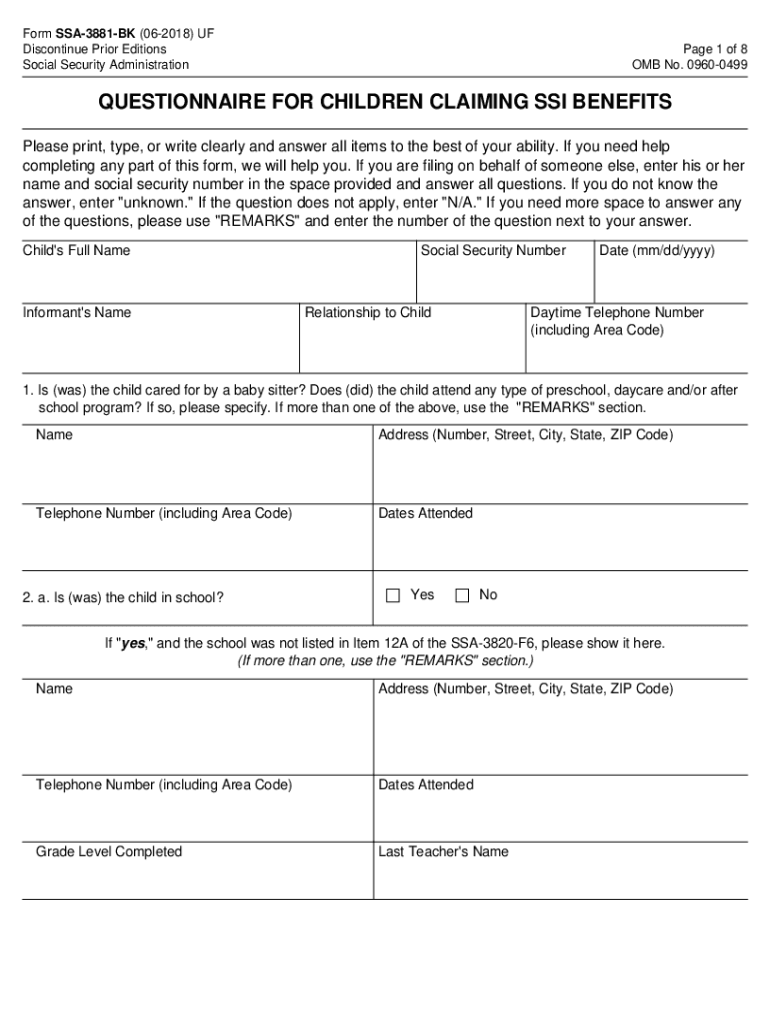
- Begin by entering the child's full name and social security number at the top of the form. Ensure that all information is accurate and clearly written.
- In Section 1, indicate if the child has been cared for by a babysitter or attended any preschool or daycare programs. Provide details such as names, addresses, and dates attended.
- For Section 2, answer whether the child is currently in school. If yes, provide additional details about the school, grade level completed, and any special education programs they may be part of.
- Continue through Sections 3 to 10, providing information on counseling services, therapy received, medications taken, and any community activities participated in. Use the 'REMARKS' section for additional notes if necessary.
- Finally, review all entries for accuracy before submitting your completed form through our platform.
Start filling out your children claiming SSI benefits form online for free today!
It's free
See more children claiming ssi benefits versions
Got questions?
How can I eSign my bk questionnaire from Gmail?
With DocHub, it’s quite simple. The platform offers users an add-on called DocHub for Gmail, which you can locate in the Google Workspace Marketplace free of charge. Install it and give it access to your Google account. Open your email with your bk questionnaire attached and click on the add-on button in the right-side panel. Sign in to your DocHub account, and import the file to our editor, where you can fill it out and sign.
Can I print my ssi questionnaire and complete it by myself?
When you go for analog ways of completing your ssi questionnaire, it is simple to download your file for printing. Search DocHub’s Forms & Templates catalog to locate the exact file template you require and open it for editing or download it on your gadget in the format of your choice. It is easy to complete your form electronically and place your handwritten signature on it right after printing or eSign your file with DocHub.
What qualifies a child to receive SSI?
How do children qualify for SSI?
Can a child get SSI if parents make too much money?
Security and compliance
At DocHub, your data security is our priority. We follow HIPAA, SOC2, GDPR, and other standards, so you can work on your documents with confidence.
Learn more


