Forms and Documents - Registrar - Toronto Metropolitan University 2026

Get Form
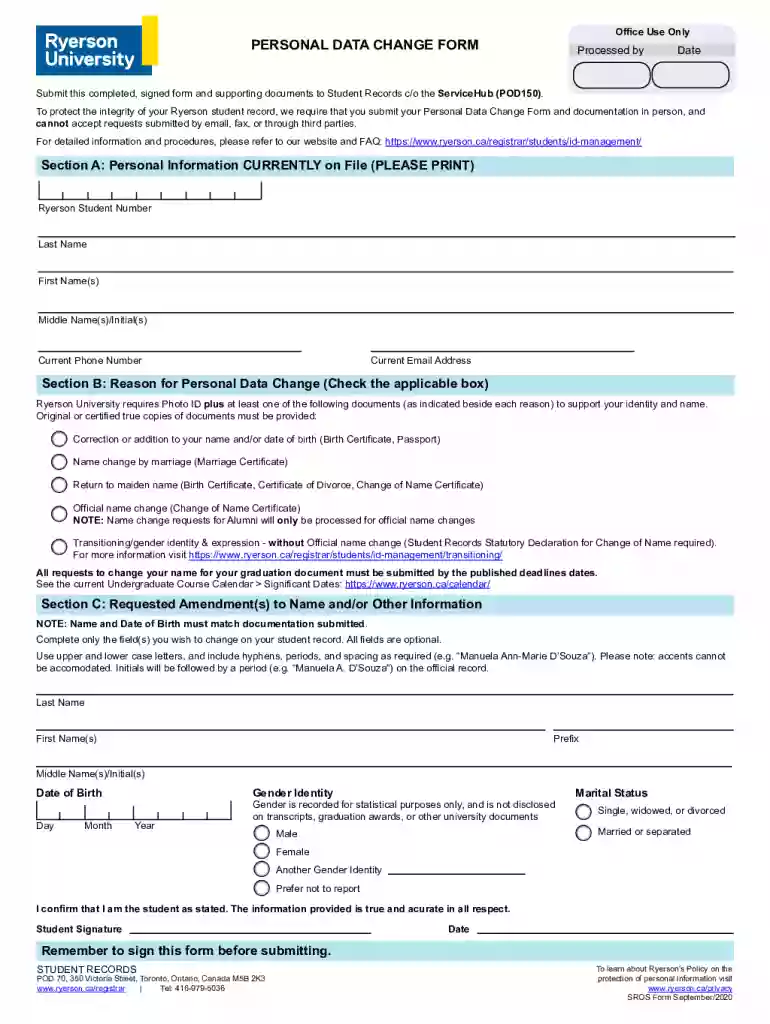
Forms and Documents - Registrar - Toronto Metropolitan University Preview on Page 1

Here's how it works

01. Edit your form online
Type text, add images, blackout confidential details, add comments, highlights and more.

02. Sign it in a few clicks
Draw your signature, type it, upload its image, or use your mobile device as a signature pad.

03. Share your form with others
Send it via email, link, or fax. You can also download it, export it or print it out.

How to use or fill out Forms and Documents - Registrar - Toronto Metropolitan University

Form edit decoration
9.5
Ease of Setup
DocHub User Ratings on G2
9.0
Ease of Use
DocHub User Ratings on G2
  1. Click ‘Get Form’ to open it in the editor.
  2. Begin with Section A: Personal Information. Fill in your Ryerson Student Number, Last Name, First Name(s), Middle Name(s)/Initial(s), Current Phone Number, and Current Email Address. Ensure all information is accurate and printed clearly.
  3. Move to Section B: Reason for Personal Data Change. Check the applicable box that corresponds to your reason for the change. Remember, you will need to provide supporting documents as specified.
  4. In Section C: Requested Amendment(s) to Name and/or Other Information, complete only the fields you wish to change. Use proper casing and include any necessary punctuation. Note that initials will be followed by a period on official records.
  5. Finally, confirm your identity by signing the form in the designated area and entering the date before submission.

Start using our platform today to easily fill out your forms for free!

See more Forms and Documents - Registrar - Toronto Metropolitan University versions

We've got more versions of the Forms and Documents - Registrar - Toronto Metropolitan University form. Select the right Forms and Documents - Registrar - Toronto Metropolitan University version from the list and start editing it straight away!
Versions Form popularity Fillable & printable
2020 4.6 Satisfied (34 Votes)
be ready to get more

Complete this form in 5 minutes or less

Get form

Got questions?

We have answers to the most popular questions from our customers. If you can't find an answer to your question, please contact us.
Contact us
Please direct all admissions questions to gradhelp@torontomu.ca. For admissions inquiries or to contact Admissions and Recruitment Officer, email gradhelp@torontomu.ca.
Access the letter request on MyServiceHub From the Student Homepage in MyServiceHub, select Student Center or Academic Records. If Academic Records is chosen, select Request A Letter from the options available. If Student Center is chosen, select Request A Letter in the Academics section of the Student Center.
A Letter of Permission (LOP) is a formal authorization for students who wish to take courses at other accredited post-secondary institutions for credit towards their Toronto Metropolitan University Degree or Certificate program.
You can request and pay for your Proof of Enrolment Letter on MyServiceHub. It will take one to three business days to process your request. Letters cost $20. They can be used to confirm enrolment with RESP and financial institutions, employers, and other third parties.
Letters and verification can be requested by students and be sent directly to third parties, or sent to students and then forwarded.

Security and compliance

At DocHub, your data security is our priority. We follow HIPAA, SOC2, GDPR, and other standards, so you can work on your documents with confidence.

Learn more
ccpa2
pci-dss
gdpr-compliance
hipaa
soc-compliance
be ready to get more

Complete this form in 5 minutes or less

Get form

People also ask

On the percentile scale, 3.5 GPA is equal to 90% and considered as grade A which denotes excellence. Students who earned a weighted academic GPA of 3.5 or higher in 3 semesters qualify for an Academic Letter.
Your school will give you a letter of acceptance. Upload this to your online application. Your school will be asked to make sure your letter of acceptance (LOA) is valid. If your school does not respond by the deadline, well return your application and refund your processing fee.
Parchment, Scoir and MyCreds TMU is registered to receive electronic documents via Parchment (external link) , Scoir (external link) and MyCreds (external link) .

Related links