Preview Business Profit And Loss Form - AllBusinessTemplates.com 2026

Get Form
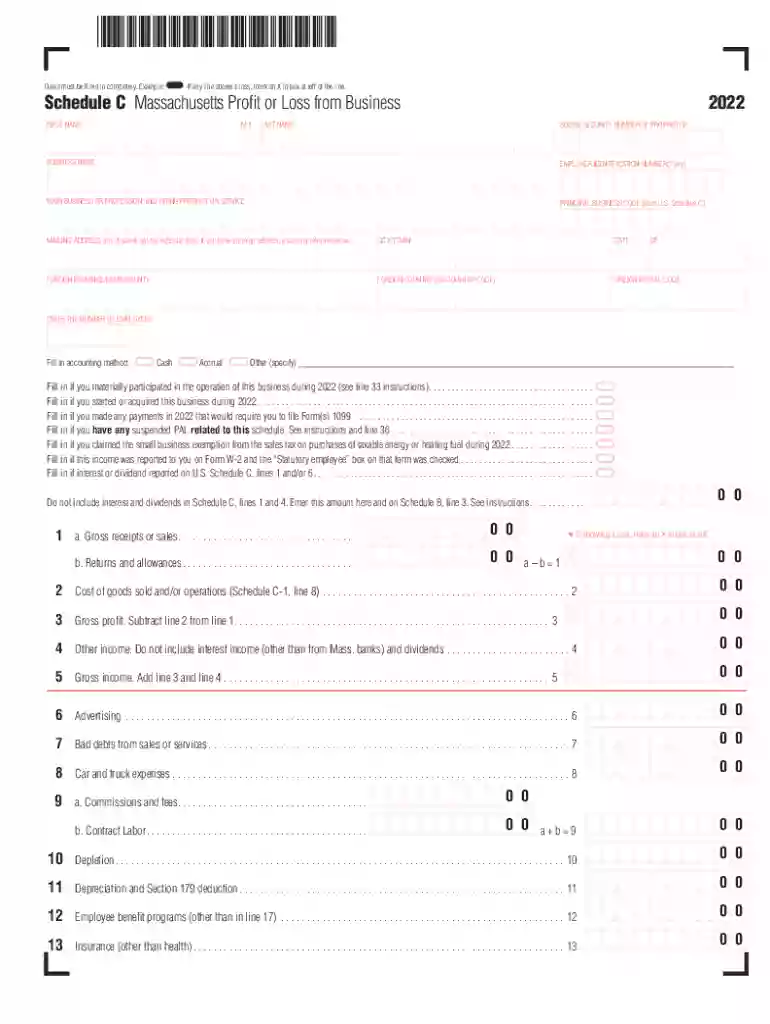
Preview Business Profit And Loss Form - AllBusinessTemplates.com Preview on Page 1

Here's how it works

01. Edit your form online
Type text, add images, blackout confidential details, add comments, highlights and more.

02. Sign it in a few clicks
Draw your signature, type it, upload its image, or use your mobile device as a signature pad.

03. Share your form with others
Send it via email, link, or fax. You can also download it, export it or print it out.

How to use or fill out Preview Business Profit And Loss Form - AllBusinessTemplates.com with DocHub

Form edit decoration
9.5
Ease of Setup
DocHub User Ratings on G2
9.0
Ease of Use
DocHub User Ratings on G2
  1. Click ‘Get Form’ to open it in the editor.
  2. Begin by filling in your personal information, including your first name, last name, and social security number. Ensure all fields are completed accurately.
  3. Next, provide your business details such as the business name, employer identification number (if applicable), and principal business code. This information is crucial for tax purposes.
  4. Indicate your accounting method by selecting either Cash, Accrual, or Other. This will affect how you report income and expenses.
  5. Proceed to fill out the income section. Enter gross receipts or sales and any returns and allowances. If there’s a loss, mark an X in the designated box.
  6. Continue through the expense sections, detailing costs like advertising, travel, and utilities. Be thorough to ensure accurate reporting of your financial situation.
  7. Finally, review all entries for accuracy before saving or exporting your completed form directly from our platform.

Start using our platform today to streamline your form completion process for free!

See more Preview Business Profit And Loss Form - AllBusinessTemplates.com versions

We've got more versions of the Preview Business Profit And Loss Form - AllBusinessTemplates.com form. Select the right Preview Business Profit And Loss Form - AllBusinessTemplates.com version from the list and start editing it straight away!
Versions Form popularity Fillable & printable
2023 4.3 Satisfied (39 Votes)
2022 4.9 Satisfied (28 Votes)
2021 4.8 Satisfied (37 Votes)
2020 4.3 Satisfied (124 Votes)
2019 4.2 Satisfied (62 Votes)
2018 4.4 Satisfied (157 Votes)
2017 4.3 Satisfied (106 Votes)
2016 4.4 Satisfied (214 Votes)
2004 4.6 Satisfied (56 Votes)
be ready to get more

Complete this form in 5 minutes or less

Get form

Got questions?

We have answers to the most popular questions from our customers. If you can't find an answer to your question, please contact us.
Contact us
You can ask your accountant to prepare a profit and loss statement for your company or you can build one yourself using the steps below.
How to create a profit and loss statement: 9 steps Step 1: Choose a reporting period. Step 2: Track the business revenue. Step 3: Calculate the cost of goods sold. Step 4: Subtract cost of goods sold from revenue to determine gross profit. Step 5: Record and calculate operating expenses.
Add all revenue earned over the accounting period. Add all expenditures made throughout the accounting period. Subtract total expenses from total revenue to know the difference. If the value is positive, it represents profit; if it is negative, it represents a loss.
To create a manual profit and loss statement, list all business income sources first. Then, detail all expenses such as rent, supplies, and salaries. Subtract total expenses from total income to find net profit or loss. Use clear categories and keep supporting documents handy.
What is Profit Loss Statement? Add all revenue earned over the accounting period. Add all expenditures made throughout the accounting period. Subtract total expenses from total revenue to know the difference. If the value is positive, it represents profit; if it is negative, it represents a loss.

Security and compliance

At DocHub, your data security is our priority. We follow HIPAA, SOC2, GDPR, and other standards, so you can work on your documents with confidence.

Learn more
ccpa2
pci-dss
gdpr-compliance
hipaa
soc-compliance
be ready to get more

Complete this form in 5 minutes or less

Get form