ME (Maine) Notarial Certificates 2026

Get Form
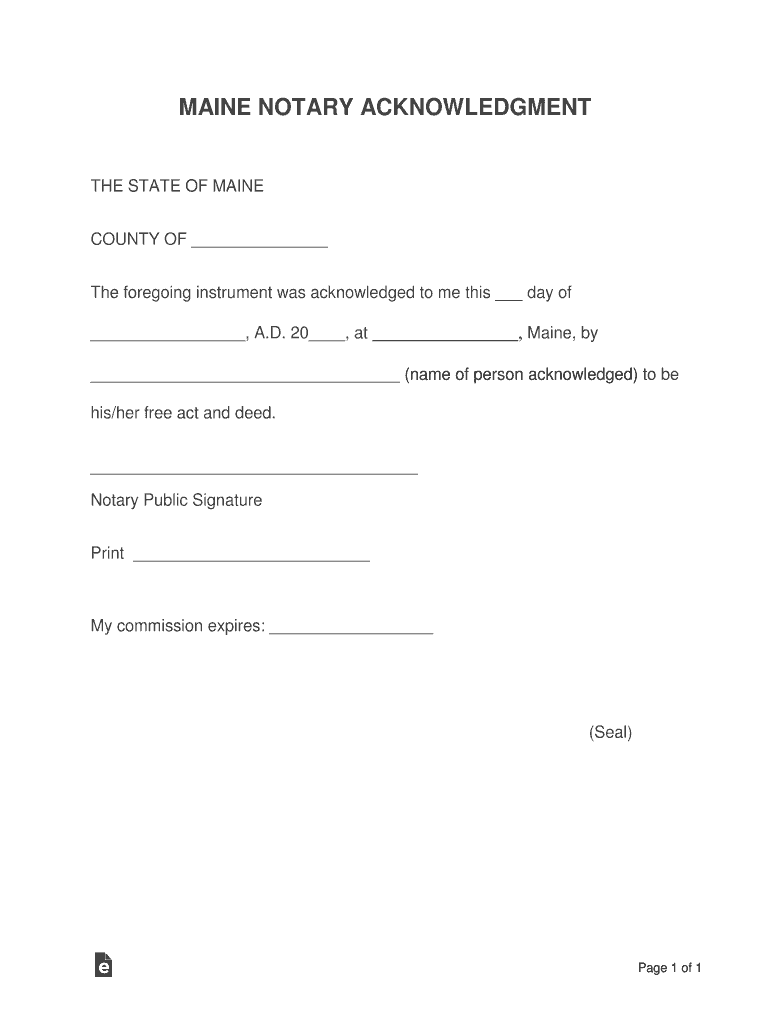
notarial certificate Preview on Page 1

Here's how it works

01. Edit your notarial certificate online
Type text, add images, blackout confidential details, add comments, highlights and more.
02. Sign it in a few clicks
Draw your signature, type it, upload its image, or use your mobile device as a signature pad.
03. Share your form with others
Send it via email, link, or fax. You can also download it, export it or print it out.

How to use or fill out ME (Maine) Notarial Certificates with our platform

Form edit decoration
9.5
Ease of Setup
DocHub User Ratings on G2
9.0
Ease of Use
DocHub User Ratings on G2
  1. Click ‘Get Form’ to open the ME (Maine) Notarial Certificate in the editor.
  2. Begin by filling in the 'COUNTY OF' field with the appropriate county where the acknowledgment is taking place.
  3. In the space provided for 'the ___ day of', enter the date of acknowledgment. Ensure you format it correctly for clarity.
  4. Next, write the name of the person being acknowledged in the designated area. This should be their full legal name.
  5. Sign your name as a Notary Public in the signature section. Make sure your signature is clear and legible.
  6. Print your name below your signature in the 'Print' field to ensure proper identification.
  7. Finally, indicate when your commission expires in the provided space, ensuring all information is accurate before finalizing.

Start using our platform today to easily complete your ME (Maine) Notarial Certificates online for free!

See more ME (Maine) Notarial Certificates versions

We've got more versions of the ME (Maine) Notarial Certificates form. Select the right ME (Maine) Notarial Certificates version from the list and start editing it straight away!
Versions Form popularity Fillable & printable
2017 4.8 Satisfied (155 Votes)
be ready to get more

Complete this form in 5 minutes or less

Get form

Got questions?

We have answers to the most popular questions from our customers. If you can't find an answer to your question, please contact us.
Contact us
A Notary stamp and journal are optional for Maine Notaries performing in-person paper notarizations, but theyre strongly recommended. These supplies are only required when notarizing electronic records. If youre planning to perform electronic or remote notarizations in Maine, check out this guide.
Failing to require signers to be present at the notarization is the number one claim of misconduct against Notaries.
1. Certificate required. A notarial act must be evidenced by a certificate.
Its not unusual for a Notary to be named in a lawsuit simply because plaintiffs are obligated to cast a wide net. In other words, the civil process is Sue first, ask questions later. And even with the best outcome, being sued is incredibly disruptive.
Dont let simple things like improper wording or formatting make your docHubd document invalid. Additionally, failing to properly identify the signer or making an illegible stamp impression are other common mistakes that undermine a notarys public trust.

Security and compliance

At DocHub, your data security is our priority. We follow HIPAA, SOC2, GDPR, and other standards, so you can work on your documents with confidence.

Learn more
ccpa2
pci-dss
gdpr-compliance
hipaa
soc-compliance
be ready to get more

Complete this form in 5 minutes or less

Get form

People also ask

A notary public commissioned by the Secretary of State; A justice, judge, clerk or deputy clerk of a court of this State; or. An attorney-at-law duly admitted and eligible to practice in the courts of this State.
If you falsify information on a certificate, whoever possesses the fraudulently docHubd document can use it to commit fraud. What are the consequences? Knowingly falsifying a Notary certificate is prohibited in every state and can result in severe penalties.

Related links