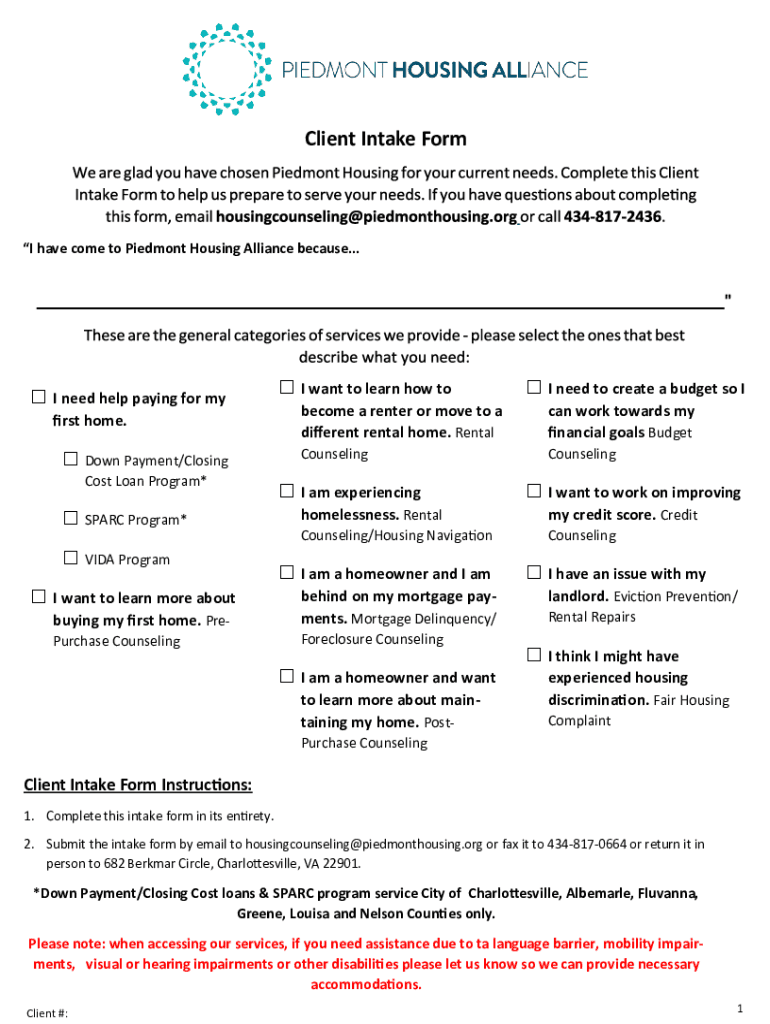
Piedmonthousingalliance.orgwp-contentuploadsClient Intake Form - Piedmont Housing Alliance 2026

Get Form
piedmonthousingalliance.orgwp-contentuploadsClient Intake Form - Piedmont Housing Alliance Preview on Page 1

Here's how it works

01. Edit your form online
Type text, add images, blackout confidential details, add comments, highlights and more.
02. Sign it in a few clicks
Draw your signature, type it, upload its image, or use your mobile device as a signature pad.
03. Share your form with others
Send it via email, link, or fax. You can also download it, export it or print it out.

How to use or fill out piedmonthousingalliance.orgwp-contentuploadsClient Intake Form - Piedmont Housing Alliance

Form edit decoration
9.5
Ease of Setup
DocHub User Ratings on G2
9.0
Ease of Use
DocHub User Ratings on G2
  1. Click ‘Get Form’ to open it in the editor.
  2. Begin by filling out the 'Primary Applicant Information' section. Enter your first name, middle initial, last name, and contact details including your phone number and email address.
  3. Indicate your preferred method of contact and provide information about the number of people living in your household. Be sure to include any relevant details regarding disabilities or military status.
  4. Proceed to the 'Co-Applicant' section if applicable, providing similar information for the co-applicant.
  5. Fill out the 'Income' section by listing all sources of income for each household member, including employer names and yearly income before taxes.
  6. Complete the 'Liabilities/Debts' and 'Fixed Expenses' sections with accurate financial details to ensure a comprehensive overview of your financial situation.
  7. Review all entries for accuracy before submitting. Once completed, submit the form via email or fax as instructed at the end of the document.

Start using our platform today to easily fill out your Client Intake Form for free!

See more piedmonthousingalliance.orgwp-contentuploadsClient Intake Form - Piedmont Housing Alliance versions

We've got more versions of the piedmonthousingalliance.orgwp-contentuploadsClient Intake Form - Piedmont Housing Alliance form. Select the right piedmonthousingalliance.orgwp-contentuploadsClient Intake Form - Piedmont Housing Alliance version from the list and start editing it straight away!
Versions Form popularity Fillable & printable
2020 4.9 Satisfied (45 Votes)
2019 4.6 Satisfied (51 Votes)
be ready to get more

Complete this form in 5 minutes or less

Get form

Got questions?

We have answers to the most popular questions from our customers. If you can't find an answer to your question, please contact us.
Contact us

Yes, you can use DocHub for signing any business and private documentation, including your piedmonthousingalliance.orgwp-contentuploadsClient Intake Form - Piedmont Housing Alliance. All eSignatures you create with our service are legally binding and court-admissible, as DocHub complies with criteria required by ESIGN and UETA. Save your accomplished document with a detailed Audit Trail if necessary.

With DocHub, you have several convenient ways to edit your piedmonthousingalliance.orgwp-contentuploadsClient Intake Form - Piedmont Housing Alliance online. You can drag and drop the form and edit it directly at the DocHub site or use our browser extension to fill out your form immediately. Additionally, you can edit your PDF on your phone, as DocHub works with all the available mobile platforms.

Lets have a look at the key elements every intake form should have: Client Information. This includes important details for identification and contact purposes. Business Background. Target Audience. Products and Services. Client Goals. Existing Strategies. Budget and Timeline. Challenges or Concerns.
An intake form is a document used to gather important information from clients, customers, or patients when they first interact with a service or organization. It typically includes basic details like contact information, purpose of seeking services, and other relevant data.
Create a client intake form using Google Forms. In Google Forms, click the plus sign. Click the Untitled form header box. Enter a name and description for the form.

Security and compliance

At DocHub, your data security is our priority. We follow HIPAA, SOC2, GDPR, and other standards, so you can work on your documents with confidence.

Learn more
ccpa2
pci-dss
gdpr-compliance
hipaa
soc-compliance
be ready to get more

Complete this form in 5 minutes or less

Get form

People also ask

Your client intake form is a tool to obtain accurate and up-to-date information from a new client. It covers key details you need to perform your job. You can use it to ask questions, for links to key documents, or usernames and passwords for specific applications, ensuring you never miss any crucial data points.
Here are some key elements you can include on your project intake form to ensure your team has all the information they need to be successful: Client contact information. Type of project. Objective. Budget. Deadline. Determine the format. Make a list of important questions. Determine your project threshold.
So, what information does the client intake form gather? It can range from basic contact details to nuanced preferences and requirements. Client intake forms, especially digital intake forms, can also collect information on their internal processes.