01. Edit your form online
Type text, add images, blackout confidential details, add comments, highlights and more.

Type text, add images, blackout confidential details, add comments, highlights and more.

Draw your signature, type it, upload its image, or use your mobile device as a signature pad.

Send it via email, link, or fax. You can also download it, export it or print it out.
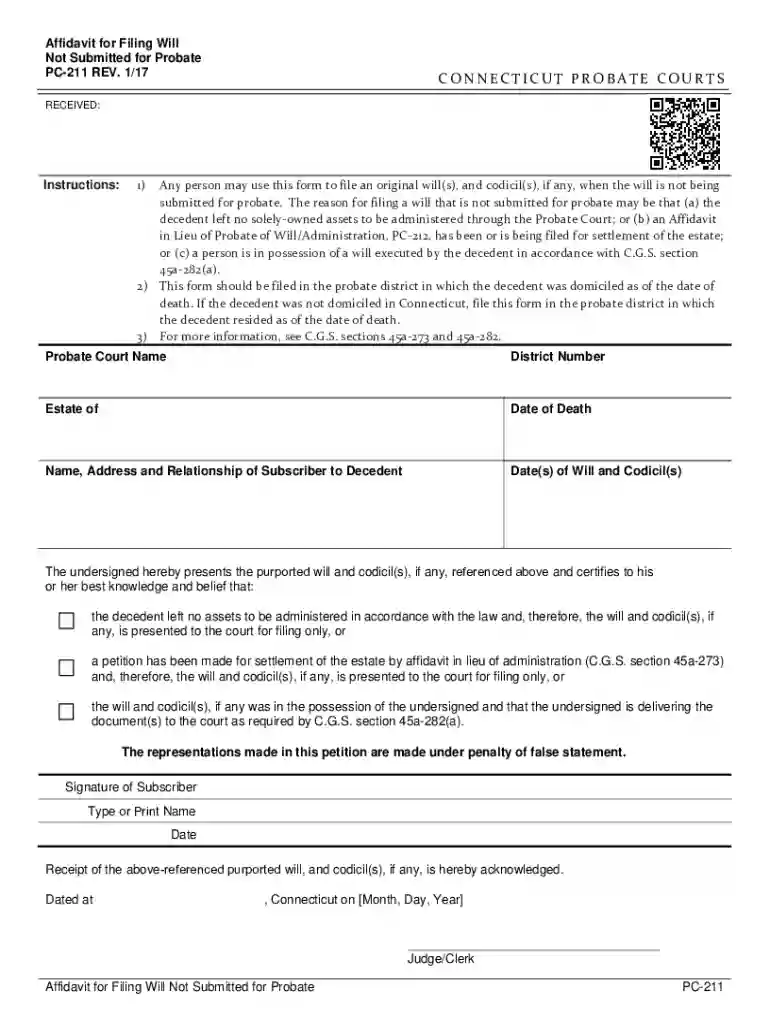
The "Affidavit for Filing Will Not Submitted for Probate PC-211" is a legal document used specifically in Connecticut Probate Courts. Its primary function is to allow individuals to file a will and any associated codicils without proceeding through the probate process. This form is essential in situations where the decedent may not have solely-owned assets needing probate administration, or when an Affidavit in Lieu of Probate can be filed. Its usage is primarily for record-keeping, ensuring the decedent's testamentary intentions are documented without court intervention.
To effectively use the Affidavit for Filing Will Not Submitted for Probate PC-211, one must gather relevant details about the decedent and any particular conditions that exempt the will from probate. Here are the key steps:
Gather Necessary Information: Ensure you have all required details about the decedent, including personal information and relationships to the subscribers.
Understand Filing Conditions: Confirm that the conditions warranting the will not requiring probate are met, such as no solely-owned assets.
Complete the Form: Fill in the form accurately, detailing the purpose and ensuring it's used solely for record purposes rather than distribution of assets.
File with the Probate Court: Submit the completed affidavit to the relevant Connecticut Probate Court.
Retain a Copy: Keep a copy of the submitted affidavit and any related documents for personal records or future reference.
When completing the Affidavit for Filing Will Not Submitted for Probate, follow these steps to ensure accuracy and compliance with legal standards:
Begin with Personal Details: Fill in the decedent’s full name, date of death, and relationship to you.
Certify Will Details: Provide details of the will and any codicils if present. Include dates and relevant circumstances that highlight why probate is unnecessary.
Affirmation of Intent: Certify that the submission is purely for record purposes and not indicative of estate distribution.
Sign and Notarize: Sign the affidavit in the presence of a notary public to validate the document's authenticity.
Submit and Document: File the form with the appropriate probate court and ensure all steps adhere to procedural requirements.
Certain elements must be included within the form to ensure that it meets legal and procedural criteria:
Decedent’s Information: Full legal name, date of death, and relevant identifying details.
Relationship Declaration: The relationship between the affidavit subscriber and the decedent must be clarified.
Will and Codicil Details: A complete description of the will and any codicils, with specifics on document creation and storage.
Conditions for Non-Probate Filing: Precise reasons for not submitting for probate, such as the absence of substantial assets.
Notarization: The affidavit must be notarized to verify its validity and the integrity of the information provided.
Connecticut's probate laws provide specific guidelines concerning the Affidavit for Non-Probate Filing:
Eligibility: The affidavit is specifically applicable within Connecticut jurisdiction and follows state probate policies.
Legal Boundaries: Laws limit the use of this affidavit to record-keeping, not asset distribution.
Court Protocols: Adherence to court procedures is mandatory to ensure the affidavit serves its legal purpose.
Several scenarios illustrate the practical application of the Affidavit PC-211:
Scenario A: Where a decedent left behind minimal assets and no need for formal probate, the affidavit can be filed to record the will without the need for probate.
Scenario B: If an estate consists solely of jointly-owned property or is less than the state threshold requiring probate, the affidavit serves as a formal record.
Utilizing the PC-211 affidavit offers several advantages:
Simplicity: Allows wills to be filed efficiently without the complexities of probate, saving time and legal expenses.
Record Keeping: Ensures that the will is on public record without necessitating the probate process, maintaining documentation integrity.
Peace of Mind: Provides a legal framework for ensuring the decedent's testamentary wishes are accessible and acknowledged without unnecessary bureaucracy.
The form is most commonly used by:
Family Members: Especially those directly related to the decedent, ensuring that the will is cataloged effectively.
Estate Attorneys: Legal professionals managing the affairs of estates without formal probate proceedings.
Executors or Personal Representatives: Those responsible for handling the will and testamentary intentions without full probate procedures.


We've got more versions of the Affidavit for Filing Will Not Submitted for Probate PC-211 form. Select the right Affidavit for Filing Will Not Submitted for Probate PC-211 version from the list and start editing it straight away!
At DocHub, your data security is our priority. We follow HIPAA, SOC2, GDPR, and other standards, so you can work on your documents with confidence.