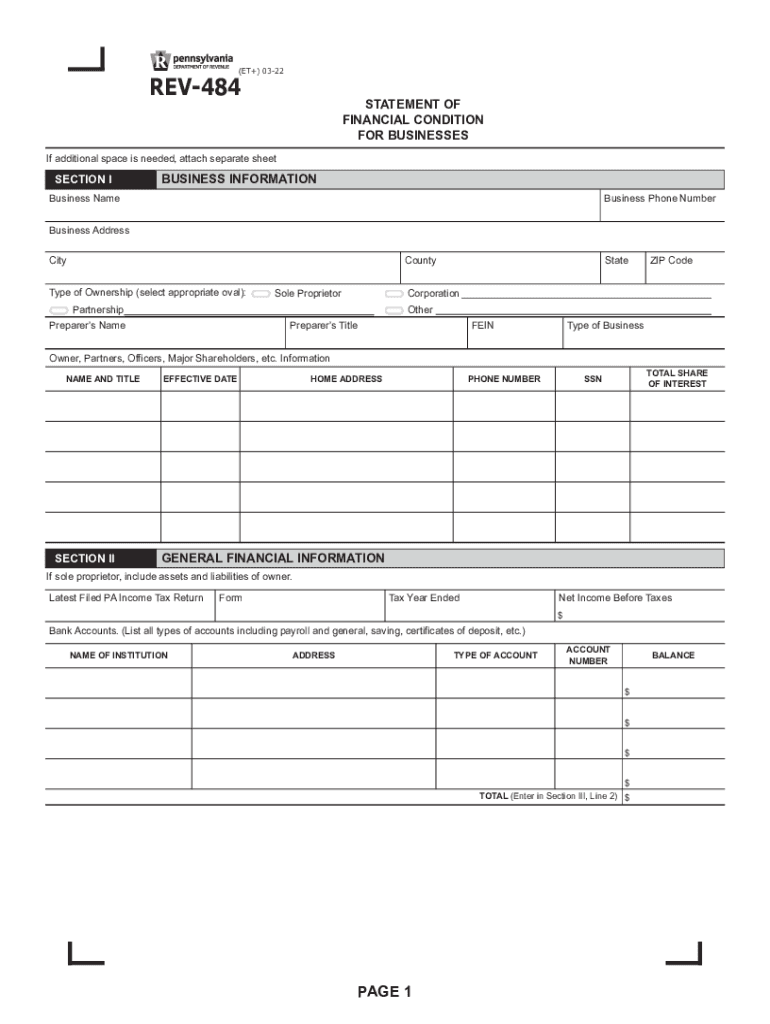
Statement of Financial Condition for Businesses (REV-484). Forms/Publications 2026

Get Form
rev 484 Preview on Page 1

Here's how it works

01. Edit your rev 484 online
Type text, add images, blackout confidential details, add comments, highlights and more.
02. Sign it in a few clicks
Draw your signature, type it, upload its image, or use your mobile device as a signature pad.
03. Share your form with others
Send it via email, link, or fax. You can also download it, export it or print it out.

How to use or fill out Statement of Financial Condition for Businesses (REV-484) with our platform

Form edit decoration
9.5
Ease of Setup
DocHub User Ratings on G2
9.0
Ease of Use
DocHub User Ratings on G2
  1. Download the REV-484 form onto your computer before starting. Open it in our editor.
  2. Begin with SECTION I: BUSINESS INFORMATION. Fill in your business name, phone number, address, and type of ownership. Ensure all details are accurate.
  3. Proceed to SECTION II: GENERAL FINANCIAL INFORMATION. Report your latest filed PA Income Tax Return and net income before taxes. List all bank accounts, including balances.
  4. In SECTION III: ASSETS AND LIABILITIES ANALYSIS, provide a detailed account of assets and liabilities. Include cash on hand, bank accounts, real estate properties, and any loans.
  5. Move to SECTION IV: INCOME AND EXPENSE ANALYSIS. Document all sources of income and expenses during the specified period accurately.
  6. Finally, complete SECTION V: CERTIFICATION by signing and dating the form to confirm its accuracy.

Start using our platform today to fill out your REV-484 form easily and for free!

See more Statement of Financial Condition for Businesses (REV-484). Forms/Publications versions

We've got more versions of the Statement of Financial Condition for Businesses (REV-484). Forms/Publications form. Select the right Statement of Financial Condition for Businesses (REV-484). Forms/Publications version from the list and start editing it straight away!
Versions Form popularity Fillable & printable
2022 4.4 Satisfied (57 Votes)
2013 4.9 Satisfied (496 Votes)
be ready to get more

Complete this form in 5 minutes or less

Get form

Got questions?

We have answers to the most popular questions from our customers. If you can't find an answer to your question, please contact us.
Contact us

Microsoft Word doesn’t have signing tools to generate valid electronic signatures and enforceable documents. Luckily, DocHub is an online eSignature-compliant editor that works with various file formats, including .doc files. Log in to your account and import the Word edition of your Statement of Financial Condition for Businesses (REV-484). Forms/Publications from your device and cloud, or URL - our editor will automatically turn it into an editable PDF. Make all necessary changes in your document and click Sign to generate your own legally-binding eSignature. You will find four signing options from which to choose.

If you edit your Statement of Financial Condition for Businesses (REV-484). Forms/Publications with DocHub, you only require a stable web connection and virtually any web browser installed on your device. No need to install any third-party applications or research guides. Just open a tab with DocHub, drag and drop your file, and edit it immediately.

Financial information can be found on the companys web page in Investor Relations where Securities and Exchange Commission (SEC) and other company reports are often kept. The SEC has financial filings electronically available beginning in 1993/1994 free on their website. See EDGAR: Company Filings.
A balance sheet or statement of financial position provides a snapshot of the financial well-being of a business at a specified point in time. Typically, its used alongside income statements, cash flow statements, and statements of shareholder equity.
Balance Sheet Basics Your balance sheet (sometimes called a statement of financial position) provides a snapshot of your practices financial status at a particular point in time. This financial statement details your assets, liabilities and equity, as of a particular date.

Security and compliance

At DocHub, your data security is our priority. We follow HIPAA, SOC2, GDPR, and other standards, so you can work on your documents with confidence.

Learn more
ccpa2
pci-dss
gdpr-compliance
hipaa
soc-compliance

People also ask

An income statement shows a companys revenue, expenditures and profitability over a period of time, usually a month, a quarter or a year. A balance sheet shows what a business owns and how much it owes at a specific point in time.
How to prepare an income statement Choose your reporting period. First, choose the length of your reporting period. Determine your trial balance. Determine revenue. Calculate the cost of goods sold. Determine gross profit. Determine expenses. Calculate total income. Determine taxes and interest.
They show you the money. They show you where a companys money came from, where it went, and where it is now. There are four main financial statements. They are: (1) balance sheets; (2) income statements; (3) cash flow statements; and (4) statements of shareholders equity.

Related links