




01. Edit your form online
Type text, add images, blackout confidential details, add comments, highlights and more.

Type text, add images, blackout confidential details, add comments, highlights and more.

Draw your signature, type it, upload its image, or use your mobile device as a signature pad.

Send it via email, link, or fax. You can also download it, export it or print it out.
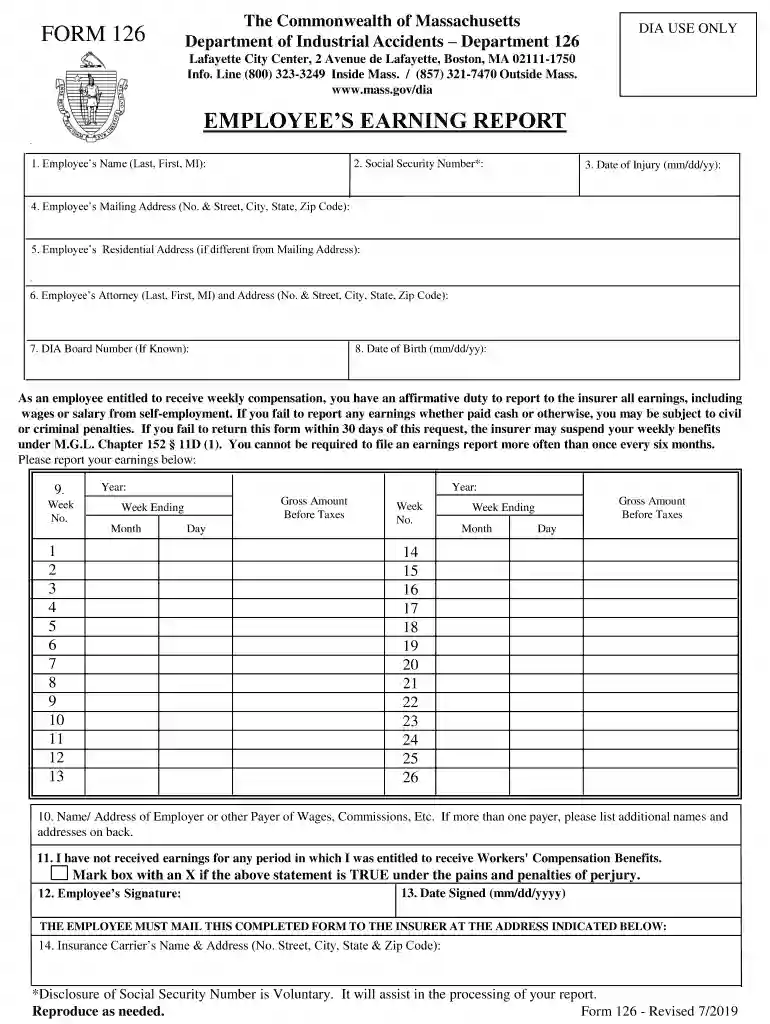
The Commonwealth of Massachusetts Department of Industrial Accidents issues Form 126, known as the Employee's Earning Report. This form is crucial for employees receiving weekly compensation due to workplace injuries. It requires the disclosure of all earnings, encompassing wages from employment and self-employment, during a specified timeframe. The intent is to ensure transparency and prevent fraudulent claims within the workers' compensation system. Employees must complete this form accurately to avoid potential penalties, including the suspension of benefits.
To procure Form 126, employees can visit the official website of the Massachusetts Department of Industrial Accidents, which typically offers downloadable PDFs for convenience. Alternatively, individuals can request a physical copy through their employer or insurer. Employers and insurers are usually responsible for informing employees about the need to complete this form as part of the compensation claim process.
Gather Required Information: Before filling out Form 126, collect all necessary data such as personal details, social security number, and comprehensive earnings information across the reporting period.
Fill in Personal Information: Enter your name, address, social security number, and the date of injury. Ensure all personal details are accurate, as discrepancies could lead to processing delays.
Report Earnings: Clearly document all sources of income, including salaries, wages, bonuses, and any self-employment earnings. Accurately capturing this information is vital for compliance with reporting requirements.
Review for Accuracy: Double-check the form to ensure all information is complete and accurate. This step helps prevent any rejection or delays in processing your report.
Submit the Form: Submit the completed form to your insurer within the stipulated 30-day period. Remember, failing to submit on time can result in suspension of your benefits.
Accurate reporting on this form is imperative because it enables the verification of benefits eligibility and the prevention of overpayments. Misreporting earnings can lead to significant legal and financial repercussions. Moreover, precise data entry ensures that you continue to receive appropriate benefits without interruptions.
Completing Form 126 necessitates a few supporting documents:
Employees have multiple options for submitting Form 126:
Online Submission: Many prefer the electronic method due to its efficiency and instant delivery. Check if your insurer or the Department of Industrial Accidents provides an online portal.
Mail Submission: If you opt for traditional mail, ensure the form is posted well before the deadline to account for delivery delays.
In-Person Submission: You may also deliver the form directly to your insurer for swift processing. Confirm the exact submission procedure with your insurer to ensure adherence to their preferences.
Understanding the legal implications of Form 126 is critical. This form becomes part of the legal dossier concerning your compensation claim. Deliberate false reporting or omission of information can result in legal actions, including fines or discontinuation of benefits. Compliance with completion and submission guidelines not only protects your rights but also reinforces the integrity of the worker's compensation system.
Failing to submit Form 126 or providing inaccurate information can have serious consequences:
Suspension of Benefits: The most immediate penalty is the suspension of current and future compensation benefits until the matter is resolved.
Legal Action: Intentional misreporting may lead to criminal charges and financial penalties, including the repayment of overpayments received.
By adhering to these guidelines and understanding the critical nature of Form 126, employees can ensure continued support during their recovery from workplace injuries while maintaining compliance with Massachusetts regulations.
We've got more versions of the Department of Industrial Accidents Department 126 form. Select the right Department of Industrial Accidents Department 126 version from the list and start editing it straight away!
Managing your documents with DocHub this way is very simple once you have downloaded its extension for Google Chrome. Navigate to the Chrome Web Store and install DocHub - Sign PDF from Gmail to obtain it. Give our tool access to your Google account, and then open an email containing Department of Industrial Accidents Department 126 as an attachment and point to the file with your cursor - the DocHub extension key will automatically show up there. Click on it to open your form in our editor. Make any necessary adjustments, fill out the blanks, and click Sign to create your legally-binding electronic signature.
You can find the latest and most relevant version of the Department of Industrial Accidents Department 126 in our DocHub forms library. Browse it by categories or use the search field to locate the exact template that fits your situation. You may open this form for editing after you find it.
At DocHub, your data security is our priority. We follow HIPAA, SOC2, GDPR, and other standards, so you can work on your documents with confidence.
Jun 8, 2022 All the Department of Industrial Accidents (DIA) forms that we use. Employee Earning Report (/doc/form-126-employee-earning-report/download) (Read more
The Department of Industrial Accident (DIA) oversees the Massachusetts workers compensation system. We work to ensure that those involved have the resourcesRead more


