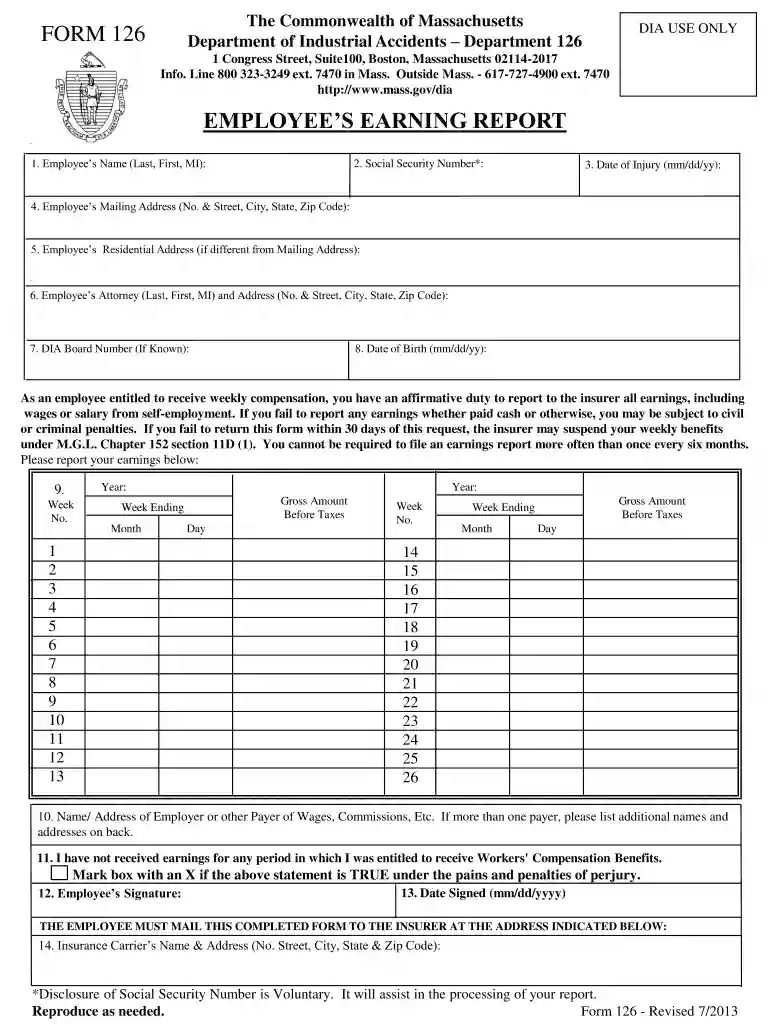
EMPLOYEES EARNING REPORT - MassGov 2026

Get Form
EMPLOYEES EARNING REPORT - MassGov Preview on Page 1

Here's how it works

01. Edit your form online
Type text, add images, blackout confidential details, add comments, highlights and more.

02. Sign it in a few clicks
Draw your signature, type it, upload its image, or use your mobile device as a signature pad.

03. Share your form with others
Send it via email, link, or fax. You can also download it, export it or print it out.

Definition & Meaning

The "EMPLOYEES EARNING REPORT - MassGov" is a critical document issued by the Massachusetts Department of Industrial Accidents. It serves the purpose of recording the earnings of employees who are receiving workers’ compensation benefits. It is essential for maintaining transparency and accurate reporting of any income earned by the beneficiary. This form ensures that employees disclose all earnings, including those from self-employment, while they are receiving workers' compensation benefits. Providing such information helps avoid potential legal issues and penalties associated with non-compliance or misinformation.

How to Use the EMPLOYEES EARNING REPORT - MassGov

To utilize the "EMPLOYEES EARNING REPORT - MassGov," employees need to meticulously record any income acquired during the compensation period. This includes salaries, wages, bonuses, tips, and any self-employment income. The following steps outline how to effectively use the form:

  1. Gather Income Information: Collect all relevant documentation such as pay stubs, invoices, and bank statements to ensure accurate reporting.
  2. Complete Personal Information: Enter your personal details as required by the form, including your name, address, and social security number.
  3. Disclose Earnings: Using the collected documentation, fill in your earnings for the specified period.
  4. Review: Double-check all entries for accuracy.
  5. Submit: File the completed form according to the submission instructions provided.

How to Obtain the EMPLOYEES EARNING REPORT - MassGov

You can obtain this form through the Massachusetts Department of Industrial Accidents. It is available for download from their official website, ensuring ease of access for all employees who require it.

  • Online: Visit the official MassGov portal, navigate to the forms section, and download the form directly.
  • In-Person: Visit a local office of the Massachusetts Department of Industrial Accidents to collect a physical copy.

Steps to Complete the EMPLOYEES EARNING REPORT - MassGov

Here is a detailed breakdown of the steps necessary to fill out the form:

  1. Start with Requisite Information: Enter all requested personal and contact information.
  2. Document Earnings:
    • Use separate sections for regular employment and self-employment.
    • Include gross earnings before any deductions.
  3. Sign the Declaration: Certify the accuracy of the information provided with your signature.
  4. Additional Remarks: If needed, use the comments section to include any explanatory notes.

Each part of the form is designed to capture specific types of information, so thoroughness is crucial.

Penalties for Non-Compliance

Non-compliance with the submission requirements can lead to serious legal consequences. The Massachusetts Department of Industrial Accidents imposes penalties, which may include fines or the suspension of workers’ compensation benefits. Intentional misreporting or failure to report earnings not only affects benefit entitlement but can also lead to further legal action.

Key Elements of the EMPLOYEES EARNING REPORT - MassGov

Several critical components are integral to completing the form accurately:

  • Personal Identification: Ensures the form is linked to the correct employee.
  • Earnings Section: Captures all forms of income.
  • Declaration: Serves as both a confirmation of truthfulness and an acknowledgment of the accuracy of the details provided.
  • Comments and Clarifications: Allows for further transparency if any part of the form requires additional context.

Legal Use of the EMPLOYEES EARNING REPORT - MassGov

This form is legally binding and serves to ensure compliance with the rules governing workers' compensation in Massachusetts. Employees must understand that submitting the form with complete and accurate information is essential for gaining or continuing to receive workers’ compensation benefits legally.

Step-by-Step Instructions for Form Submission

  • Online Submission: Ensure you have digital copies of all necessary documents before submission. The form, once filled, should be uploaded through the official Massachusetts Department of Industrial Accidents portal.
  • Mail Submission: If using mail, double-check that the form is properly filled out and signed. Include any necessary additional information and send it to the specified address on the form instructions.

Maintaining compliance and ensuring timely submission is critical to benefit maintenance and avoiding disruptions. Always follow up to confirm receipt if mailing the form, to secure proof of submission.

See more EMPLOYEES EARNING REPORT - MassGov versions

We've got more versions of the EMPLOYEES EARNING REPORT - MassGov form. Select the right EMPLOYEES EARNING REPORT - MassGov version from the list and start editing it straight away!
Versions Form popularity Fillable & printable
2019 4.9 Satisfied (55 Votes)
2013 4.3 Satisfied (90 Votes)
be ready to get more

Complete this form in 5 minutes or less

Get form

Got questions?

We have answers to the most popular questions from our customers. If you can't find an answer to your question, please contact us.
Contact us
Massachusetts regulations If you were scheduled to work for 3 hours or more and get sent home, your employer must pay you for at least 3 hours at least minimum wage. This does not apply to charitable organizations. Explains when employers are and are not required to pay for on-call time.
There is nothing in state law that mandates an employer pay an employee a special premium for work performed on holidays, Saturdays, or Sundays, other than the overtime premium required for work in excess of eight hours in a workday or 40 hours in a workweek.
Workers have the right to be paid for all the time that they work and to be paid on time. They must get paystubs and be able to see their employers record of their hours and pay. Workers who think their rights were violated can file a complaint with the Attorney Generals Fair Labor Division.
Massachusetts does not require employers to pay employees extra for working on holidays, except for certain industries and employees covered under collective bargaining agreements. While you may have the right to time off on holidays, you wont automatically receive extra pay.
Employers must report newly hired employees and independent contractors to us within 14 days of their first day of work. Find out how you can report your new hires to us.

Security and compliance

At DocHub, your data security is our priority. We follow HIPAA, SOC2, GDPR, and other standards, so you can work on your documents with confidence.

Learn more
ccpa2
pci-dss
gdpr-compliance
hipaa
soc-compliance
be ready to get more

Complete this form in 5 minutes or less

Get form

People also ask

Assuming you are entitled Sunday pay (see above), your employer must pay you 1.3 times your regular rate during 2020, 1.2 times your regular rate during 2021, and 1.1 times your regular rate during 2022. The Sunday pay requirement will be phased out entirely on January 1, 2023.
Francisco Martin, the head coach of UMass Mens Basketball, maintained his position as the highest-paid state employee in 2024 for the second year in a row. Martin collected a total salary of $1.83 million last year.
Please note that premium pay requirements were eliminated effective January 1, 2023. Previously, certain retailers were required to pay certain hourly employees a higher hourly wage rate on Sundays and certain holidays. That requirement expired as a result of a change in state law.

Related links