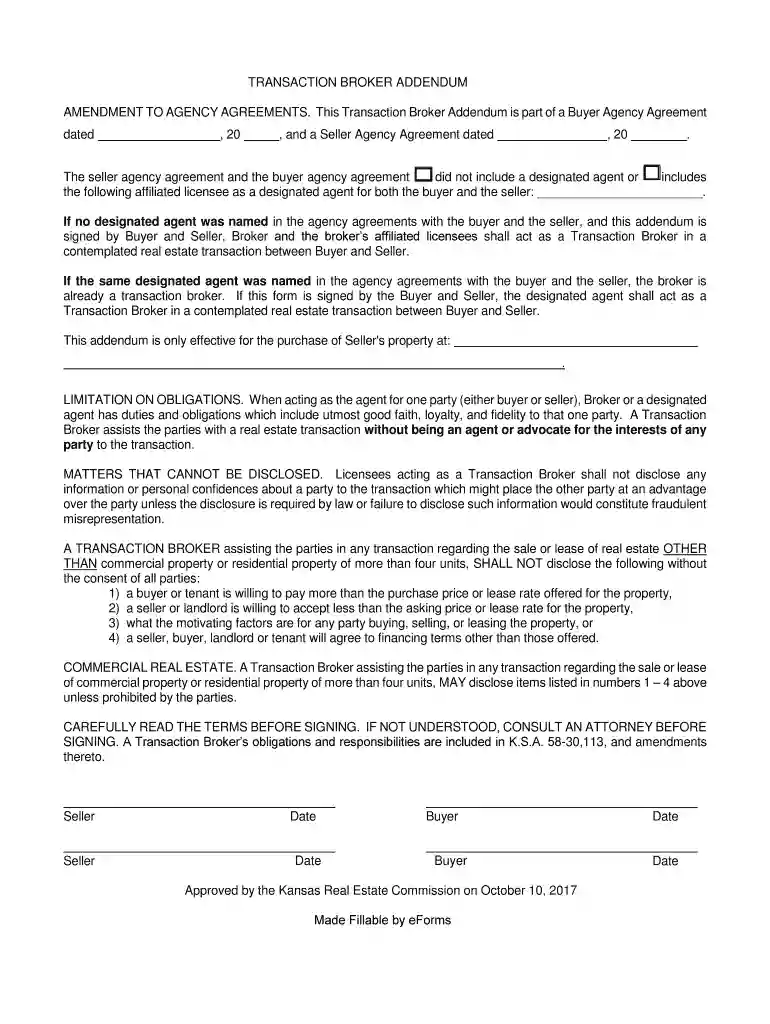
Kansas Transaction Broker Consent Form 2026

Get Form
Kansas Transaction Broker Consent Form Preview on Page 1

Here's how it works

01. Edit your form online
Type text, add images, blackout confidential details, add comments, highlights and more.

02. Sign it in a few clicks
Draw your signature, type it, upload its image, or use your mobile device as a signature pad.

03. Share your form with others
Send it via email, link, or fax. You can also download it, export it or print it out.

How to use or fill out Kansas Transaction Broker Consent Form with DocHub

Form edit decoration
9.5
Ease of Setup
DocHub User Ratings on G2
9.0
Ease of Use
DocHub User Ratings on G2
  1. Click ‘Get Form’ to open the Kansas Transaction Broker Consent Form in our platform.
  2. Begin by entering the date of the Buyer Agency Agreement and Seller Agency Agreement in the designated fields. This establishes the context for your transaction.
  3. If applicable, specify any designated agent by filling in their name where indicated. If no agent is named, simply proceed without filling this section.
  4. Review the section on limitations of obligations carefully. Ensure you understand that as a Transaction Broker, you will not advocate for either party's interests.
  5. Fill out the property address where the transaction will take place. This is crucial for identifying the specific real estate involved.
  6. Finally, ensure all parties (Buyer and Seller) sign and date the form at the bottom to validate it. Use our editor’s signature feature for convenience.

Start using our platform today to fill out your Kansas Transaction Broker Consent Form online for free!

See more Kansas Transaction Broker Consent Form versions

We've got more versions of the Kansas Transaction Broker Consent Form form. Select the right Kansas Transaction Broker Consent Form version from the list and start editing it straight away!
Versions Form popularity Fillable & printable
2017 4.8 Satisfied (64 Votes)
be ready to get more

Complete this form in 5 minutes or less

Get form

Got questions?

We have answers to the most popular questions from our customers. If you can't find an answer to your question, please contact us.
Contact us
In contrast, transaction brokers remain neutral parties, while agents typically represent a single party involved in the transaction. As an agents client, youll receive advocacy, direction, negotiation, and informed advice regarding potential risks associated with the transaction.
Transaction Broker Defined Unlike a buyers or sellers agent, a transaction broker does not represent either party as a fiduciary. Instead, they serve as a neutral third party, assisting the buyer and the seller in docHubing a successful deal without taking sides.
The transaction broker is responsible for performing the following duties: -exercising reasonable skill and care -presenting all offers in a timely manner advising the parties regarding the transaction -suggesting that the parties obtain expert advice accounting for all money and property received -keeping the parties
Brokerage agreement means the written agreement creating a brokerage relationship between a client and a licensee. The brokerage agreement shall state whether the real estate licensee will represent the client as an agent or an independent contractor.
Transaction brokers assist with negotiating sale terms, handling paperwork, and providing market information and property comparisons. In certain states, transaction brokers are referred to as affiliated business arrangements or third-party service providers.

Security and compliance

At DocHub, your data security is our priority. We follow HIPAA, SOC2, GDPR, and other standards, so you can work on your documents with confidence.

Learn more
ccpa2
pci-dss
gdpr-compliance
hipaa
soc-compliance

People also ask

The transaction broker is not an agent for either party, so the transaction broker does not advocate the interests of either party. disclosing to the buyer all adverse material facts actually known by the transaction broker, including: environmental hazards affecting the property that are required to be disclosed.
58-30.106, the law states that a home sellers real estate agent must disclose to the buyer all adverse material facts actually known to the broker about the property, including: environmental hazards that affect it. its physical condition. any material defects in the property itself.

Related links