







Definition & Meaning
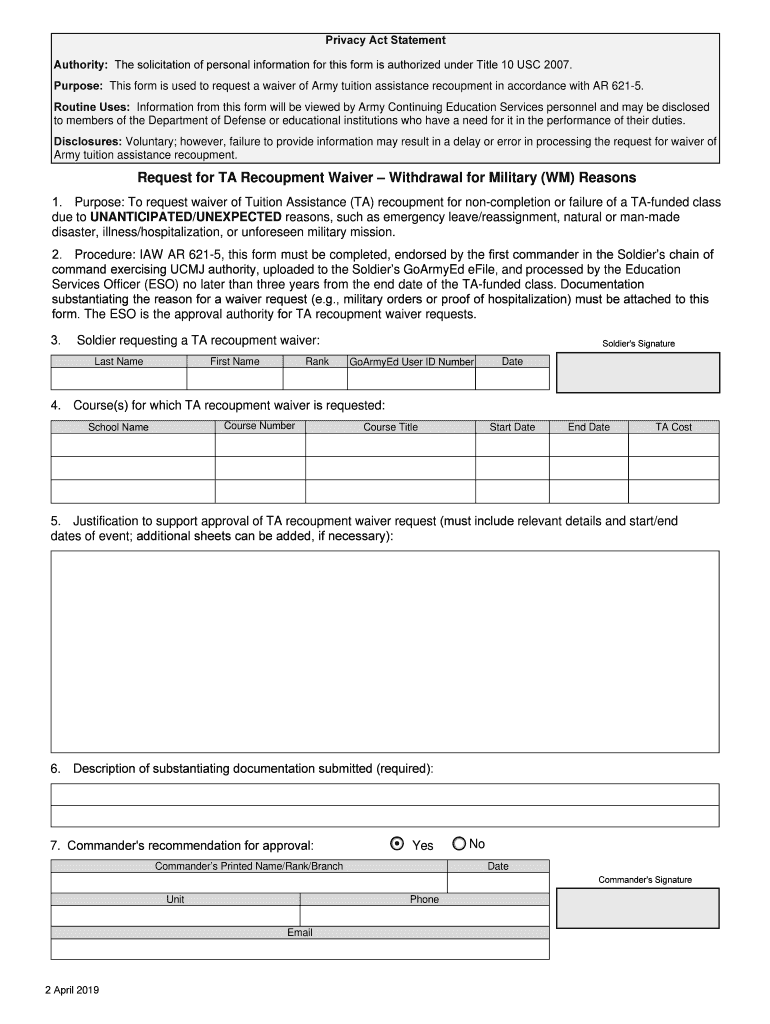
The term "recoupment withdrawal subject" generally refers to the process or action related to the recovery of funds previously disbursed, typically in circumstances involving military or educational benefits. This can occur when an individual is required to return funds due to the non-fulfillment of service commitments or eligibility criteria. In educational and military contexts, this withdrawal may arise under specific financial assistance programs, such as tuition assistance for soldiers, when obligations attached to the assistance are not met.
How to Use the Recoupment Withdrawal Subject
The recoupment withdrawal subject is often utilized by institutions or authorities to ensure compliance with financial assistance agreements. Individuals who receive financial support are expected to adhere to the terms of the assistance. In the event of non-compliance, they might be notified to return or adjust the funds. This process is typically outlined in the terms of the financial assistance program, requiring individuals to thoroughly review these before accepting aid. Compliance involves monitoring obligations like service completion and maintaining required eligibility.
How to Obtain the Recoupment Withdrawal Subject
Typically, individuals do not proactively obtain a recoupment withdrawal subject, as it is usually flagged by the issuing agency when conditions of financial assistance are unmet. If notified, the individual should contact the issuing body to obtain detailed instructions and relevant documentation regarding recoupment procedures. This will often involve contacting a specific department within the agency or organization that manages the financial assistance program.
Steps to Complete the Recoupment Withdrawal Subject
- Receive Notification: Obtain an official notice that describes the recoupment requirement, including the reasons and related obligations.
- Review Details: Examine the notice carefully for information about the amount, due date, and any specific instructions.
- Gather Documentation: Collect all relevant documentation, such as financial assistance agreements, service contracts, and any evidence of compliance or attempted compliance.
- Contact Issuer: Reach out to the issuing authority for clarification or to dispute the claim if necessary. Use the contact information provided in the notification.
- Submit Required Documentation: Provide the necessary documentation suggested in the recoupment notice to validate claims or negotiate terms.
- Resolve Outstanding Issues: Work with the issuing authority to resolve issues, which may include establishing a repayment plan or applying for a waiver if applicable.
Why Should You Be Aware of the Recoupment Withdrawal Subject
Understanding the concept and implications of recoupment withdrawal is vital for anyone involved in financial assistance programs. This awareness helps individuals maintain compliance with the terms of their agreements and avoid financial penalties or legal consequences. Being cognizant of recoupment procedures can also aid in accurately planning finances and ensuring obligations are met in a timely manner.
Who Typically Uses the Recoupment Withdrawal Subject
The recoupment withdrawal subject is predominantly used by military personnel, educational institutions, government agencies, and scholarship providers. Participants in these programs, such as soldiers receiving tuition assistance, students awarded scholarships, or government benefit recipients, may interact with recoupment if contractual obligations are breached or remain unfulfilled.


Legal Use of the Recoupment Withdrawal Subject
The legal framework surrounding recoupment withdrawal subjects varies based on the specific program and jurisdiction. Commonly, federal and state laws govern such processes, establishing clear guidelines for when and how recoupment can be enforced. In the military context, the recoupment processes are often defined by the applicable service branch’s regulations and fall under broader military and federal statutes.
Key Elements of the Recoupment Withdrawal Subject
- Obligation Compliance: Whether the recipient has fulfilled all conditions attached to the financial assistance.
- Notification Processes: The methods and timing of communicating recoupment requirements.
- Documentation and Evidence: The requisite forms and records needed to address or dispute recoupment claims.
- Repayment Arrangements: Options for settling obligations, including lump-sum payments or installment plans.
- Dispute Resolution: Procedures for contesting a recoupment decision, including timelines and required evidence.
Important Terms Related to Recoupment Withdrawal Subject
- Financial Assistance: Monetary support provided under specific conditions which may include scholarships, grants, or military benefits.
- Compliance Obligations: The requirements or conditions the recipient must meet to avoid recoupment.
- Notification: Official communication regarding recoupment, often detailing the amount due and any relevant deadlines.
- Repayment Plan: An agreement between the recipient and issuing body on how the recoupment amount will be repaid.
Penalties for Non-Compliance
Failing to address a recoupment withdrawal subject can lead to various penalties, including loss of future aid, additional fees or interest, or even legal action. In severe cases, particularly within military or government contexts, it may also affect an individual’s service record or impact security clearance status. Therefore, it’s critical to promptly respond to any notices related to recoupment and seek resolution.




