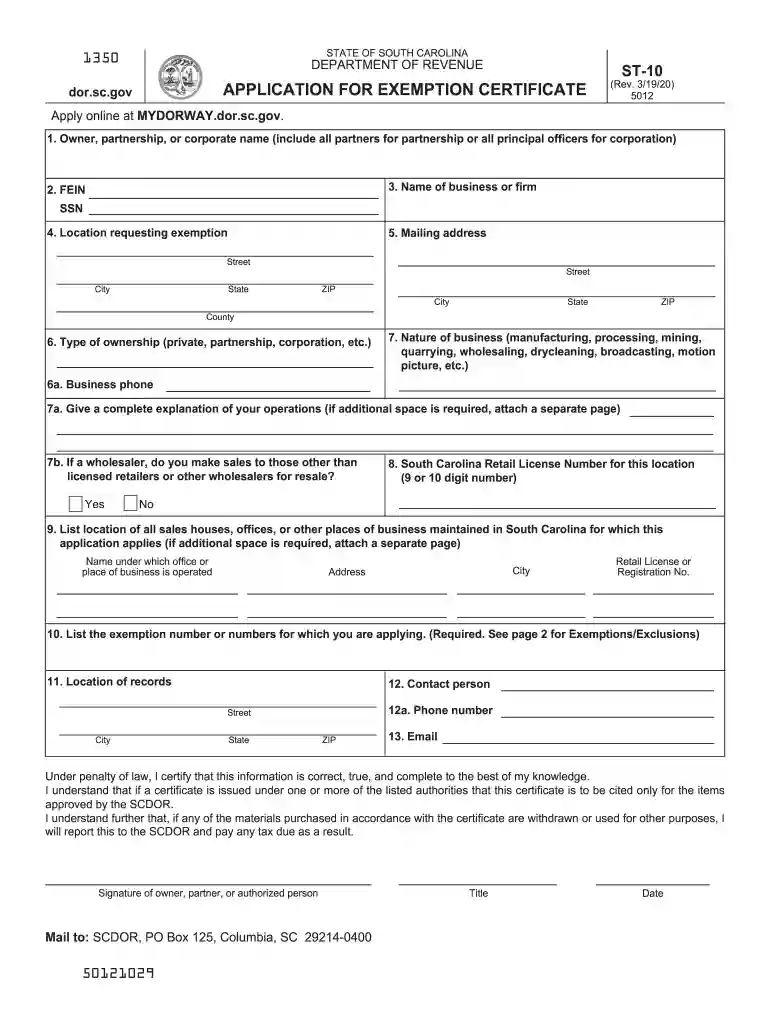
south carolina form st Preview on Page 1

South carolina form st 2026

Here's how it works

  • 01. Edit your south carolina form st online

    Type text, add images, blackout confidential details, add comments, highlights and more.

  • 02. Sign it in a few clicks

    Draw your signature, type it, upload its image, or use your mobile device as a signature pad.

  • 03. Share your form with others

    Send st10 form via email, link, or fax. You can also download it, export it or print it out.

How to use or fill out South Carolina Form ST with our platform

Form edit decoration
9.5
Ease of Setup
DocHub User Ratings on G2
9.0
Ease of Use
DocHub User Ratings on G2
  1. Click ‘Get Form’ to open the South Carolina Form ST in the editor.
  2. Begin by entering the Owner, partnership, or corporate name in the designated field. Ensure you include all partners for partnerships or all principal officers for corporations.
  3. Fill in the FEIN or SSN as required. This is crucial for identification purposes.
  4. Provide the location requesting exemption and mailing address. Make sure to include street, city, state, and ZIP code accurately.
  5. Indicate the type of ownership (private, partnership, corporation) and describe the nature of your business (e.g., manufacturing, wholesaling).
  6. Complete sections regarding business phone and a detailed explanation of operations if necessary. Attach additional pages if more space is needed.
  7. List any sales houses or offices maintained in South Carolina that this application applies to, including their addresses and Retail License Numbers.
  8. Finally, review all information for accuracy before signing at the bottom of the form. Ensure you provide your title and date.

Start filling out your South Carolina Form ST online for free today!

See more south carolina form st versions

We've got more versions of the south carolina form st form. Select the right south carolina form st version from the list and start editing it straight away!

VersionsForm popularityFillable & printable
20204.8 Satisfied (99 Votes)
20184.3 Satisfied (77 Votes)
20164.3 Satisfied (51 Votes)
20084.1 Satisfied (32 Votes)

be ready to get more

Complete this form in 5 minutes or less

Got questions?

We have answers to the most popular questions from our customers. If you can't find an answer to your question, please contact us.

If you are a South Carolina resident, you are generally required to file a South Carolina Income Tax return if you are required to file a federal return.
South Carolinas graduated state income tax system features tax rates ranging from 0% to 6.2%. The taxes you owe depend on your taxable income, filing status, and applicable deductions or credits. In certain situations, South Carolina residents may not owe any state income tax.
South Carolina employees must complete the SC W-4, Employees Withholding Allowance Certificate. SC W-4 forms are available here: .
You must apply for a South Carolina Withholding file number to deposit your withholding payments. The fastest, easiest way to apply is online at MyDORWAY.dor.sc.gov. You can also apply by completing and submitting an SCDOR-111, Business Tax Application. The number makes you a withholding agent.
There are two types of Withholding Tax returns: the WH-1605 and the WH-1606. Annual filers should only file the WH-1606. You must complete the WH-1605 for the first three quarters of the year. You must complete the WH-1606 if your South Carolina Withholding account was open for any portion of the year.

Security and compliance

At DocHub, your data security is our priority. We follow HIPAA, SOC2, GDPR, and other standards, so you can work on your documents with confidence.

People also ask

Organizations such as nonprofit professional and trade schools, scouts, youth groups, youth athletic and recreational pro- grams, etc., operated exclusively for educational purposes must apply for exempt status authorization from the department and use Form ST3 on qualifying purchases.
All Application for Exemption Certificate requests must be submitted on our free online tax portal, MyDORWAY, at MyDORWAY.dor.sc.gov. a MyDORWAY account to request Sales and Use Tax exemptions. If you do not have a Sales and Use Tax account, complete the Business Tax Application at dor.sc.gov/register.
Tax Withholding Table If the Amount of Taxable Income Is:The Amount of Tax Withholding Should Be: Over $0 but not over $3,560 $0 Over $3,560 but not over $17,830 $0.00 plus 3.0% of excess over $3,560 Over $17,830 $428.10 plus 6.2% of excess over $17,830 Mar 24, 2025

sc st application online

Sales Tax Forms | South Carolina Department of Revenue

Form name, Form number. State Sales and Use Tax Return, ST-3. Affidavit to Limit to Three Hundred Dollars the Maximum Sales/Use of Musical Instruments andRead more

Learn more
Instructions for Form 7004 (Rev. December 2017)

Feb 1, 2018 Form 7004 has been simplified and now consists of two parts. is used to request an extension of time to file. South Carolina, Vermont, Virginia,

Learn more
If you believe that this page should be taken down, please follow our DMCA take down process here