Type text, add images, blackout confidential details, add comments, highlights and more.
02. Sign it in a few clicks
Draw your signature, type it, upload its image, or use your mobile device as a signature pad.
03. Share your form with others
Send it via email, link, or fax. You can also download it, export it or print it out.
How to use or fill out sc st 10 with our platform
Ease of Setup
DocHub User Ratings on G2
Ease of Use
DocHub User Ratings on G2
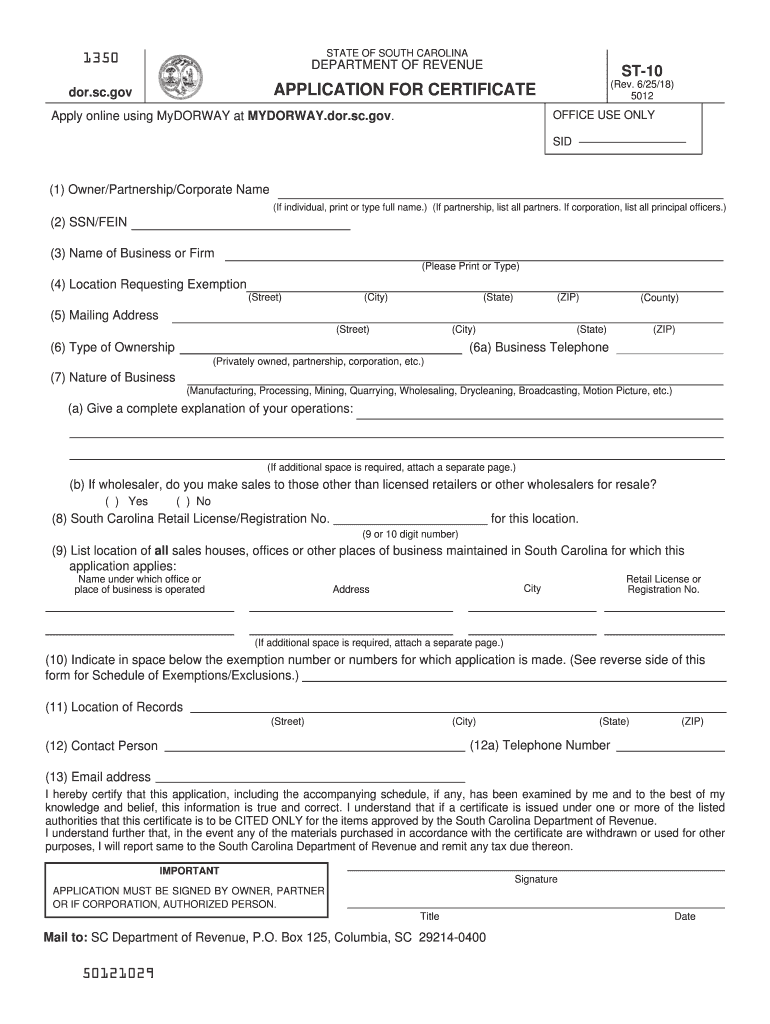
Click ‘Get Form’ to open the sc st 10 application in the editor.
Begin by entering the Owner/Partnership/Corporate Name in the first field. If you are an individual, type your full name; for partnerships, list all partners; and for corporations, include all principal officers.
In the next field, provide your SSN or FEIN. This is essential for identification purposes.
Fill in the Name of Business or Firm. Ensure this is printed or typed clearly.
Next, specify the Location Requesting Exemption by providing the street address, city, state, ZIP code, and county.
Complete the Mailing Address section with your street address and city. If different from the location requesting exemption, ensure accuracy.
Indicate your Type of Ownership (e.g., privately owned, partnership) and provide a Business Telephone number.
Describe the Nature of Business in detail. If necessary, attach a separate page for additional information.
List any locations of sales houses or offices maintained in South Carolina that apply to this application.
Finally, review all fields for accuracy before signing and dating your application at the bottom. Ensure it is signed by an authorized person.
Start filling out your sc st 10 form online for free today!
Application for Exemption Certificate (ST-10). Review SC Code Section 12-36-2120 for qualifying exemptions from Sales Tax. A Sales Use Tax account is requiredRead more
Cookie consent notice
This site uses cookies to enhance site navigation and personalize your experience.
By using this site you agree to our use of cookies as described in our Privacy Notice.
You can modify your selections by visiting our Cookie and Advertising Notice.