Type text, add images, blackout confidential details, add comments, highlights and more.

02. Sign it in a few clicks
Draw your signature, type it, upload its image, or use your mobile device as a signature pad.

03. Share your form with others
Send fillable nc 4 via email, link, or fax. You can also download it, export it or print it out.

How to use or fill out nc 4 ez 2020 with DocHub
Ease of Setup
DocHub User Ratings on G2
Ease of Use
DocHub User Ratings on G2
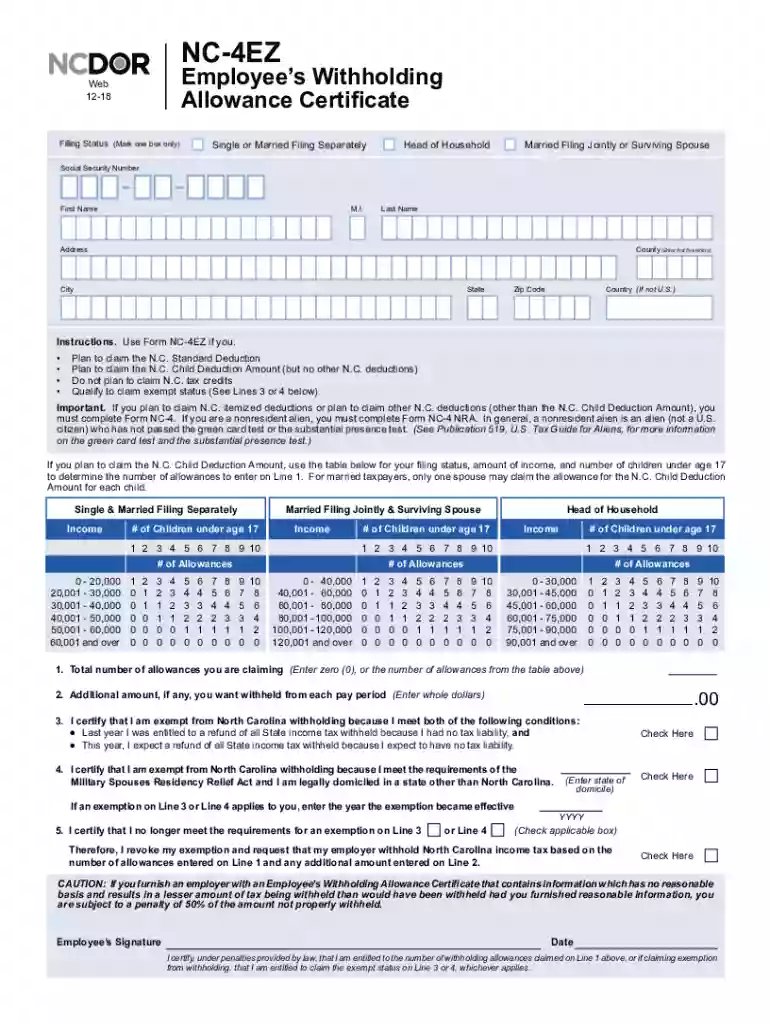
Click ‘Get Form’ to open the nc 4 ez 2020 in our editor.
Begin by selecting your filing status. Mark one box for Head of Household, Single or Married Filing Separately, or Married Filing Jointly.
Enter your Social Security Number, First Name, Middle Initial, Last Name, and County (first five letters). Fill in your Address, City, State, Zip Code, and Country if not U.S.
On Line 1, enter the total number of allowances you are claiming based on the provided table according to your income and number of children under age 17.
If applicable, specify any additional amount you want withheld from each pay period on Line 2.
Check the appropriate boxes for exemption claims on Lines 3 and 4 if they apply to you. Enter the year the exemption became effective if necessary.
Sign and date the form at the bottom to certify that all information is accurate before submitting it.
Start using our platform today for free to complete your nc 4 ez 2020 effortlessly!
Taxation clarification for nonresidents of North Carolina
Feb 18, 2014 A nonresident employee is subject to North Carolina withholding on any part of his wages paid for performing services in this State. Any reliefRead more
Cookie consent notice
This site uses cookies to enhance site navigation and personalize your experience.
By using this site you agree to our use of cookies as described in our Privacy Notice.
You can modify your selections by visiting our Cookie and Advertising Notice.