Account chet my 2026

Get Form
chet login Preview on Page 1

Here's how it works

01. Edit your chet login online
Type text, add images, blackout confidential details, add comments, highlights and more.
02. Sign it in a few clicks
Draw your signature, type it, upload its image, or use your mobile device as a signature pad.
03. Share your form with others
Send chet account login via email, link, or fax. You can also download it, export it or print it out.

How to use or fill out account chet my with our platform

Form edit decoration
9.5
Ease of Setup
DocHub User Ratings on G2
9.0
Ease of Use
DocHub User Ratings on G2
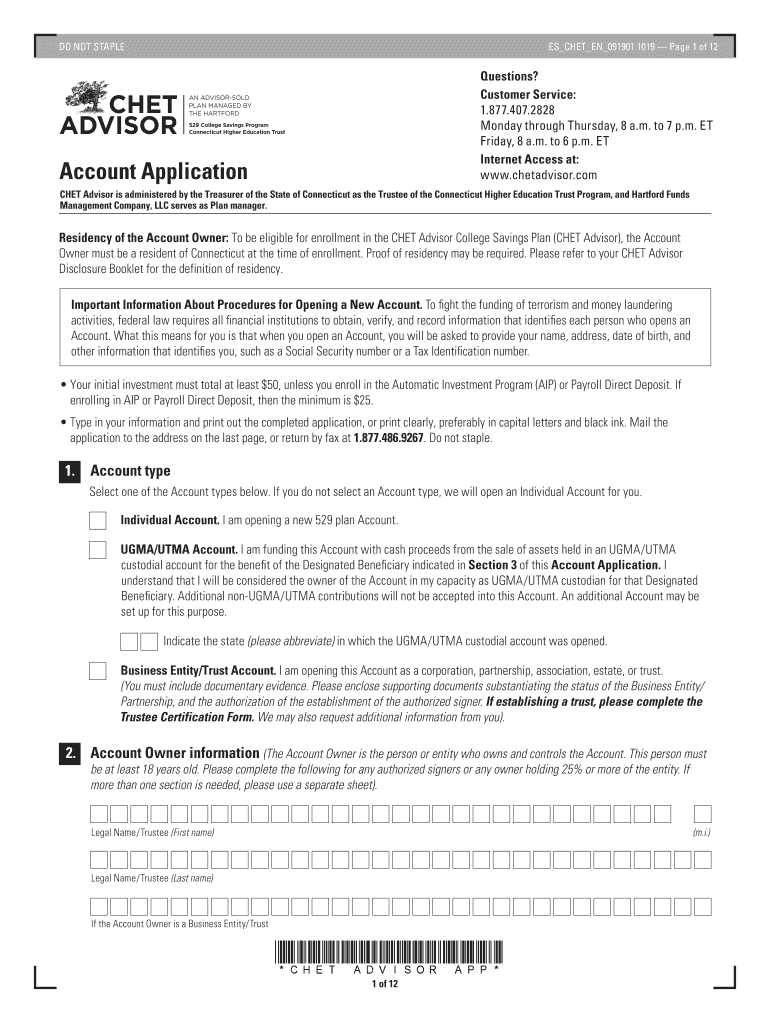
  1. Click ‘Get Form’ to open the account chet my in the editor.
  2. Begin by selecting the Account type. Choose between Individual Account, UGMA/UTMA Account, or Business Entity/Trust Account. Ensure you understand the implications of each choice.
  3. Fill in the Account Owner information. This includes providing your legal name, Social Security Number or Taxpayer Identification Number, and contact details. Make sure all information is accurate.
  4. Complete the Designated Beneficiary section by entering their legal name and Social Security Number. If their address differs from yours, provide that as well.
  5. If desired, add a Successor Account Owner by filling out their details in Section 4. This person will take control of the account if necessary.
  6. Proceed to select your Investment Options in Section 8. Allocate percentages carefully, ensuring they total 100%.
  7. Provide your Bank Information for setting up contributions via Electronic Fund Transfer (EFT) or Automatic Investment Program (AIP).
  8. Review all sections for accuracy before signing at the end of the form to certify your agreement with the terms outlined.

Start using our platform today to easily complete your account chet my application online for free!

See more account chet my versions

We've got more versions of the account chet my form. Select the right account chet my version from the list and start editing it straight away!
Versions Form popularity Fillable & printable
2019 4.8 Satisfied (55 Votes)
2019 4.3 Satisfied (84 Votes)
2014 4.3 Satisfied (189 Votes)
be ready to get more

Complete this form in 5 minutes or less

Get form

Got questions?

We have answers to the most popular questions from our customers. If you can't find an answer to your question, please contact us.
Contact us
Why open a CHET 529 college savings plan? Connecticut taxpayers could receive a state income tax deduction of up to $10,000 on contributions made to your CHET account. Use for a wide variety of expenses at any accredited university, college, or vocational school nationwideand many abroad.
529 cons. If not used for college expenses, there is a 10% additional tax on earnings. If not used for qualified expenses, all earnings are taxed as ordinary income (even if the actual earnings were capital gains). The management fees for a 529 account are typically higher than the fees for comparable mutual funds.
24-hour account access and customer service: View and manage your CHET account anytime at Fidelity.com. Should you need help, our education planning specialists are available MondayFriday from 8 a.m.9 p.m. ET at 888-799-CHET (2438).
CHET is a tax-advantaged, low cost savings program specifically designed to help families save for future college costs. The funds can be used at accredited colleges and universities across the country, including vocational and technical schools, and some colleges abroad.

Security and compliance

At DocHub, your data security is our priority. We follow HIPAA, SOC2, GDPR, and other standards, so you can work on your documents with confidence.

Learn more
ccpa2
pci-dss
gdpr-compliance
hipaa
soc-compliance