Colorado dr 0145-2026

Get Form
dr 0145 Preview on Page 1

Here's how it works

01. Edit your dr 0145 online
Type text, add images, blackout confidential details, add comments, highlights and more.

02. Sign it in a few clicks
Draw your signature, type it, upload its image, or use your mobile device as a signature pad.

03. Share your form with others
Send it via email, link, or fax. You can also download it, export it or print it out.

How to use or fill out colorado dr 0145 with our platform

Form edit decoration
9.5
Ease of Setup
DocHub User Ratings on G2
9.0
Ease of Use
DocHub User Ratings on G2
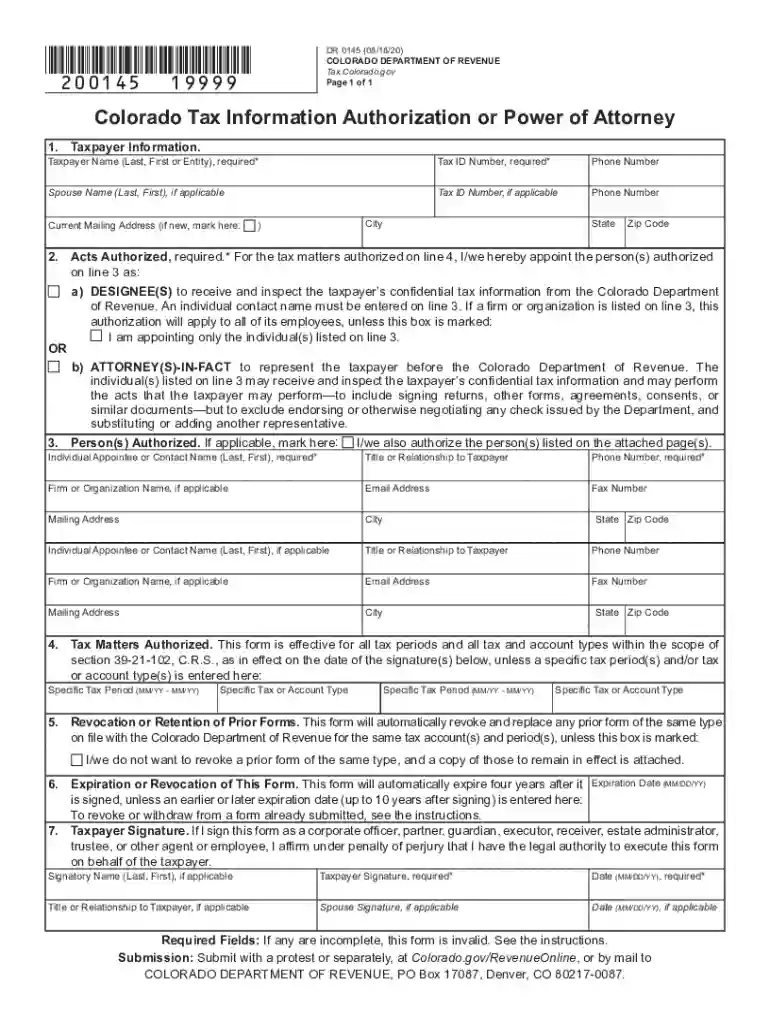
  1. Click ‘Get Form’ to open the Colorado DR 0145 in the editor.
  2. Begin with Line 1 by entering the taxpayer's information, including a tax identification number such as CAN, EIN, ITIN, or SSN. If applicable, include the spouse's details.
  3. On Line 2, select whether you are designating a Tax Information Authorization (TIA) or a Power of Attorney (POA). Mark the appropriate box.
  4. For Line 3, enter at least one authorized individual’s name and contact information. If more individuals need to be added, check the box and attach additional pages as necessary.
  5. In Line 4, specify any particular tax matters authorized. If none are specified, this form will cover all tax periods and types.
  6. Line 5 allows you to indicate if you wish to retain any prior forms. Mark the box if applicable and attach copies of those forms.
  7. Complete Line 6 by entering an expiration date for this authorization if desired; otherwise, it will expire four years after signing.
  8. Finally, sign on Line 7 to validate the form. Ensure that all required fields are completed before submission.

Start using our platform today for free to streamline your document editing and signing process!

See more colorado dr 0145 versions

We've got more versions of the colorado dr 0145 form. Select the right colorado dr 0145 version from the list and start editing it straight away!
Versions Form popularity Fillable & printable
2021 4.8 Satisfied (75 Votes)
2020 4.2 Satisfied (29 Votes)
be ready to get more

Complete this form in 5 minutes or less

Get form

Got questions?

We have answers to the most popular questions from our customers. If you can't find an answer to your question, please contact us.
Contact us
Health First Colorado - Colorados Medicaid Program.
With few exceptions, Colorado Medicaid claims must be submitted electronically through the Automated Medical Payments (AMP) system. Providers consistently submitting fewer than 10 claims per month may submit paper claims using the information and instructions in the Medicaid Provider Manual.
The bill makes the 4.25% tax rate permanent beginning with the income tax year commencing on January 1, 2025, makes any additional temporarily reduced income tax rate permanent for subsequent income tax years, and eliminates the state income tax on individuals, estates, and trusts for income tax years commencing on or
Appendix B Colorado Medical Assistance Program Fiscal Agent Gainwell Technologies P.O. Box 30 Denver, CO 80201 Mailing Addresses Paper claims PO Box 30 Denver, CO 80201-0030 Correspondence Adjustment Requests PO Box 30 Denver, CO 80201-0030 Fiscal Agent Gainwell Technologies P.O. Box 30 Denver, CO 802014 more rows
The amount shown in the ownership tax (OWN. TAX) section of your vehicle registration receipt can be claimed as an itemized deduction on your federal income tax return.

Security and compliance

At DocHub, your data security is our priority. We follow HIPAA, SOC2, GDPR, and other standards, so you can work on your documents with confidence.

Learn more
ccpa2
pci-dss
gdpr-compliance
hipaa
soc-compliance

People also ask

$51 hourly is how much per year? What is the average salary in United States of America? If you make $100,000 a year living in the region of Colorado, United States of America, you will be taxed $26,786. That means that your net pay will be $73,214 per year, or $6,101 per month.
Submitting a Professional Claim Log in to the Provider Web Portal. Select Claims in the header. Select Submit Claim Prof. Submit Professional Claim: Step 1 (Provider and Member Information) Submit Professional Claim: Step 2 (Diagnoses Details) Submit Professional Claim: Step 3 (Service Details)

Related links