



Here's how it works



How to use or fill out REIMBURSEMENT CHILD FORENSIC INTERVIEW. Connecticut Bar Examining Committee Additional Response Page - Form 2S with our platform

- Click ‘Get Form’ to open it in the editor.
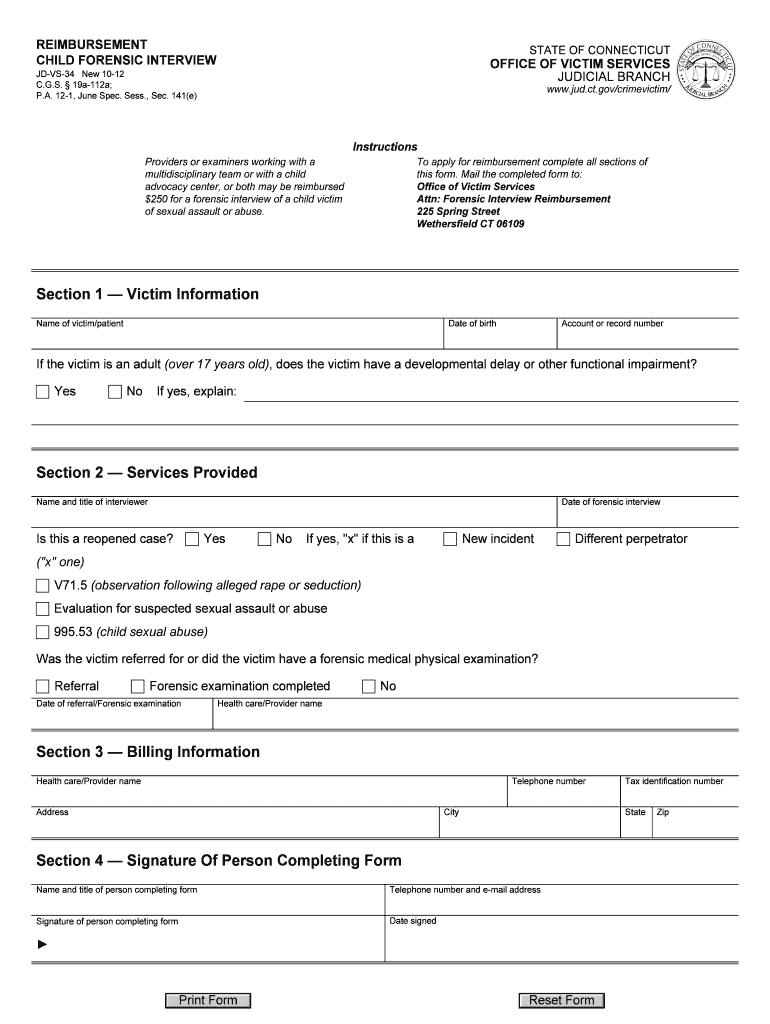
- Begin with Section 1 — Victim Information. Enter the name of the victim/patient, their date of birth, and account or record number. If applicable, indicate whether the victim is an adult with a developmental delay or functional impairment by selecting 'Yes' or 'No'. Provide an explanation if 'Yes' is selected.
- Move to Section 2 — Services Provided. Fill in the name and title of the interviewer along with the date of the forensic interview. Specify if this is a reopened case by selecting 'Yes' or 'No', and mark whether it pertains to a new incident or different perpetrator.
- Indicate if there was a referral for a forensic medical examination by selecting 'Referral' or 'Forensic examination completed'. Include the date of referral/examination and health care/provider name.
- Proceed to Section 3 — Billing Information. Enter the health care/provider name, telephone number, address, city, state, and zip code.
- Finally, complete Section 4 — Signature Of Person Completing Form. Provide your name, title, telephone number, email address, signature, and date signed.
Start using our platform today to easily fill out your forms online for free!
It's free
See more REIMBURSEMENT CHILD FORENSIC INTERVIEW. Connecticut Bar Examining Committee Additional Response Page - Form 2S versions
Got questions?
How can I send my connecticut bar examining committee for eSignature?
Upload your connecticut bar examining committee to DocHub (once you’ve set up an account for this). If you need to fill out fields in it, use appropriate tools from the top pane. For instance, drop Signature Fields, assign each to specific party, and click on Sign → Request signatures from others. Change your message for your recipients and click Send Request. You can also send your document by fax or as a Signing link instead of using email (you’ll locate these options by navigating to the Menu → Send)
How do you edit ct bar exam application on iOS?
You can easily edit and complete your ct bar exam application on any iOS gadget. Open an internet browser of your liking, go to the DocHub site, authorize or create a new account, add your file for editing, and make your desired adjustments. Our service is mobile-friendly, so utilizing its functions on your smartphone will be a no-brainer, even on the first try.
Security and compliance
At DocHub, your data security is our priority. We follow HIPAA, SOC2, GDPR, and other standards, so you can work on your documents with confidence.
Learn more