SUPPLEMENTAL FORM 3 2026

Get Form
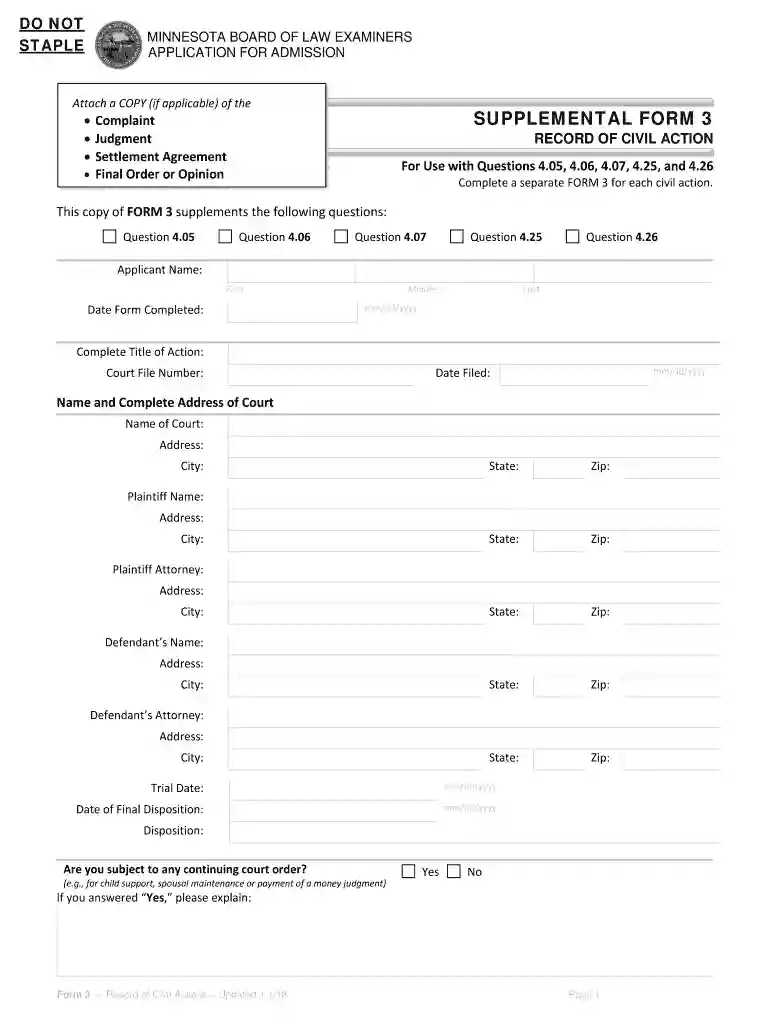
SUPPLEMENTAL FORM 3 Preview on Page 1

Here's how it works

01. Edit your form online
Type text, add images, blackout confidential details, add comments, highlights and more.

02. Sign it in a few clicks
Draw your signature, type it, upload its image, or use your mobile device as a signature pad.

03. Share your form with others
Send it via email, link, or fax. You can also download it, export it or print it out.

How to use or fill out SUPPLEMENTAL FORM 3 with our platform

Form edit decoration
9.5
Ease of Setup
DocHub User Ratings on G2
9.0
Ease of Use
DocHub User Ratings on G2
  1. Click ‘Get Form’ to open SUPPLEMENTAL FORM 3 in the editor.
  2. Begin by entering your name in the 'Applicant Name' section. Fill in your first, middle, and last names as required.
  3. Next, complete the 'Date Form Completed' field using the mm/dd/yyyy format.
  4. In the 'Complete Title of Action' section, provide a brief title for the civil action you are reporting.
  5. Fill in the 'Court File Number' and 'Date Filed' fields with the appropriate information.
  6. Enter the name and complete address of the court handling your case, including city, state, and zip code.
  7. Provide details for both plaintiff and defendant names along with their respective addresses and attorneys if applicable.
  8. Indicate trial date and date of final disposition using mm/dd/yyyy format.
  9. Answer whether you are subject to any continuing court order by selecting 'Yes' or 'No', and provide explanations if necessary.
  10. Finally, include any additional explanations regarding the civil action as needed before saving your completed form.

Start filling out SUPPLEMENTAL FORM 3 online for free today!

See more SUPPLEMENTAL FORM 3 versions

We've got more versions of the SUPPLEMENTAL FORM 3 form. Select the right SUPPLEMENTAL FORM 3 version from the list and start editing it straight away!
Versions Form popularity Fillable & printable
2019 4.8 Satisfied (196 Votes)
2018 4.3 Satisfied (104 Votes)
be ready to get more

Complete this form in 5 minutes or less

Get form

Got questions?

We have answers to the most popular questions from our customers. If you can't find an answer to your question, please contact us.
Contact us

Sure, and it’s really easy! DocHub is an online PDF editor with advanced document processing functions that allow you promptly modify your forms, fill out empty fields and drop new ones for other people to fill out, and create electronic signatures in several ways. Upload your SUPPLEMENTAL FORM 3, give information as required, and select how you want to eSign your document - by typing your name, drawing your signature, uploading its picture, or utilizing a QR code.

If you are searching for a state-specific SUPPLEMENTAL FORM 3 sample, you will find it in our DocHub Forms & Templates catalog. Use the search field, key in your form’s name, and search through the results for your state. You can also filter out irrelevant results while browsing our catalog by categories.

Part 3: Processing Information. This asks various questions about your how and where you were approved for U.S. residence and (if applicable) entered the United States with your immigrant visa. Question 1 asks where you applied for an immigrant visa or adjustment of status.
Form 3 is a document that a company insider or major shareholder must file with the SEC. The information provided on the form is meant to disclose the holdings of directors, officers, and beneficial owners of registered companies and becomes public record.
Form 3 is an SEC filing filed with the US Securities and Exchange Commission to indicate a preliminary insider transaction by an officer, director, or beneficial (10%) owner of the companys securities. These are typically seen after a company IPOs when insiders make their first transactions.

Security and compliance

At DocHub, your data security is our priority. We follow HIPAA, SOC2, GDPR, and other standards, so you can work on your documents with confidence.

Learn more
ccpa2
pci-dss
gdpr-compliance
hipaa
soc-compliance
be ready to get more

Complete this form in 5 minutes or less

Get form

People also ask

Form 3 must be filed within 10 days after the person becomes an insider. Whats a Form 4? In most cases, when an insider executes a transaction, he or she must file a Form 4.
SEC Form S-3 is a regulatory filing that provides simplified reporting for issuers of registered securities. An S-3 filing is utilized when a company wishes to raise capital, usually as a secondary offering after an initial public offering has already occurred.
Form 3 collects the initial percentage of beneficial ownership of equity securities for (1) any director or officer of an issuer with a class of equity securities registered pursuant to Section 12 of the Securities Exchange Act of 1934 (Exchange Act); (2) any beneficial owner of greater than 10 percent of a class of
When a person becomes an insider (for example, when they are hired as an officer or director), they must file a Form 3 to initially disclose his or her ownership of the companys securities. Form 3 must be filed within 10 days after the person becomes an insider.

Related links