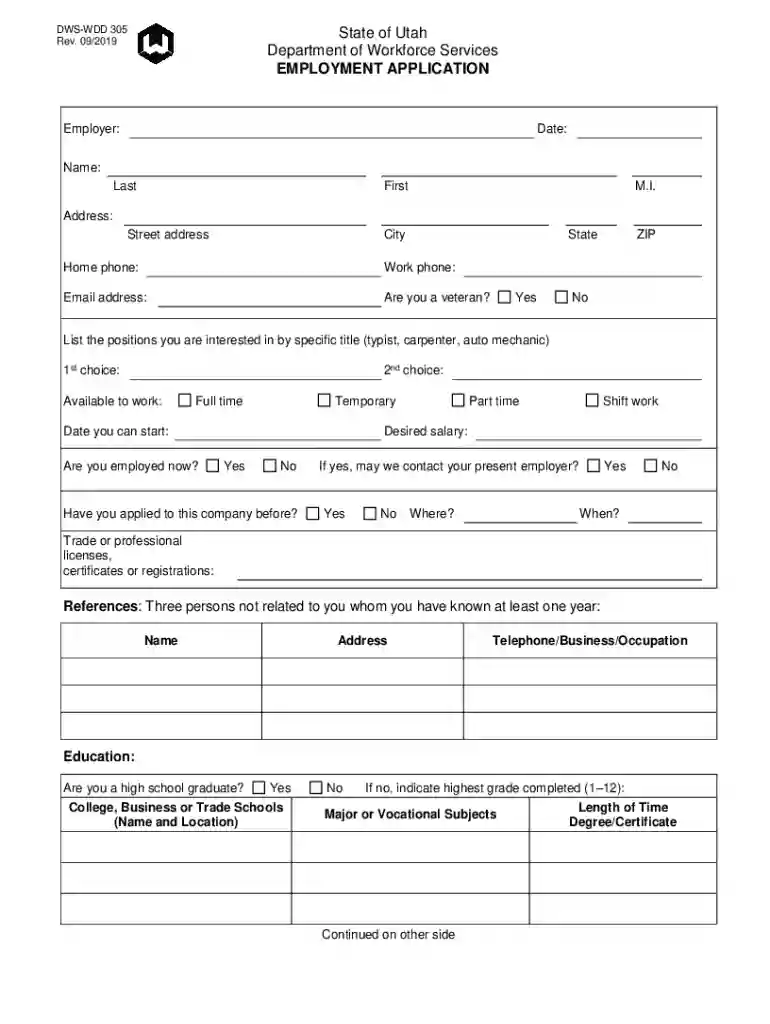
Job application form 2026

Get Form
application job Preview on Page 1

Here's how it works

01. Edit your application job online
Type text, add images, blackout confidential details, add comments, highlights and more.

02. Sign it in a few clicks
Draw your signature, type it, upload its image, or use your mobile device as a signature pad.

03. Share your form with others
Send job application via email, link, or fax. You can also download it, export it or print it out.

How to use or fill out job application form with DocHub

Form edit decoration
9.5
Ease of Setup
DocHub User Ratings on G2
9.0
Ease of Use
DocHub User Ratings on G2
  1. Click ‘Get Form’ to open the job application form in our editor.
  2. Begin by entering your personal information, including your name, address, and contact details. Ensure accuracy as this is crucial for potential employers.
  3. Indicate your employment preferences by selecting the positions you are interested in and your availability for work. This helps employers understand your suitability for their needs.
  4. Fill out the education section, specifying whether you are a high school graduate and detailing any further education or certifications.
  5. In the work history section, list your most significant employers starting from the most recent. Include job titles and responsibilities to highlight your experience.
  6. Complete the references section by providing contact information for three individuals who can vouch for your qualifications.
  7. Finally, review all entries for accuracy before signing and dating the certification of applicant section at the end of the form.

Start filling out your job application form today using our platform for free!

See more job application form versions

We've got more versions of the job application form form. Select the right job application form version from the list and start editing it straight away!
Versions Form popularity Fillable & printable
2021 4.8 Satisfied (126 Votes)
2019 4.2 Satisfied (43 Votes)
2013 4.4 Satisfied (560 Votes)
be ready to get more

Complete this form in 5 minutes or less

Get form

Got questions?

We have answers to the most popular questions from our customers. If you can't find an answer to your question, please contact us.
Contact us
10 Dos and Donts of Applying for Jobs Online Research the company before applying. Read the job description carefully. Apply as soon as you can. Follow all instructions in the posting. Write a cover letter. Include your LinkedIn profile. Review your social media accounts. Dont get too personal.
Follow these steps to fill out your next job application properly: Read the application before filling it out. Take your time. Answer completely and truthfully. Include your resume . Fill out job information chronologically. Put in the extra effort. Research your salary.
What not to do on a job application List a salary expectation thats too high or too low. Include information thats different from the information on your resume. Submit outdated contact information. List negative reasons for leaving a job. Forget to check for errors. Leave some response boxes blank.
Online employment application forms They can also print the job application and then return the scanned version via email or in person. Additionally, most online job applications allow candidates to upload resumes and cover letters.
Table of contents Being overly formal. Being too informal. Using a stock cover letter. Saying too much. Forgetting to proofread. Bragging. Focusing too much on yourself. Clumsy language.

Security and compliance

At DocHub, your data security is our priority. We follow HIPAA, SOC2, GDPR, and other standards, so you can work on your documents with confidence.

Learn more
ccpa2
pci-dss
gdpr-compliance
hipaa
soc-compliance
be ready to get more

Complete this form in 5 minutes or less

Get form

People also ask

10 Tips To Build The Perfect Job Application Form Keep it short. Be clear. Add any relevant information about the open opportunity. Be outstanding. Be an Equal Opportunity employer. Build a flow through the form. Pay attention to your form structure. Proofread and review your form before publishing it.
Completeness : Ensure all sections of the application are filled out, even if some fields are optional. Correct Information : Double-check that all personal information, employment history, and qualifications are accurate and up to date. Tailoring Your Application Professional Language Follow Instructions
If a question does not apply to you, draw a line or write N/A in the space. Use only positive information. Avoid negative words such as quit or fired. Use positive phrases such as better opportunity or potential for advancement.

Related links