DocHub 500426850--Tax-Department-CityFillable Online Tax Department - City of Oregon, OhioCity of 2026

Get Form
DocHub 500426850--Tax-Department-CityFillable Online Tax Department - City of Oregon, OhioCity of Preview on Page 1

Here's how it works

01. Edit your form online
Type text, add images, blackout confidential details, add comments, highlights and more.
02. Sign it in a few clicks
Draw your signature, type it, upload its image, or use your mobile device as a signature pad.
03. Share your form with others
Send it via email, link, or fax. You can also download it, export it or print it out.

How to use or fill out DocHub 500426850--Tax-Department-CityFillable Online Tax Department - City of Oregon, OhioCity of with DocHub

Form edit decoration
9.5
Ease of Setup
DocHub User Ratings on G2
9.0
Ease of Use
DocHub User Ratings on G2
  1. Click ‘Get Form’ to open it in the editor.
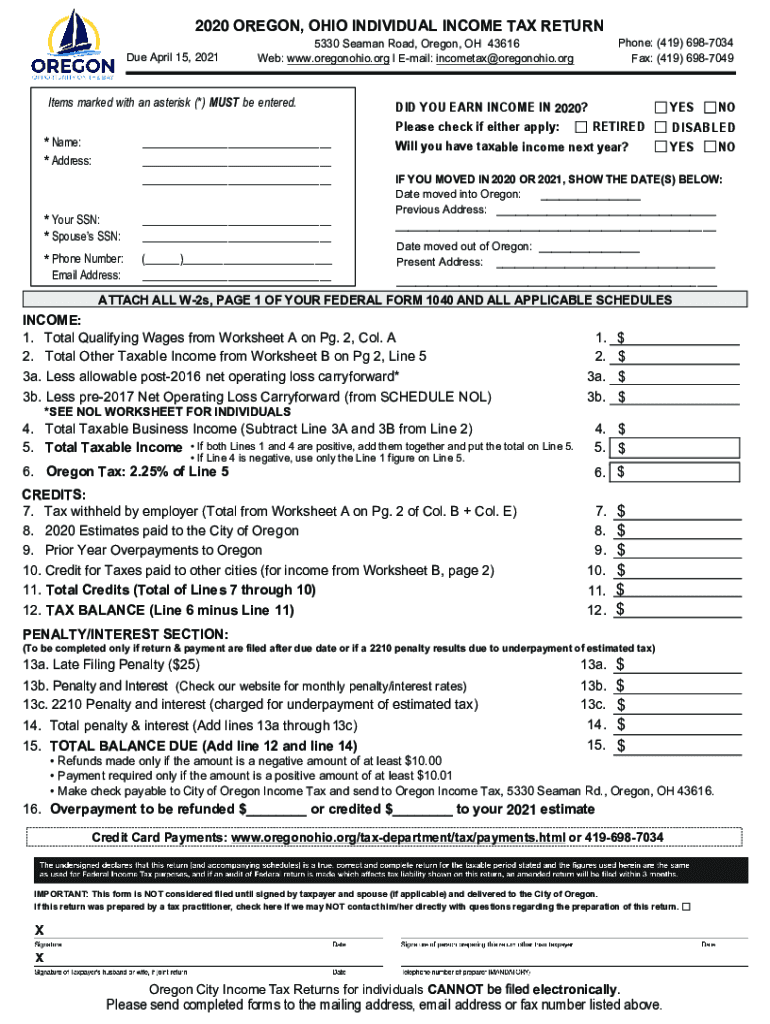
  2. Begin by entering your name and address in the designated fields marked with an asterisk (*). Ensure accuracy as this information is crucial for processing your tax return.
  3. Input your Social Security Number (SSN) and your spouse’s SSN if applicable. These fields are also mandatory.
  4. Provide your phone number and email address for any necessary communication regarding your tax return.
  5. Indicate whether you earned income in 2020 by checking the appropriate box. If you moved during the year, fill in the dates and addresses as required.
  6. Complete the income section by entering figures from Worksheets A and B as instructed. Make sure to follow the calculations carefully to determine your taxable income.
  7. Review all entries for accuracy before signing at the bottom of the form. Remember, this form is not considered filed until signed.

Start filling out your tax return today using our platform for free!

See more DocHub 500426850--Tax-Department-CityFillable Online Tax Department - City of Oregon, OhioCity of versions

We've got more versions of the DocHub 500426850--Tax-Department-CityFillable Online Tax Department - City of Oregon, OhioCity of form. Select the right DocHub 500426850--Tax-Department-CityFillable Online Tax Department - City of Oregon, OhioCity of version from the list and start editing it straight away!
Versions Form popularity Fillable & printable
2020 4.6 Satisfied (44 Votes)
2016 4.8 Satisfied (80 Votes)
be ready to get more

Complete this form in 5 minutes or less

Get form

Got questions?

We have answers to the most popular questions from our customers. If you can't find an answer to your question, please contact us.
Contact us

Yes, electronically drawing your signature is appropriate, but only if you use a tool that complies with industry regulations and policies. Consider DocHub, which ensures eSignature validity under ESIGN and UETA requirements. All you need to eSign your DocHub 500426850--Tax-Department-CityFillable Online Tax Department - City of Oregon, OhioCity of is an account with DocHub and an internet connection. After you open your document in our editor, click Sign and choose the Draw tool.

You can quickly fill out, edit, and even eSign your DocHub 500426850--Tax-Department-CityFillable Online Tax Department - City of Oregon, OhioCity of utilizing DocHub. Create a new profile and start your free trial. After that, you may upload the file with the form and simply make all the required edits. No need to print on paper or use a third-party application to sign it, as you can put your electronic signature on your document quicker through DocHub.

A penalty may be imposed for failure of a taxpayer to pay city income tax due, other than taxes withheld, two and one-half percent (2.5%) of such outstanding tax per month or fraction thereof that the tax remains outstanding, or ten percent (10%) of the outstanding liability, whichever is greater, with the penalty on
Pay Online Its fast, easy, and secure to make your payments electronically. Follow the links below to make your payment now!
Filing Season Deadline: April 15, 2025 Most taxpayers must file their Ohio individual (IT 1040) and school district income tax return (SD 100) by this date. All tax payments are due by this date.

Security and compliance

At DocHub, your data security is our priority. We follow HIPAA, SOC2, GDPR, and other standards, so you can work on your documents with confidence.

Learn more
ccpa2
pci-dss
gdpr-compliance
hipaa
soc-compliance

People also ask

Online Notice Response Service. The Online Notice Response Service (ONRS) allows you to securely respond to certain notices received from the Ohio Department of Taxation. If you already have an account through OHID (e.g., Ohio Business Gateway), utilize the same Username and Password to access this service.
Taxpayers can use an electronic check or credit/debit card to make the following payments online: Current year tax return payments. Estimated payments. Bill or assessment payments.
Ohios two-week sales tax holiday started August 1 and ends August 14. Items under $500, including clothing, electronics, and home goods, are tax-free. Online purchases from retailers like Amazon and Walmart are included if they meet the criteria.
In Ohio, you have an income tax obligation to both your employment city and your resident city. Your employer is required by law to withhold only your work place city tax. You may request your employer to withhold your resident city tax, but they are not required to do so.
Signing up for an account with us may allow you to file your individual and school district income tax returns for free online by using our app. You may also be able to file amended returns. Our program gives detailed instructions and does the math for you as you enter your tax information.