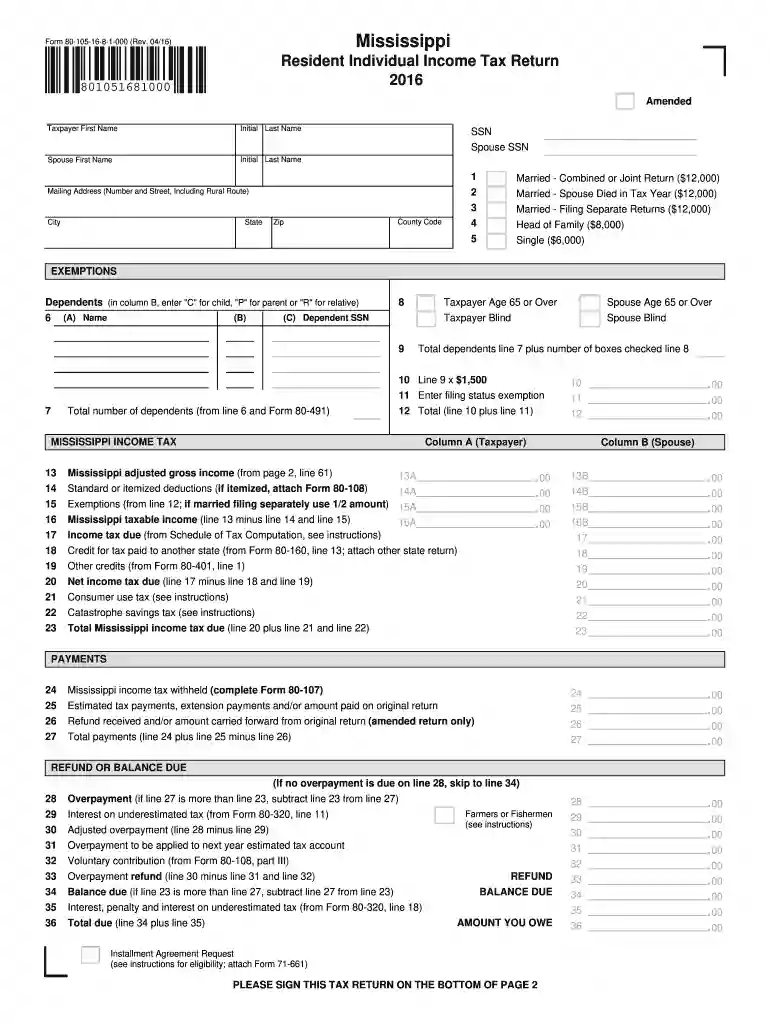
Mississippi resident individual income tax return 2016-2026

Get Form
2016 ms tax rate Preview on Page 1

Here's how it works

01. Edit your 2016 ms tax rate online
Type text, add images, blackout confidential details, add comments, highlights and more.

02. Sign it in a few clicks
Draw your signature, type it, upload its image, or use your mobile device as a signature pad.

03. Share your form with others
Send mississippi income tax via email, link, or fax. You can also download it, export it or print it out.

How to use or fill out Mississippi Resident Individual Income Tax Return 2016 with DocHub

Form edit decoration
9.5
Ease of Setup
DocHub User Ratings on G2
9.0
Ease of Use
DocHub User Ratings on G2
  1. Click ‘Get Form’ to open the Mississippi Resident Individual Income Tax Return 2016 in our editor.
  2. Begin by entering your personal information, including your name, Social Security Number (SSN), and mailing address. Ensure accuracy to avoid processing delays.
  3. Select your filing status from the options provided, such as 'Married - Combined or Joint Return' or 'Single'. This will determine your exemption amounts.
  4. List any dependents you have by filling in their names and SSNs. Indicate their relationship to you using the designated codes.
  5. Proceed to report your income on Page 2. Fill in all relevant fields for wages, business income, and other sources of income accurately.
  6. Calculate your deductions and exemptions based on the information provided earlier. This will help determine your taxable income.
  7. Finally, review all entries for accuracy before signing at the bottom of Page 2. Use our platform’s features to save and share your completed form easily.

Start using our editor today for free to complete your Mississippi tax return efficiently!

See more mississippi resident individual income tax return 2016 versions

We've got more versions of the mississippi resident individual income tax return 2016 form. Select the right mississippi resident individual income tax return 2016 version from the list and start editing it straight away!
Versions Form popularity Fillable & printable
2023 4.8 Satisfied (53 Votes)
2022 4.2 Satisfied (53 Votes)
2021 4.8 Satisfied (95 Votes)
2020 4.4 Satisfied (46 Votes)
2016 4.4 Satisfied (146 Votes)
2013 4.7 Satisfied (49 Votes)
be ready to get more

Complete this form in 5 minutes or less

Get form

Got questions?

We have answers to the most popular questions from our customers. If you can't find an answer to your question, please contact us.
Contact us
Get Transcript by MAIL Go to .irs.gov, under the Tools heading, click Get a tax transcript. Get Transcript ONLINE Go to .irs.gov, under the Tools heading, click Get a tax transcript. Click Get. Paper Request Form IRS Form 4506T-EZ () or IRS Form 4506-T.
To check the status of your Mississippi state refund online, go to .
Prior year tax returns are available from the IRS for a fee. Taxpayers can request a copy of a tax return by completing and mailing Form 4506, Request for Copy of Tax Return, to the IRS address listed on the form. Theres a $30 fee for each copy. These are available for the current tax year and up to seven years prior.
Keep records for 3 years from the date you filed your original return or 2 years from the date you paid the tax, whichever is later, if you file a claim for credit or refund after you file your return.
Log in to your MyGov account, select Link a Service, and choose the ATO. Youll be prompted for your Tax File Number (TFN) and other details such as bank account information from a previous tax return, a notice of assessment reference number, or your superannuation fund details.

Security and compliance

At DocHub, your data security is our priority. We follow HIPAA, SOC2, GDPR, and other standards, so you can work on your documents with confidence.

Learn more
ccpa2
pci-dss
gdpr-compliance
hipaa
soc-compliance

People also ask

Step 1: Go to the e-Filing portal homepage. Step 2: Enter the user ID and password. Step 3: Go to e-File tab Income Tax Returns View Filed Returns. Step 4: Now you can check the refund status for the desired Assessment year. Status 1: When refund is issued: Status 2: When refund is partially adjusted:

Related links