
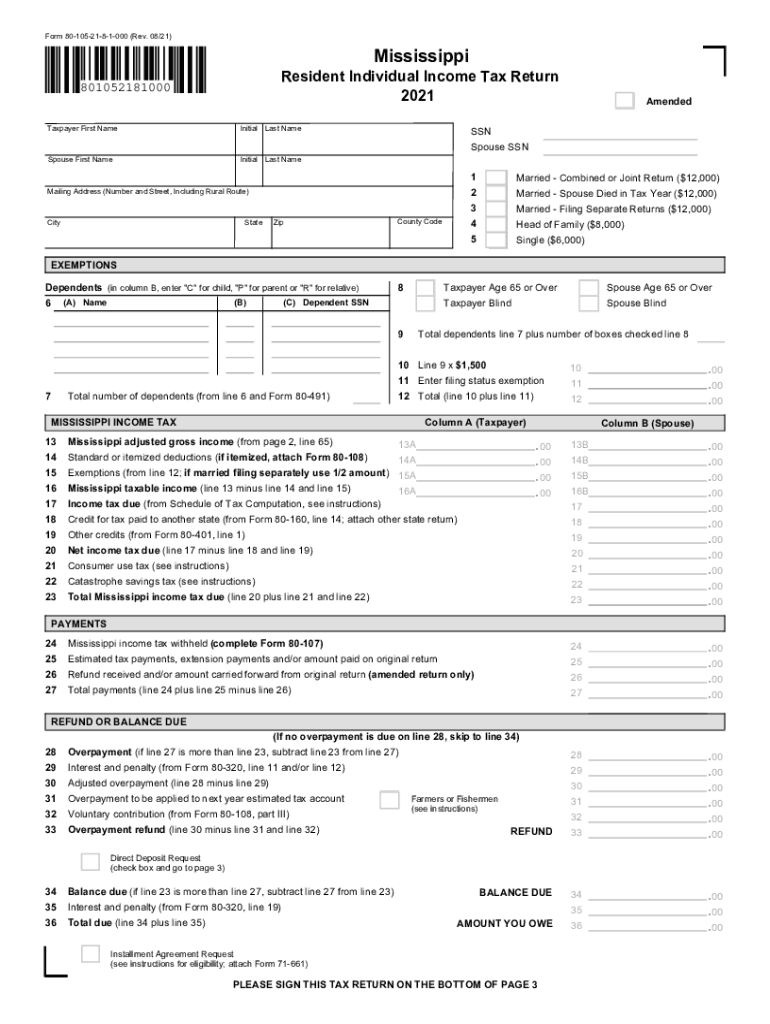



80 105 form 2026

Get Form
80 105 form Preview on Page 1

Here's how it works

01. Edit your form online
Type text, add images, blackout confidential details, add comments, highlights and more.

02. Sign it in a few clicks
Draw your signature, type it, upload its image, or use your mobile device as a signature pad.

03. Share your form with others
Send it via email, link, or fax. You can also download it, export it or print it out.

How to use or fill out 80 105 form with our platform

Form edit decoration
9.5
Ease of Setup
DocHub User Ratings on G2
9.0
Ease of Use
DocHub User Ratings on G2
  1. Click ‘Get Form’ to open the 80 105 form in the editor.
  2. Begin by entering your personal information in the designated fields, including your first name, last name, and Social Security Number (SSN). If applicable, fill in your spouse's details as well.
  3. Select your filing status from the options provided. This includes choices for married couples, heads of families, and singles. Ensure you understand which category applies to you.
  4. List any dependents by entering their names and SSNs in the appropriate columns. Mark each dependent's relationship using 'C' for child, 'P' for parent, or 'R' for relative.
  5. Proceed to input your income details across various categories such as wages, business income, and other sources. Make sure to attach any necessary schedules if required.
  6. Complete the deductions section by selecting either standard or itemized deductions based on your situation. Attach additional forms if needed.
  7. Review all entries for accuracy before signing at the bottom of page three. Ensure that both taxpayer and spouse signatures are included if applicable.

Start filling out your 80 105 form online for free today!

See more 80 105 form versions

We've got more versions of the 80 105 form form. Select the right 80 105 form version from the list and start editing it straight away!
Versions Form popularity Fillable & printable
2023 4.8 Satisfied (53 Votes)
2022 4.2 Satisfied (53 Votes)
2021 4.8 Satisfied (95 Votes)
2020 4.4 Satisfied (46 Votes)
2016 4.4 Satisfied (146 Votes)
2013 4.7 Satisfied (49 Votes)
be ready to get more

Complete this form in 5 minutes or less

Get form

Got questions?

We have answers to the most popular questions from our customers. If you can't find an answer to your question, please contact us.
Contact us
You should file a Mississippi Income Tax Return if any of the following statements apply to you: You have Mississippi income tax withheld from your wages (other than Mississippi gambling income). You are a non-resident or part-year resident with income taxed by Mississippi (other than gambling income).
Box 105 Other Income on the T4A slip will report the sum of: scholarship, bursary, fellowship, tuition waiver for dependant children and/or a spouse payments recorded in the students ACORN student account in the calendar year.
Starting Tax Year 2023: A credit is available up to $5,000 for dependent child residing outside of Mississippi before adoption and up to $10,000 for dependent child residing in Mississippi before adoption for qualified adoption expenses incurred or paid during the tax year for each child that is legally adopted by a
Your Form 1099G will show the total benefits paid to you and any federal taxes withheld or child support you owed. So, your 1099G may show more than the EDD payments you received for your claim. You can confirm the amount on your Form 1099G by viewing your Payment History in UI Online.
What to report Pension or superannuation. Lump-sum payments. Self-employed commissions. Annuities. Patronage allocations. Registered education savings plan (RESP) accumulated income payments. RESP educational assistance payments. Fees or other amounts for services.

Security and compliance

At DocHub, your data security is our priority. We follow HIPAA, SOC2, GDPR, and other standards, so you can work on your documents with confidence.

Learn more
ccpa2
pci-dss
gdpr-compliance
hipaa
soc-compliance

People also ask

However, you do need to enter the T4A information on your tax return. So, when you enter your T4A income, choose the option for Box 105 that applies to full-time students to make sure youre not paying tax on this tax-exempt income.
The net amount will be reported on line 10400. Amount from box 105 of your T4A slip will be reported on line 13010.

Related links