Form PI-E - Notification of Change to Qualified Facilities - TCEQ 2026

Get Form
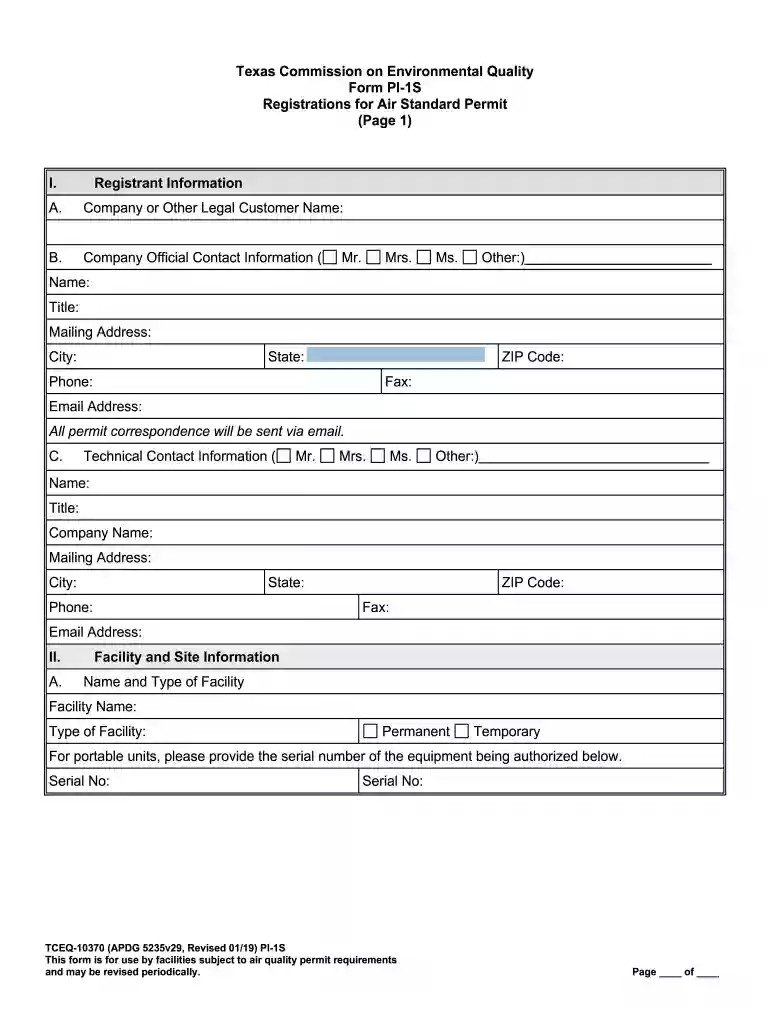
Form PI-E - Notification of Change to Qualified Facilities - TCEQ Preview on Page 1

Here's how it works

01. Edit your form online
Type text, add images, blackout confidential details, add comments, highlights and more.

02. Sign it in a few clicks
Draw your signature, type it, upload its image, or use your mobile device as a signature pad.

03. Share your form with others
Send it via email, link, or fax. You can also download it, export it or print it out.

How to use or fill out Form PI-E - Notification of Change to Qualified Facilities - TCEQ with our platform

Form edit decoration
9.5
Ease of Setup
DocHub User Ratings on G2
9.0
Ease of Use
DocHub User Ratings on G2
  1. Click ‘Get Form’ to open it in the editor.
  2. Begin by entering your Registrant Information. Fill in the Company or Other Legal Customer Name, ensuring it matches the legal name verified with the Texas Secretary of State.
  3. Provide the Company Official Contact Information, including name, title, mailing address, and email. This ensures all correspondence is directed appropriately.
  4. Next, complete the Facility and Site Information section. Enter the Facility Name and select whether it is Permanent or Temporary. Include detailed location information such as street address and coordinates.
  5. Indicate the Type of Action being requested—Initial Application, Change to Registration, or Renewal—and provide any necessary registration numbers if applicable.
  6. Review and complete any additional sections required for Fee Information and Public Notice requirements based on your facility type.
  7. Finally, ensure that all required signatures are obtained before submitting your completed form through our platform for processing.

Start using our platform today to streamline your document editing and submission process for Form PI-E!

See more Form PI-E - Notification of Change to Qualified Facilities - TCEQ versions

We've got more versions of the Form PI-E - Notification of Change to Qualified Facilities - TCEQ form. Select the right Form PI-E - Notification of Change to Qualified Facilities - TCEQ version from the list and start editing it straight away!
Versions Form popularity Fillable & printable
2021 4.8 Satisfied (75 Votes)
2021 4.3 Satisfied (81 Votes)
2020 4.3 Satisfied (264 Votes)
2020 4.3 Satisfied (78 Votes)
2019 4.3 Satisfied (50 Votes)
2015 4.4 Satisfied (369 Votes)
2013 4.3 Satisfied (66 Votes)
be ready to get more

Complete this form in 5 minutes or less

Get form

Got questions?

We have answers to the most popular questions from our customers. If you can't find an answer to your question, please contact us.
Contact us
How To Use FTP to Transfer Files If prompted, enter your FTP login credentials, such as a username and password. Once youre connected to the FTP server, you will see a list of directories and files on the server. To download a file from the server, click on the file and select Save As from the context menu.
11 Popular File Transfer Protocols Explained 1.FTPTCP 2. FTPS AS2 3. SFTP AS3 4. SCP AS4 5 HTTP PeSIT1 more row Sep 20, 2023
TCEQ is committed to delivering records as quickly and as accurately as possible while adhering to the confidential provisions in the Public Information Act. Submit a written request using our Public Information Request Form or a self-composed request in any legible format by: Emailing to openrecs@tceq.texas.gov.
TCEQ FTPS is based on secure FTP and is provided as a way to share files. Files can be shared within the agency, shared by TCEQ with the public, and shared by the public with TCEQ. Small files are often shared in email, which has a 25 MB size limit for e-mail attachments within TCEQ.

Security and compliance

At DocHub, your data security is our priority. We follow HIPAA, SOC2, GDPR, and other standards, so you can work on your documents with confidence.

Learn more
ccpa2
pci-dss
gdpr-compliance
hipaa
soc-compliance
be ready to get more

Complete this form in 5 minutes or less

Get form