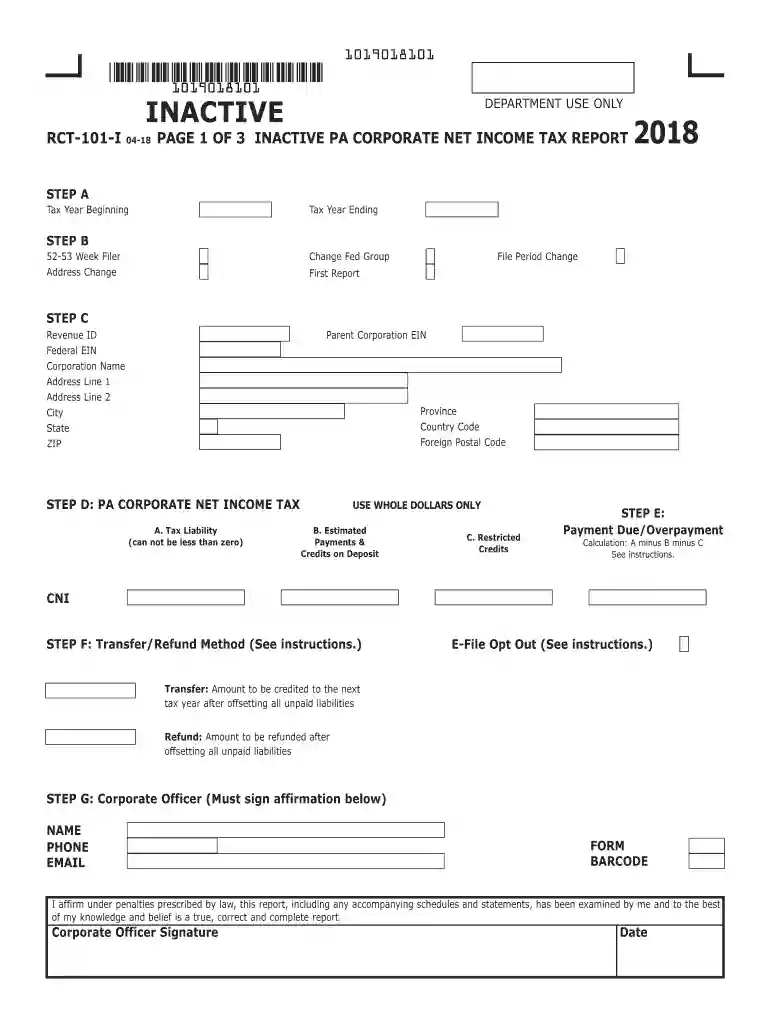
rct 101 instructions Preview on Page 1

Rct 101 instructions 2026

Here's how it works

  • 01. Edit your form online

    Type text, add images, blackout confidential details, add comments, highlights and more.

  • 02. Sign it in a few clicks

    Draw your signature, type it, upload its image, or use your mobile device as a signature pad.

  • 03. Share your form with others

    Send it via email, link, or fax. You can also download it, export it or print it out.

How to use or fill out rct 101 instructions with our platform

Form edit decoration
9.5
Ease of Setup
DocHub User Ratings on G2
9.0
Ease of Use
DocHub User Ratings on G2
  1. Click ‘Get Form’ to open the RCT-101 instructions in the editor.
  2. Begin with Step A, entering the tax year ending and beginning dates. Ensure accuracy as this sets the context for your report.
  3. In Step B, indicate any changes to your federal group status or address. If applicable, check the box for a 52-53 week filer.
  4. Proceed to Step C, where you will input essential corporate information such as the Parent Corporation EIN, Revenue ID, and address details.
  5. For Step D, calculate your tax liability using whole dollars only. Enter estimated payments and credits on deposit in section B and restricted credits in section C.
  6. In Step E, determine payment due or overpayment by following the calculation: A minus B minus C.
  7. Step F requires you to select a transfer or refund method. Make sure to read the instructions carefully before making your choice.
  8. Complete Steps G through J by providing corporate officer details and answering general information questions accurately.

Start using our platform today for free to streamline your RCT-101 form completion!

See more rct 101 instructions versions

We've got more versions of the rct 101 instructions form. Select the right rct 101 instructions version from the list and start editing it straight away!

VersionsForm popularityFillable & printable
20244.9 Satisfied (22 Votes)
20234.6 Satisfied (60 Votes)
20224.2 Satisfied (36 Votes)
20214.9 Satisfied (31 Votes)
20204.4 Satisfied (55 Votes)
20194.1 Satisfied (41 Votes)
20184.3 Satisfied (195 Votes)
20174.3 Satisfied (140 Votes)
20154.1 Satisfied (52 Votes)
20124.4 Satisfied (283 Votes)

be ready to get more

Complete this form in 5 minutes or less

Got questions?

We have answers to the most popular questions from our customers. If you can't find an answer to your question, please contact us.

Taxpayers with $500,000 or more of gross receipts sourced to Pennsylvania have a rebuttable presumption of nexus and should file a corporate tax report.
Corporations subject to the Corporate Net Income Tax (excluding PA S Corporations that have Built-In-Gains) must continue to file the RCT-101 annually.
The RCT-101 Corporate Net Income Tax Return is Pennsylvanias primary filing form for corporations. All domestic and foreign corporations doing business in PA must file Form RCT-101 annually, regardless of income.
What are the Income Tax Rates? The income tax computation depends on the following types that the individual taxpayer selects every first quarter filing of the year: Graduated Income Tax Rate. 8% Flat Income Tax Rate.

Security and compliance

At DocHub, your data security is our priority. We follow HIPAA, SOC2, GDPR, and other standards, so you can work on your documents with confidence.

Related links

CORT3D User Manual

The RCT reaction package input file is set up as shown in Figure 7.2, following RT3D instructions, for a user-defined reaction.

Learn more
2025 PA Corporate Net Income Tax

When filing an RCT-101, PA Corporate Net Income Tax Report, all corporate taxpayers are required to include forms and schedules to support the calculation ofRead more

Learn more
Starting a Business In Pennsylvania

All corporations must file Corporate Tax Reports (RCT-101) and include copies of appropriate federal forms (1120, 1120S or 1120-REIT) and supporting schedules.

Learn more
If you believe that this page should be taken down, please follow our DMCA take down process here