6 rev pdf 2026

Get Form
6 rev pdf Preview on Page 1

Here's how it works

01. Edit your form online
Type text, add images, blackout confidential details, add comments, highlights and more.
02. Sign it in a few clicks
Draw your signature, type it, upload its image, or use your mobile device as a signature pad.
03. Share your form with others
Send it via email, link, or fax. You can also download it, export it or print it out.

How to use or fill out 6 rev pdf with our platform

Form edit decoration
9.5
Ease of Setup
DocHub User Ratings on G2
9.0
Ease of Use
DocHub User Ratings on G2
  1. Click ‘Get Form’ to open the 6 rev pdf in the editor.
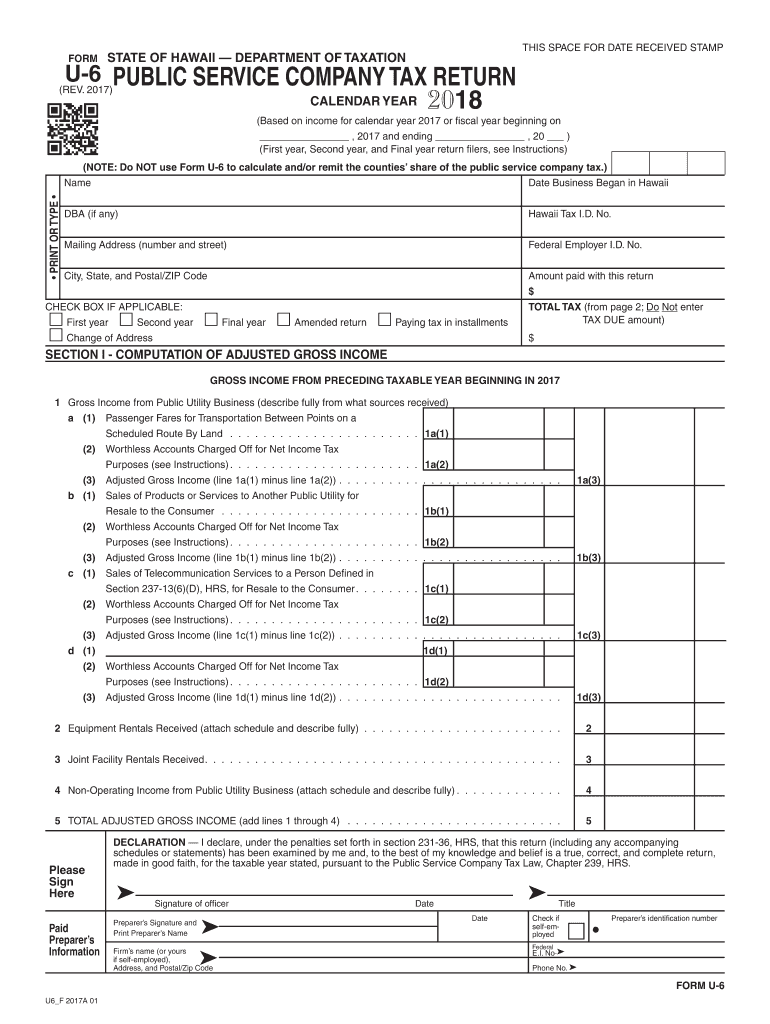
  2. Begin by entering your business name and Hawaii Tax I.D. No. in the designated fields. Ensure all information is accurate for proper processing.
  3. Fill in the date business began in Hawaii and your mailing address, including city, state, and ZIP code.
  4. In Section I, compute your adjusted gross income by detailing sources of income from public utility business. Follow the prompts for each line item carefully.
  5. Proceed to Section II to calculate your total tax based on the provided formulas. Make sure to attach any required schedules as indicated.
  6. Finally, review all entries for accuracy before signing at the bottom of the form. Use our platform’s tools to ensure everything is complete and correct.

Start filling out your 6 rev pdf today for free using our editor!

See more 6 rev pdf versions

We've got more versions of the 6 rev pdf form. Select the right 6 rev pdf version from the list and start editing it straight away!
Versions Form popularity Fillable & printable
2023 4.6 Satisfied (39 Votes)
2022 4.8 Satisfied (36 Votes)
2021 4.4 Satisfied (109 Votes)
2020 4.3 Satisfied (180 Votes)
2019 4.3 Satisfied (139 Votes)
2018 4.3 Satisfied (79 Votes)
2016 4.1 Satisfied (76 Votes)
2015 4.4 Satisfied (561 Votes)
2014 4.4 Satisfied (490 Votes)
2009 4.2 Satisfied (41 Votes)
be ready to get more

Complete this form in 5 minutes or less

Get form

Got questions?

We have answers to the most popular questions from our customers. If you can't find an answer to your question, please contact us.
Contact us

Of course, you’ll find many different applications for this on the web. Nonetheless, if you need to eSign your 6 rev pdf without installing extra software, DocHub is the best choice you can make. This powerful editor works on mobile devices just as on desktops. Open our editor in any internet browser, register or sign in to your account, and start managing your paperwork.

You may complete and eSign your 6 rev pdf online, even on a tight deadline. All you need to access top-notch editing tools on any device is a DocHub profile, that you can sign up in just a few moments. Once you register, upload your file or find what you are looking for in our catalog, complete it using the editing tools you need, and place your electronic signature on it at the end.

This form is used to obtain a State Tax Clearance. This form may be used to obtain a State or Federal Tax Clearance for the purpose of entering into contracts/submitting bids with and/or seeking final payment of contracts from state or county agencies in Hawaii.
Tax Clearance Certificates Certificates are typically used in the process of purchasing a business to verify that the entity is up-to-date on tax payments, and certificates are often required when applying for a business loan, a tax incentive, or a state-issued license.
Applications are available at Department of Taxation and IRS offices in Hawaii, and may also be requested by calling the Department of Taxation on Oahu at 808-587-4242 or toll-free at 1-800-222-3229. The Tax Clearance Application, Form A-6, can be downloaded from the Department of Taxations website at tax.hawaii.gov.

Security and compliance

At DocHub, your data security is our priority. We follow HIPAA, SOC2, GDPR, and other standards, so you can work on your documents with confidence.

Learn more
ccpa2
pci-dss
gdpr-compliance
hipaa
soc-compliance

People also ask

Your Tax Clearance information can be obtained via the Tax Compliance Status system. Request PIN on eFiling, go to My Compliance Profile: Select the Tax Compliance Status Request option Select the type of TCS for which you would like to apply.

Related links