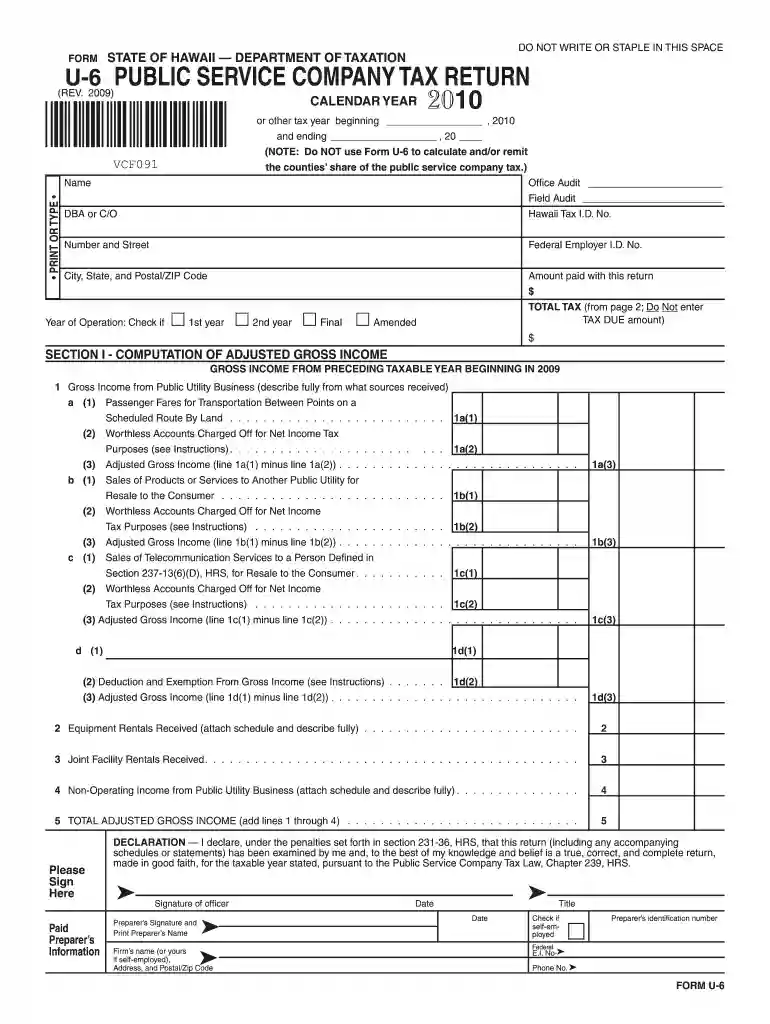
Form U-6 Rev 2009 Public Service Company Tax Return - Hawaii.gov-2026

Get Form
dcorr work registration form Preview on Page 1

Here's how it works

01. Edit your dcorr work registration form online
Type text, add images, blackout confidential details, add comments, highlights and more.

02. Sign it in a few clicks
Draw your signature, type it, upload its image, or use your mobile device as a signature pad.

03. Share your form with others
Send dcorr work registration via email, link, or fax. You can also download it, export it or print it out.

How to use or fill out Form U-6 Rev 2009 Public Service Company Tax Return - Hawaii.gov

Form edit decoration
9.5
Ease of Setup
DocHub User Ratings on G2
9.0
Ease of Use
DocHub User Ratings on G2
  1. Click ‘Get Form’ to open it in the editor.
  2. Begin by entering your name, DBA or C/O, and Hawaii Tax I.D. No. in the designated fields at the top of the form.
  3. Indicate the tax year by filling in the start and end dates, and check if this is your first, second, or final year of operation.
  4. In Section I, compute your adjusted gross income by detailing your gross income from public utility business sources. Fill out each subsection carefully, ensuring you describe all sources fully.
  5. Proceed to Section II for tax computation. Follow the instructions to calculate total tax based on your adjusted gross income from Section I.
  6. Finally, sign and date the declaration section at the bottom of the form before submitting it.

Start using our platform today to fill out your Form U-6 Rev 2009 easily and for free!

See more Form U-6 Rev 2009 Public Service Company Tax Return - Hawaii.gov versions

We've got more versions of the Form U-6 Rev 2009 Public Service Company Tax Return - Hawaii.gov form. Select the right Form U-6 Rev 2009 Public Service Company Tax Return - Hawaii.gov version from the list and start editing it straight away!
Versions Form popularity Fillable & printable
2023 4.6 Satisfied (39 Votes)
2022 4.8 Satisfied (36 Votes)
2021 4.4 Satisfied (109 Votes)
2020 4.3 Satisfied (180 Votes)
2019 4.3 Satisfied (139 Votes)
2018 4.3 Satisfied (79 Votes)
2016 4.1 Satisfied (76 Votes)
2015 4.4 Satisfied (561 Votes)
2014 4.4 Satisfied (490 Votes)
2009 4.2 Satisfied (41 Votes)
be ready to get more

Complete this form in 5 minutes or less

Get form

Got questions?

We have answers to the most popular questions from our customers. If you can't find an answer to your question, please contact us.
Contact us
Hawaii Tax Online (HTO) Taxes, permits, and licenses can be filed and paid on Hawaii Tax Online. Filing taxes and making debit payments on HTO is free.
Picking up copies at an IRS Taxpayer Assistance Center. Going to the IRS Small Business and Self-Employed Tax Center page. Requesting copies by phone 800-TAX-FORM (800-829-3676). Hours of operation are 7 a.m. to 10 p.m., Monday-Friday, your local time except Alaska and Hawaii which are Pacific time.
This form is used to obtain a State Tax Clearance. This form may be used to obtain a State or Federal Tax Clearance for the purpose of entering into contracts/submitting bids with and/or seeking final payment of contracts from state or county agencies in Hawaii.
For State of Hawaii tax inquiries, please contact the Hawaii Department of Taxation Information Line, Monday through Friday, from 8:00 AM to 4:00 PM, except state holidays: For Oahu, call (808) 587-4242. For the neighbor islands, call 1-800-222-3229.
Form N-15 is an official tax return used by individuals who were not residents of Hawaii for the entire tax year or earned income from sources within Hawaii while being a nonresident. This includes both nonresidents and part-year residents of Hawaii for tax purposes.

Security and compliance

At DocHub, your data security is our priority. We follow HIPAA, SOC2, GDPR, and other standards, so you can work on your documents with confidence.

Learn more
ccpa2
pci-dss
gdpr-compliance
hipaa
soc-compliance
be ready to get more

Complete this form in 5 minutes or less

Get form

People also ask

Hawaii state tax forms and reproduction specifications are available on the Federation of Tax Administrators (FTA) Secure Exchange System (SES) website. The SES website is a secure way to provide files to those that reproduce our forms.
How can I apply for a GET license? Register online through the DOTAX website at Hawaii Tax Online. Complete the Form BB-1, State of Hawaii Basic Business Application, BB-1 Packet, and pay a one-time $20 registration fee. Additional fees may apply depending on which tax licenses you need.

u 6 form