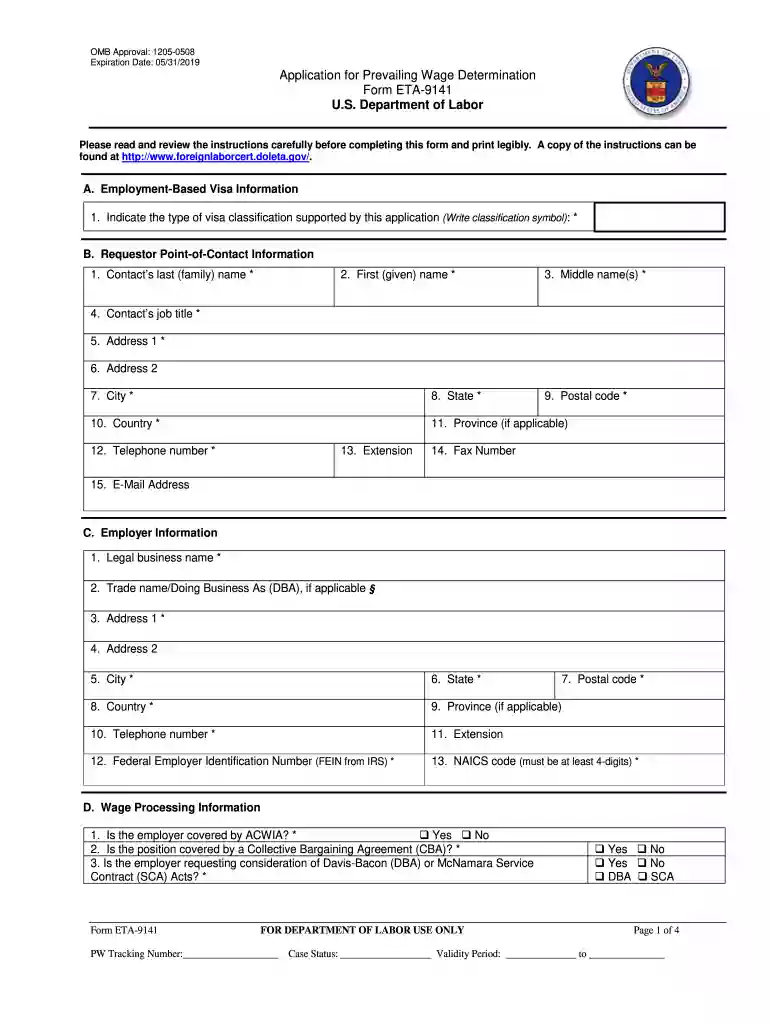
Form prevailing 2016-2019-2025

Get Form
form prevailing 2016-2019 Preview on Page 1

Here's how it works

01. Edit your form online
Type text, add images, blackout confidential details, add comments, highlights and more.

02. Sign it in a few clicks
Draw your signature, type it, upload its image, or use your mobile device as a signature pad.

03. Share your form with others
Send it via email, link, or fax. You can also download it, export it or print it out.

How to use or fill out form prevailing 2016-2019 with our platform

Form edit decoration
9.5
Ease of Setup
DocHub User Ratings on G2
9.0
Ease of Use
DocHub User Ratings on G2
  1. Click ‘Get Form’ to open it in the editor.
  2. Begin with Section A, where you will indicate the type of visa classification supported by this application. Write the classification symbol clearly.
  3. In Section B, provide your contact information. Fill in your last name, first name, middle name, job title, and address details. Ensure all fields marked with an asterisk (*) are completed.
  4. Proceed to Section C for employer information. Enter the legal business name and trade name if applicable. Complete the address and contact number fields accurately.
  5. In Section D, answer questions regarding wage processing information. Indicate if the employer is covered by ACWIA and whether the position is under a Collective Bargaining Agreement.
  6. Section E requires job offer information. Provide a detailed job description, minimum job requirements including education and experience needed, and any special skills required.
  7. Finally, review all sections for accuracy before submitting your form through our platform.

Start filling out your form today for free using our editor!

See more form prevailing 2016-2019 versions

We've got more versions of the form prevailing 2016-2019 form. Select the right form prevailing 2016-2019 version from the list and start editing it straight away!
Versions Form popularity Fillable & printable
2019 4.8 Satisfied (75 Votes)
2019 4.4 Satisfied (107 Votes)
2016 4.3 Satisfied (52 Votes)
2012 4 Satisfied (31 Votes)
be ready to get more

Complete this form in 5 minutes or less

Get form

Got questions?

We have answers to the most popular questions from our customers. If you can't find an answer to your question, please contact us.
Contact us
Prevailing wages must be paid on all hours worked on the site of the work and employers must submit weekly certified payroll records. Certified payroll reports provide proof of compliance with DBA.
To request a prevailing wage determination (PWD) for a Nonagricultural Immigration Program (PERM, H-1B, H-1B1, H-2B, and E-3) employers must complete Form ETA-9141 and submit it to the National Prevailing Wage Center. Electronic filing using the FLAG System is strongly recommended.
If recruitment begins before the PWD is issued, the PERM application cannot be filed until the PWD is received and must be filed while the PWD is still valid. If recruitment begins after the PWD is issued, the PERM application must be filed within 180 days.
Please read and review the filing instructions carefully before completing the Form ETA-9141. A copy of the instructions can be found at .
be ready to get more

Complete this form in 5 minutes or less

Get form