Form OP-383 2026

Get Form
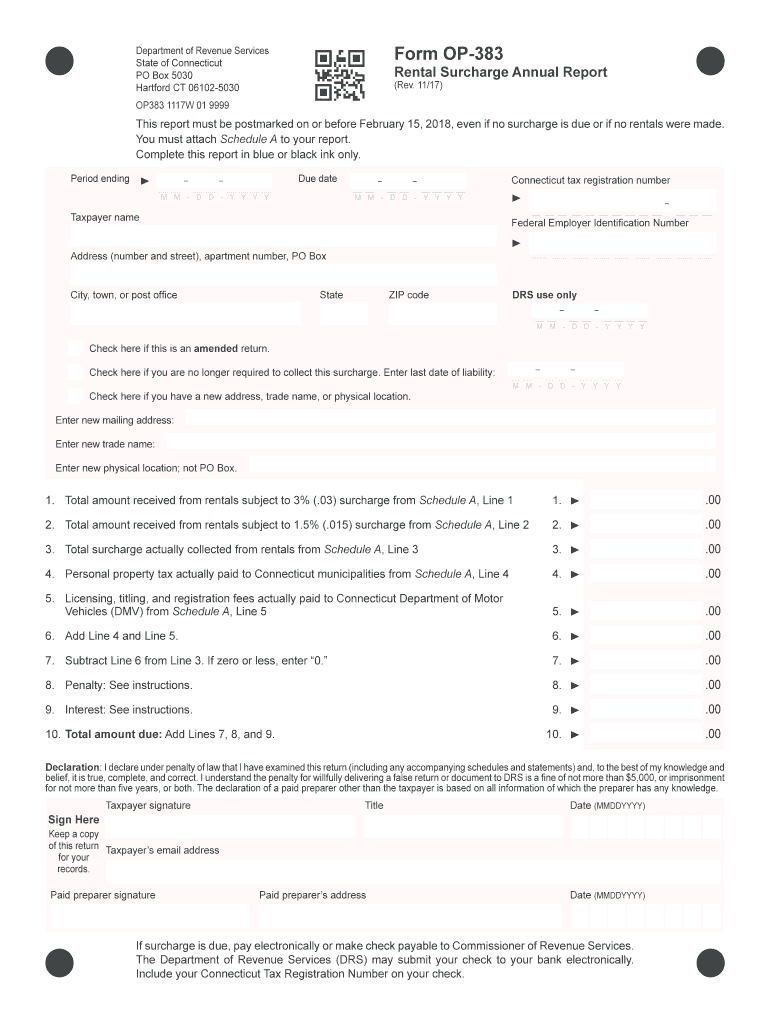
Form OP-383 Preview on Page 1

Here's how it works

01. Edit your form online
Type text, add images, blackout confidential details, add comments, highlights and more.
02. Sign it in a few clicks
Draw your signature, type it, upload its image, or use your mobile device as a signature pad.
03. Share your form with others
Send it via email, link, or fax. You can also download it, export it or print it out.

How to use or fill out Form OP-383 with our platform

Form edit decoration
9.5
Ease of Setup
DocHub User Ratings on G2
9.0
Ease of Use
DocHub User Ratings on G2
  1. Click ‘Get Form’ to open Form OP-383 in the editor.
  2. Begin by entering the 'Period ending' date and 'Due date' in the specified fields. Ensure you use blue or black ink for clarity.
  3. Fill in your Connecticut tax registration number, taxpayer name, and address details accurately to avoid any processing issues.
  4. Indicate if this is an amended return or if you are no longer required to collect the surcharge by checking the appropriate boxes.
  5. Complete Lines 1 through 10 by entering amounts from Schedule A as instructed. Make sure to round off cents to whole dollars.
  6. Sign and date the declaration section at the bottom of the form, confirming that all information provided is true and complete.

Start filling out your Form OP-383 today for free using our platform!

See more Form OP-383 versions

We've got more versions of the Form OP-383 form. Select the right Form OP-383 version from the list and start editing it straight away!
Versions Form popularity Fillable & printable
2023 4.2 Satisfied (24 Votes)
2022 4.1 Satisfied (20 Votes)
2021 4.2 Satisfied (22 Votes)
2020 4.8 Satisfied (136 Votes)
2019 4.4 Satisfied (232 Votes)
2018 4.4 Satisfied (215 Votes)
2017 4.4 Satisfied (54 Votes)
2010 4.1 Satisfied (68 Votes)
be ready to get more

Complete this form in 5 minutes or less

Get form

Got questions?

We have answers to the most popular questions from our customers. If you can't find an answer to your question, please contact us.
Contact us
Connecticut law currently requires certain corporation business taxpayers to pay a tax surcharge of 10% of their tax liability before tax credits are applied.
The rental surcharge is imposed on the total amount the rental company charges the lessee for the rental of the machinery. The rental surcharge is in addition to any tax otherwise applicable to any rental, and is includable in the measure of the sales and use taxes imposed under Chapter 219.
How to fill out a W9 form. Line 1. The payees name. Line 2. Business name (if different from line 1). Line 3. The payees federal tax classification. Line 4. Exception codes. Lines 56. The payees mailing address. Part I. The payees taxpayer identification number (TIN). Part II.
In summary, if you prefer a larger refund and can afford to have less take-home pay, claim 0. If you want more immediate cash flow and are comfortable managing your tax liability, claim 1.
If you are trying to locate, download, or print state of Pennsylvania tax forms, you can do so on the Pennsylvania Department of Revenue. The most common Pennsylvania income tax form is the PA-40.

Security and compliance

At DocHub, your data security is our priority. We follow HIPAA, SOC2, GDPR, and other standards, so you can work on your documents with confidence.

Learn more
ccpa2
pci-dss
gdpr-compliance
hipaa
soc-compliance

People also ask

However, simply filling out a W-9 doesnt require a person to pay taxes. These payments arent typically subjected to IRS withholding, meaning it is the payees responsibility to track their income and pay the necessary taxes.
Use Form W-9 to provide your correct Taxpayer Identification Number (TIN) to the person who is required to file an information return with the IRS to report, for example: Income paid to you. Real estate transactions. Mortgage interest you paid.

Related links