




Here's how it works

01. Edit your michigan schedule 1 online
Type text, add images, blackout confidential details, add comments, highlights and more.

02. Sign it in a few clicks
Draw your signature, type it, upload its image, or use your mobile device as a signature pad.

03. Share your form with others
Send mi schedule 1 via email, link, or fax. You can also download it, export it or print it out.
How to use or fill out 2015 Michigan Schedule 1 form with our platform

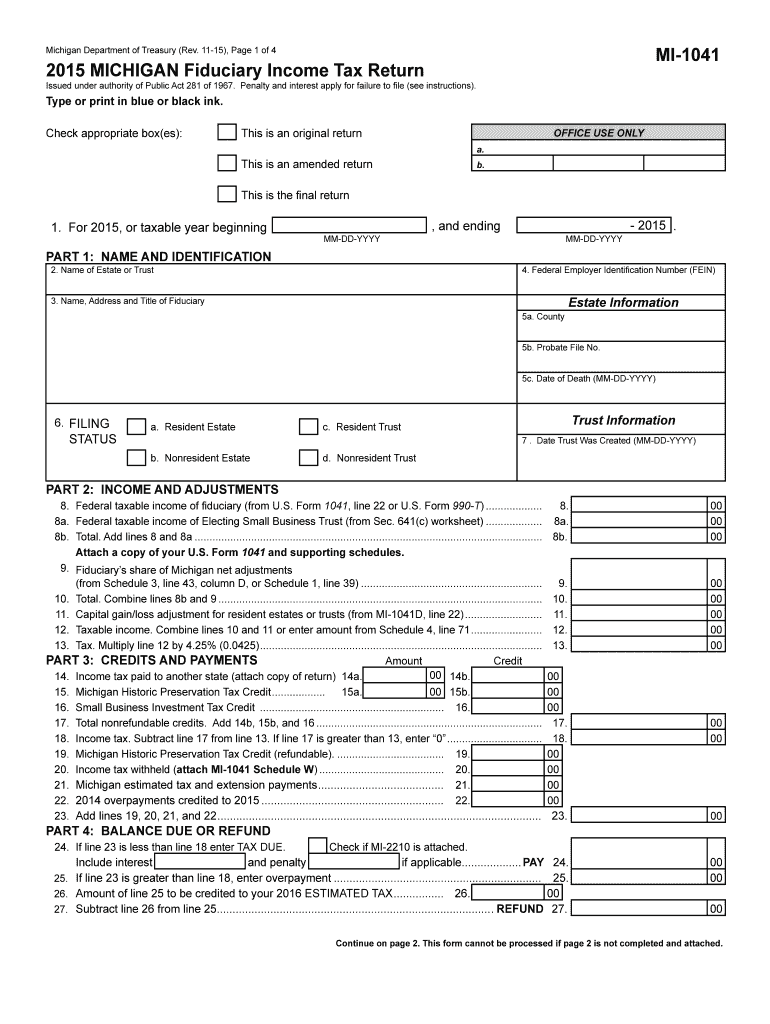
- Click ‘Get Form’ to open the 2015 Michigan Schedule 1 form in the editor.
- Begin by filling out Part 1: Name and Identification. Enter the name of the estate or trust, along with the Federal Employer Identification Number (FEIN) and other required details.
- Proceed to Part 2: Income and Adjustments. Input the federal taxable income from U.S. Form 1041, along with any adjustments specific to Michigan. Ensure you attach a copy of your U.S. Form 1041.
- In Part 3: Credits and Payments, list any credits applicable to your situation, such as income tax paid to another state or Michigan Historic Preservation Tax Credit.
- Finally, complete Part 4: Balance Due or Refund by calculating any taxes due or overpayments. Make sure all sections are filled accurately before submitting.
Start using our platform today for free to simplify your document editing and form completion!
Fill out 2015 michigan schedule 1 form online
It's free
It's free
See more 2015 michigan schedule 1 form versions
We've got more versions of the 2015 michigan schedule 1 form form. Select the right 2015 michigan schedule 1 form version from the list and start editing it straight away!
| Versions | Form popularity | Fillable & printable |
|---|---|---|
| 2025 | 4.3 Satisfied (20 Votes) | |
| 2024 | 4.6 Satisfied (55 Votes) | |
| 2023 | 4.6 Satisfied (45 Votes) | |
| 2022 | 4.5 Satisfied (56 Votes) | |
| 2021 | 4.7 Satisfied (43 Votes) | |
| 2020 | 4.8 Satisfied (175 Votes) | |
| 2019 | 4.2 Satisfied (42 Votes) | |
| 2017 | 4.3 Satisfied (149 Votes) | |
| 2016 | 4.3 Satisfied (43 Votes) | |
| 2015 | 4.3 Satisfied (51 Votes) | |
| 2014 | 4.4 Satisfied (392 Votes) | |
| 1998 | 4.4 Satisfied (52 Votes) |
Security and compliance
At DocHub, your data security is our priority. We follow HIPAA, SOC2, GDPR, and other standards, so you can work on your documents with confidence.
Learn more


Related forms
Haul slip
The document is a Certificate of Permit (Haul Slip) Order required for transporting cattle within Washington State and f ...
NEPHROLOGY CLEARANCE REQUEST
The document is a Nephrology Clearance Request form addressed to a physician regarding a mutual patient scheduled for su ...

457 Sample QDRO LANGUAGE 2007 doc
The document is a Model Qualified Domestic Relations Order (QDRO) for the Texa$aver 457 Plan, outlining the legal framew ...

BehaviorObservation doc
The document is a Behavior Observation and Intervention Form used by the Township of Union Public Schools to assess at-r ...

Grease Trap Certification (Form B)
The document outlines the requirements for Grease Trap Certification in food service establishments within the City of M ...

Basic stoichiometry phet lab answer key pdf
The document is a lab guide for a PhET simulation on basic stoichiometry, using the analogy of making sandwiches to expl ...

Nevada national guard textbook reimbursement application - nv ngb army
The document is an application form for textbook reimbursement for members of the Nevada National Guard, as provided und ...