







Definition and Purpose of Form
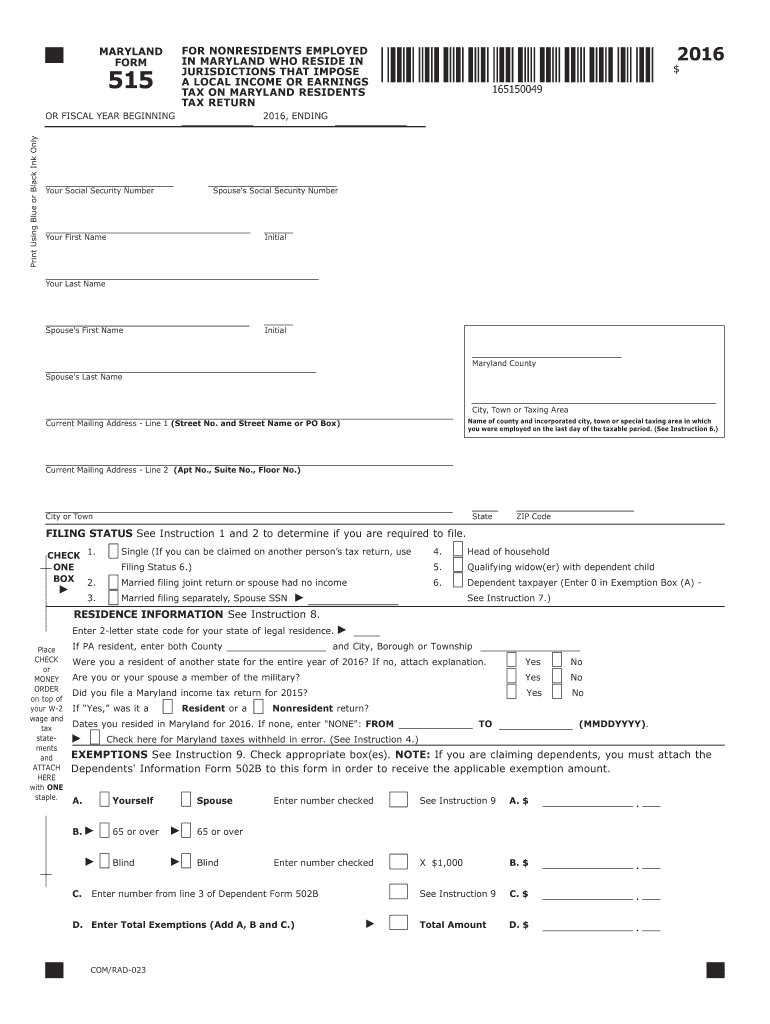
Form 515 for the year 2016 is a Maryland state tax return document that nonresidents employed in Maryland need to complete. This form is specifically required for individuals who live in jurisdictions that impose a local income or earnings tax on Maryland residents. Essentially, the document serves as a means to declare the nonresident income earned within Maryland and ensure compliance with the state's tax laws. The purpose of this form is to facilitate the collection of the appropriate tax from those who earn within the state but maintain residency elsewhere. It details instructions for nonresidents to accurately report income, claim exemptions, and calculate the necessary adjustments to taxable income.
Steps to Complete Form
-
Personal Information: Begin by providing your personal information, including your name, address, and Social Security Number. Ensure that the details align with existing records to avoid processing delays.
-
Determine Filing Status: Select the appropriate filing status, which affects the calculation of exemptions and tax rates. Typical statuses include single, married filing jointly, or married filing separately.
-
Report Income: Enter all sources of income earned within Maryland. This includes wages, salaries, interest, dividends, and any other applicable income.
-
Adjustments and Deductions: Calculate adjustments by including any Maryland-specific deductions or credits you are eligible for. Common adjustments may involve student loan interest or educator expenses.
-
Tax Computation: Use the provided table or software to determine your tax liability based on your total income and filing status.
-
Exemptions: Specify any exemptions that apply. These might depend on the number and type of dependents you claim.
-
Additional Counties and Local Jurisdictions: If required, provide details about local taxes applicable to your jurisdiction that need to be considered.
Practical Example
Consider John, who lives in Pennsylvania but works in Baltimore. He would report his wages on Form 515 and ensure that he meets the local tax obligations of his resident jurisdiction in compliance with Maryland tax laws.
How to Obtain Form
Accessing Form 515 for 2016 can be done through multiple methods:
- Online Download: Visit the Maryland State Comptroller’s website, where you can download the form and accompanying instructions.
- In-Person Acquisition: State tax offices provide physical copies upon request.
- Tax Software: Through platforms like TurboTax or QuickBooks, users can attain a digital version integrated within these programs.
Relevance Today
Although it pertains specifically to the tax year 2016, knowing where to consistently find historical tax forms can be helpful for retrospective audits or amendments.
Key Elements of Form
- Identification Section: Basic personal and contact details.
- Income and Adjustments: Lines dedicated to various income types and any state-specific modifications.
- Exemption Certification: Details on eligible dependents and corresponding exemptions that lower taxable income.
- Tax Calculations and Deductions: Steps for computing owed tax after deductions at the state and local level.
Example of Elements
A taxpayer claiming several dependents would focus on accurately completing the exemption and deductions section to maximize their return potential.
Filing Deadlines and Important Dates
- Regular Filing Deadline: The typical deadline for Form 515 submission aligns with federal tax deadlines, usually April 15 of the subsequent year.
- Extensions: If necessary, taxpayers can file for an extension, which generally grants a six-month grace period.
- Penalties for Late Filing: Missing the deadline without an extension can result in penalties, which include interest on late payments and additional fines assessed monthly.
Penalties for Non-Compliance
Failing to file Form 515 or inaccurate reporting can lead to:
- Monetary Penalties: Fines calculated based on a percentage of the unpaid tax due.
- Delayed Refunds: Errors or omissions can result in processing delays.
- Audit Risks: Increased probability of being selected for a comprehensive tax audit.
Who Typically Uses Form
This form is predominantly used by:
- Nonresident Employees: Individuals residing outside Maryland but earning income within the state.
- Seasonal Workers: Workers who temporarily relocate for employment during peak seasons.
- Cross-state Commuters: Those who travel across state lines for daily work.
State-Specific Rules for Maryland
Maryland has particular regulations governing nonresident taxation:
- Reciprocity Agreements: Understanding any state agreements that may impact taxation.
- Local Tax Differences: Variability in local taxes based on jurisdiction within Maryland.
Consideration of Jurisdictions
For example, a resident of Virginia working in Maryland must account for both state and local taxes, potentially affecting overall taxable income.
Required Documents
To accompany Form 515, prepare:
- W-2 Forms: Documentation from employers indicating total income and withholding.
- 1099 Forms: For any additional income from freelance or contract work.
- Proof of Residency: Especially if claiming deductions based on non-residency status.


