Type text, add images, blackout confidential details, add comments, highlights and more.
02. Sign it in a few clicks
Draw your signature, type it, upload its image, or use your mobile device as a signature pad.
03. Share your form with others
Send vn233 form via email, link, or fax. You can also download it, export it or print it out.
How to use or fill out vn233 with our platform
Ease of Setup
DocHub User Ratings on G2
Ease of Use
DocHub User Ratings on G2
Click ‘Get Form’ to open the vn233 document in the editor.
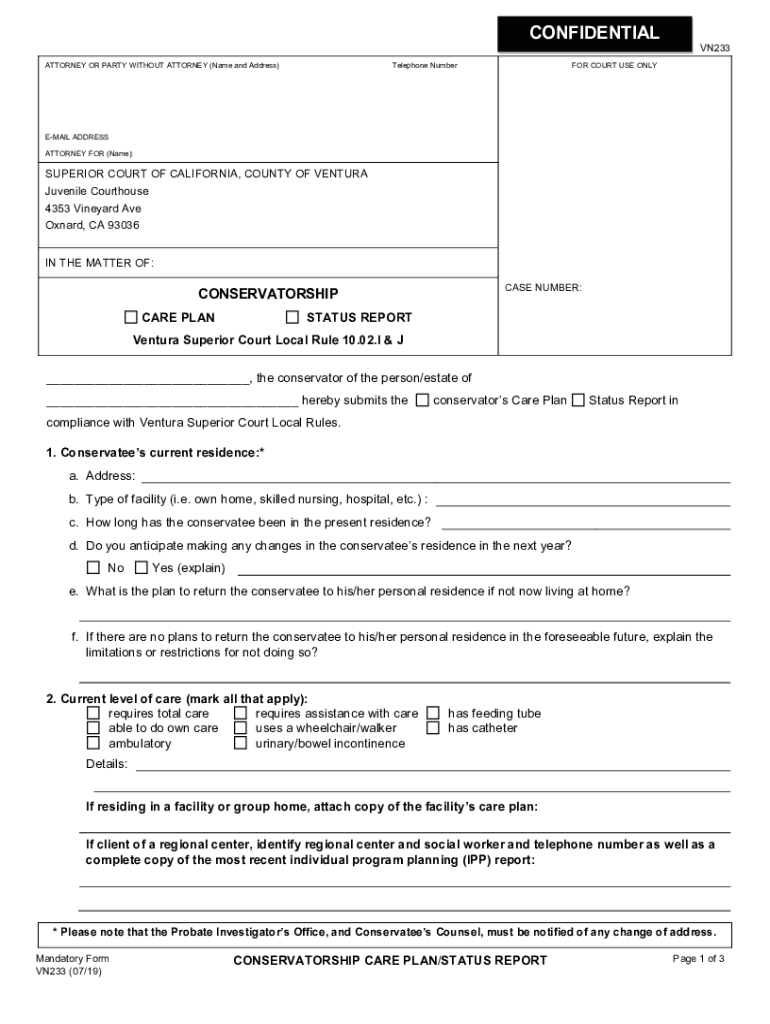
Begin by filling in your name and address as the attorney or party without an attorney. Ensure your contact information, including telephone number and email address, is accurate.
In the 'In the Matter Of' section, enter the conservatee's name and case number. This is crucial for proper identification.
Proceed to Section 1 regarding the conservatee’s current residence. Fill in details such as address, type of facility, duration of stay, and any anticipated changes.
For Section 2, mark all applicable options regarding the conservatee’s level of care. Be thorough to ensure accurate representation of their needs.
Continue through Sections 3 to 15, providing detailed information about health conditions, expenses, and any special needs or problems identified by the court.
Once completed, review all entries for accuracy before signing at the bottom. Remember to file the original with the court and send copies as required.
Start using our platform today for free to streamline your form completion process!
How do I put myself on a calendar for court Ventura?
To schedule your case for an appearance in court, contact the clerks office at 805-289-8545 or visit the walk up window. You must appear in court on or before your due date if your courtesy notice indicates that a MANDATORY APPEARANCE is required.
How can I attend a court hearing?
A person who wishes to observe a court in session may check the court calendar online or at the courthouse and watch a proceeding. The U.S. Constitution and court tradition give citizens right of access to court proceedings.
How do I reserve a hearing date in Ventura County Superior Court?
These courtrooms require the parties to call in advance and reserve a hearing date and time. Parties are encouraged to call the Civil Unit at 805-289-8525 to determine if the courtroom their case is assigned to requires a reservation and for additional information on how to reserve a hearing.
What is the phone number for Ventura County?
The Hall of Administration is open Monday Friday from 8-5. Services are also available online. Appointments are recommended and can be made by calling: 805-654-5000. VISIT OUR ONLINE SERVICES.
What is the phone number for Ventura County Superior court collections?
The Collection Unit phone number is (805) 639-5010. We are available by phone Monday through Friday from 8:00am to 5:00pm, except on holidays. If you are unable to pay your balance in full, please contact us to determine if your case is eligible for a payment arrangement.
Related Searches
VN230VN028VN120
Security and compliance
At DocHub, your data security is our priority. We follow HIPAA, SOC2, GDPR, and other standards, so you can work on your documents with confidence.
What is the branch name of Ventura County Superior court?
Ventura - Hall of Justice.
How to appear remotely in Ventura County Superior Court?
your hearing of your intent to appear remotely. Notify the Court by email to: courtroom21@ventura.courts.ca.gov with the subject line Notice to Appear Via Zoom. Include your name and affiliation with the case in the email.
Related links
Carbon and nitrogen in B2 to A2 main-sequence stars
by J Hardorp 1986 The N I lines at 1493 and 1495 A were measured in 28 sharp-lined stars below 16500 K. Nitrogen anomalies are found in 5 stars, but seem uncorrelated to the CRead more
VN233. * Please note that the Probate Investigators Office, and Conservatees Counsel, must be notified of any change of address. Mandatory Form. VN233 (Rev.Read more
Cookie consent notice
This site uses cookies to enhance site navigation and personalize your experience.
By using this site you agree to our use of cookies as described in our Privacy Notice.
You can modify your selections by visiting our Cookie and Advertising Notice.