Oregon annual 2026

Get Form
oregon annual Preview on Page 1

Here's how it works

01. Edit your form online
Type text, add images, blackout confidential details, add comments, highlights and more.
02. Sign it in a few clicks
Draw your signature, type it, upload its image, or use your mobile device as a signature pad.
03. Share your form with others
Send it via email, link, or fax. You can also download it, export it or print it out.

How to use or fill out oregon annual with our platform

Form edit decoration
9.5
Ease of Setup
DocHub User Ratings on G2
9.0
Ease of Use
DocHub User Ratings on G2
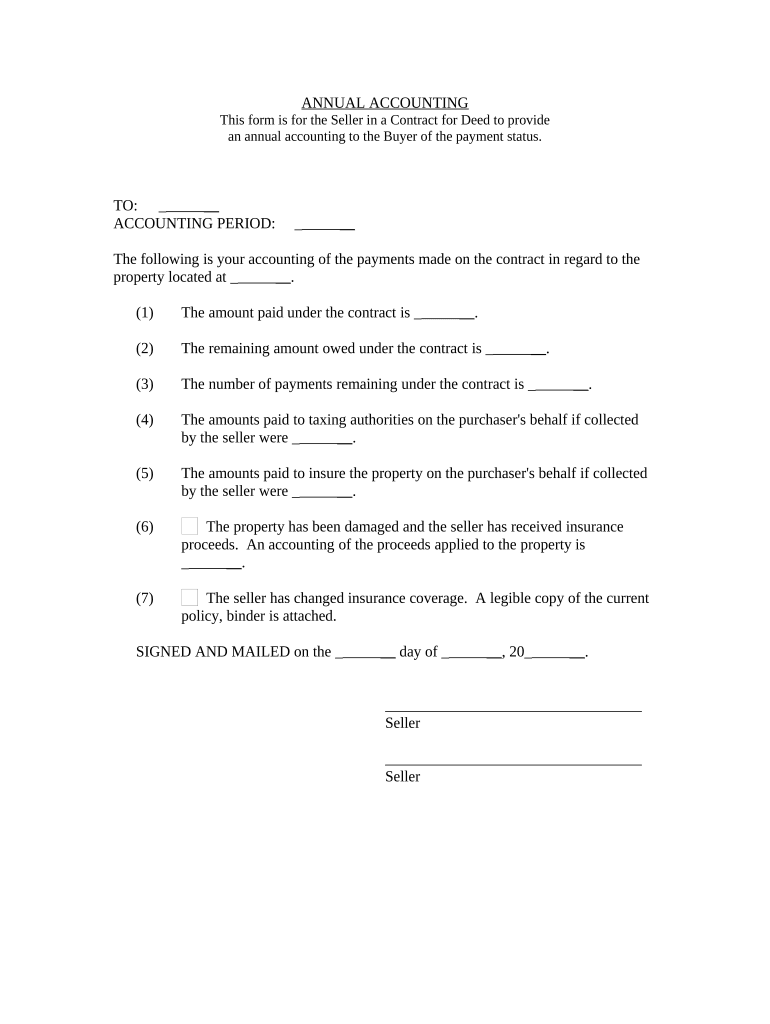
  1. Click ‘Get Form’ to open the oregon annual in the editor.
  2. Begin by entering the recipient's name in the 'TO' field, ensuring accuracy for proper documentation.
  3. Specify the 'ACCOUNTING PERIOD' for which you are providing the annual accounting, as this is crucial for clarity.
  4. In section (1), input the total amount paid under the contract. This provides a clear overview of payments made.
  5. For section (2), indicate the remaining amount owed under the contract to keep both parties informed.
  6. Fill in section (3) with the number of payments remaining, which helps track future obligations.
  7. If applicable, enter amounts paid to taxing authorities on behalf of the purchaser in section (4).
  8. In section (5), document any insurance payments made on behalf of the purchaser for transparency.
  9. Section (6) requires details about any insurance proceeds received due to property damage, ensuring accountability.
  10. Attach a legible copy of any changed insurance coverage as mentioned in section (7).
  11. Finally, sign and date at the bottom of the form before sending it off to ensure completion.

Start using our platform today to fill out your oregon annual form easily and for free!

be ready to get more

Complete this form in 5 minutes or less

Get form

Got questions?

We have answers to the most popular questions from our customers. If you can't find an answer to your question, please contact us.
Contact us
Average Salary in Oregon Annual SalaryWeekly Pay Top Earners $92,102 $1,771 75th Percentile $75,735 $1,456 Average $59,931 $1,152 25th Percentile $44,127 $848
Businesses that fail to submit their reports and pay the associated fees could encounter fines and other penalties, or risk losing their status of good standing.
The cost to file an annual report in the state of Oregon is $100. This fee applies to all domestic corporations, LLCs, and cooperative corporations. Foreign corporations must pay $275 and domestic nonprofits pay $50.
The budget covers two fiscal years (a biennium), meaning it runs from July 1 of an odd-numbered year to June 30 of the next odd-numbered year.
The purpose of the annual report filing requirement is to provide the public, investors, the filing office, and other government agencies with the information necessary to locate and communicate with companies formed or doing business in the state.
be ready to get more

Complete this form in 5 minutes or less

Get form

People also ask

Oregon businesses, with the exception of sole proprietorships and general partnerships, must file an annual report with the Secretary of States Office. This document keeps business records accurate and up-to-date and helps companies remain in good standing.
Each year, certain Oregon businesses must provide the report as a way to keep the Secretary of States office informed about vital information like the companys address, managing members, directors, and registered agent. Every LLC and corporation, foreign or domestic, must file an annual report.
Annual reports are comprehensive documents designed to provide readers with information about a companys performance in the preceding year. The reports contain information, such as performance highlights, a letter from the CEO, financial information, and objectives and goals for future years.

Related links