Name Change Notification Form - Rhode Island 2026

Get Form
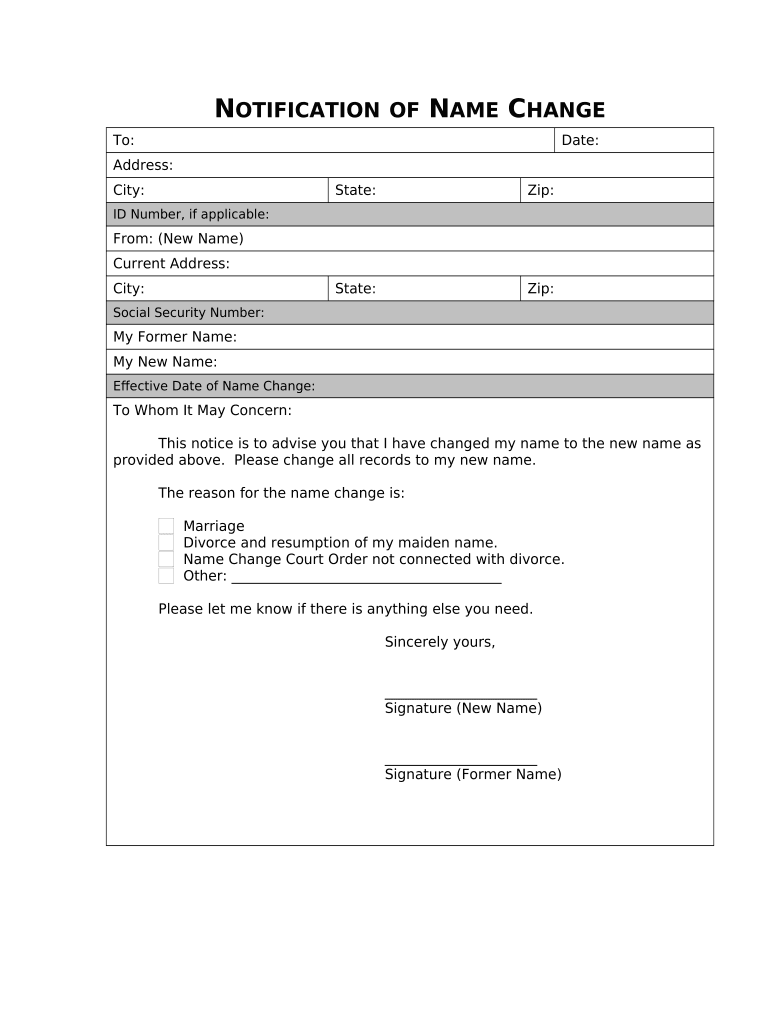
name change in ri Preview on Page 1

Here's how it works

01. Edit your name change in ri online
Type text, add images, blackout confidential details, add comments, highlights and more.
02. Sign it in a few clicks
Draw your signature, type it, upload its image, or use your mobile device as a signature pad.
03. Share your form with others
Send how to change your name in rhode island via email, link, or fax. You can also download it, export it or print it out.

How to use or fill out Name Change Notification Form - Rhode Island with DocHub

Form edit decoration
9.5
Ease of Setup
DocHub User Ratings on G2
9.0
Ease of Use
DocHub User Ratings on G2
  1. Click ‘Get Form’ to open it in the editor.
  2. Begin by entering the date at the top of the form. This is important for record-keeping purposes.
  3. Fill in your current address, including city, state, and zip code. Ensure accuracy to avoid any issues with notifications.
  4. If applicable, provide your ID number. This helps verify your identity during the name change process.
  5. In the 'From' section, enter your new name as you wish it to appear officially.
  6. Complete your current address details again for consistency.
  7. Input your Social Security Number in the designated field to link your name change with official records.
  8. Specify your former name and new name clearly in their respective fields.
  9. Indicate the effective date of the name change; this is crucial for updating records promptly.
  10. Select a reason for the name change from the provided options or specify another reason if necessary.
  11. Finally, sign both as your new name and former name at the bottom of the form to validate it.

Start using our platform today to complete your Name Change Notification Form quickly and efficiently!

be ready to get more

Complete this form in 5 minutes or less

Get form

Got questions?

We have answers to the most popular questions from our customers. If you can't find an answer to your question, please contact us.
Contact us
You might change your name through marriage, divorce, or court. Update your new name with Social Security, the motor vehicle office, and other government agencies.
You can find this form at: govt.nz/name-change-adult. You must present your current photo identification or completed BDM76 form (with attached photo) to the person authorised to take a statutory declaration when you sign the declaration in front of them.
Sample Email Templates for Name Change Announcements I am writing to inform you of a docHub personal change. Effective [Date], I have legally changed my name from [Old Name] to [New Name]. Please update your records accordingly. Effective immediately, my email address will also change to [New Email Address].
banks, building societies, and credit unions - current accounts, credit cards, loan agreements, savings and ISAs. pension providers - current and previous. healthcare practitioners - doctors and dentist. utility providers - gas and electricity companies.
Use certified copies of marriage and divorce certificates or name change orders as proof to notify these federal and state agencies that you changed your name. Social Security card. Drivers license or state ID card. Tax returns. U.S. passport. Naturalization certificate and certificate of citizenship. Veterans benefits.

Security and compliance

At DocHub, your data security is our priority. We follow HIPAA, SOC2, GDPR, and other standards, so you can work on your documents with confidence.

Learn more
ccpa2
pci-dss
gdpr-compliance
hipaa
soc-compliance