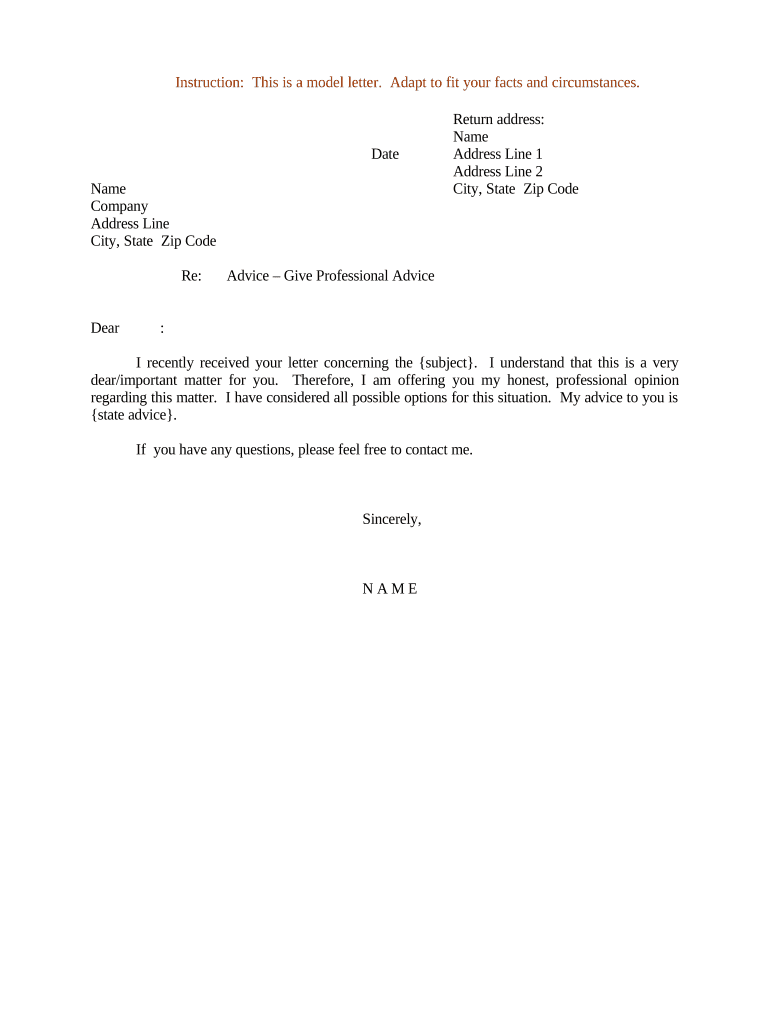
Sample letter advice 2026

Get Form
advice letter Preview on Page 1

Here's how it works

01. Edit your advice letter online
Type text, add images, blackout confidential details, add comments, highlights and more.
02. Sign it in a few clicks
Draw your signature, type it, upload its image, or use your mobile device as a signature pad.
03. Share your form with others
Send advice letter structure via email, link, or fax. You can also download it, export it or print it out.

How to use or fill out sample letter advice with our platform

Form edit decoration
9.5
Ease of Setup
DocHub User Ratings on G2
9.0
Ease of Use
DocHub User Ratings on G2
  1. Click ‘Get Form’ to open the sample letter advice in the editor.
  2. Begin by entering the date at the top of the letter. This sets a clear timeline for your correspondence.
  3. Fill in your name, company, and address details in the designated fields. Ensure accuracy for effective communication.
  4. In the 'Re:' section, specify the subject of your letter to provide context to the recipient.
  5. Address the recipient formally by entering their name after 'Dear'. This personal touch enhances professionalism.
  6. In the body of the letter, articulate your professional advice clearly. Replace '{subject}' and '{state advice}' with relevant information tailored to their situation.
  7. Conclude with your name at the bottom of the letter, ensuring it reflects your identity as a sender.

Start using our platform today for free to streamline your document editing and signing process!

be ready to get more

Complete this form in 5 minutes or less

Get form

Got questions?

We have answers to the most popular questions from our customers. If you can't find an answer to your question, please contact us.
Contact us

Yes, you can use DocHub for signing any business and private paperwork, including your giving advice letter. All eSignatures you generate with our tool are legally binding and court-admissible, as DocHub complies with criteria required by ESIGN and UETA. Save your completed document with a detailed Audit Trail if needed.

When you edit your giving advice letter sample with DocHub, you will not need to look for other applications or services to sign it. An electronic signature is part of DocHub’s comprehensive editing toolset, which allows you to apply changes in your form without switching between platforms. Just complete your form, double-check the correctness of the information and place your electronic signature at the end to make it submission-ready within a few minutes.

Security and compliance

At DocHub, your data security is our priority. We follow HIPAA, SOC2, GDPR, and other standards, so you can work on your documents with confidence.

Learn more
ccpa2
pci-dss
gdpr-compliance
hipaa
soc-compliance