South dakota will 2026

Get Form
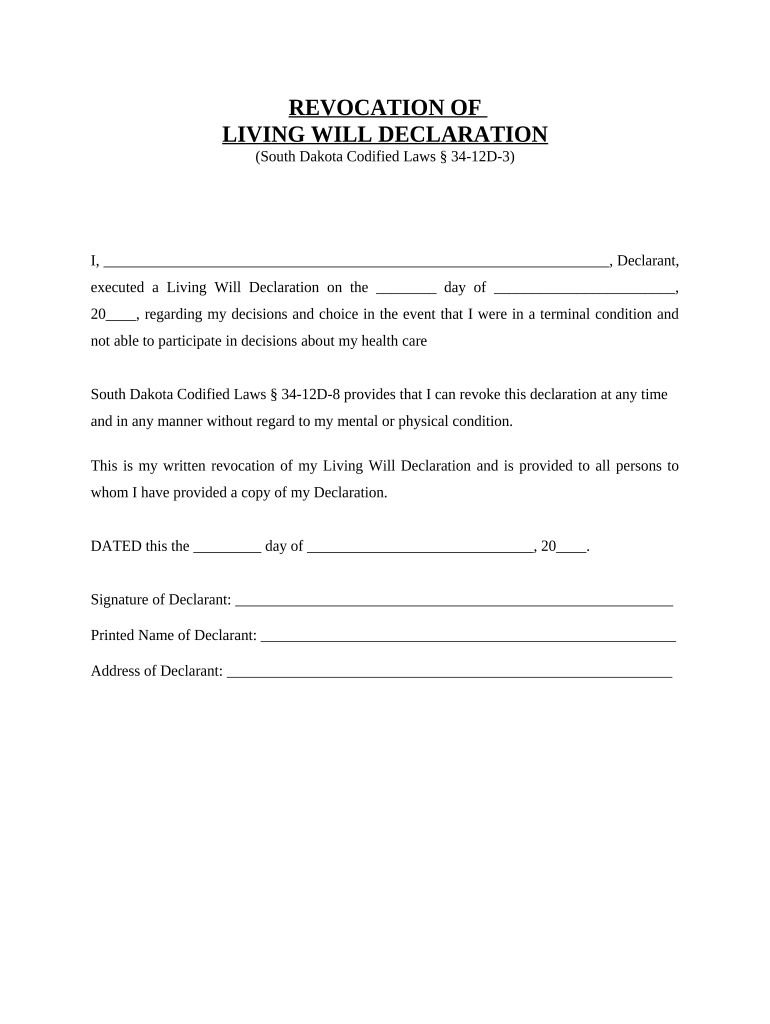
south dakota will Preview on Page 1

Here's how it works

01. Edit your form online
Type text, add images, blackout confidential details, add comments, highlights and more.
02. Sign it in a few clicks
Draw your signature, type it, upload its image, or use your mobile device as a signature pad.
03. Share your form with others
Send it via email, link, or fax. You can also download it, export it or print it out.

How to use or fill out South Dakota Will with our platform

Form edit decoration
9.5
Ease of Setup
DocHub User Ratings on G2
9.0
Ease of Use
DocHub User Ratings on G2
  1. Click ‘Get Form’ to open the South Dakota Will in the editor.
  2. Begin by entering your name as the Declarant in the designated field at the top of the form.
  3. Fill in the date you executed your original Living Will Declaration in the format: day, month, year.
  4. Acknowledge your right to revoke this declaration by reviewing the statement provided regarding South Dakota Codified Laws § 34-12D-8.
  5. Indicate the date of revocation at the bottom of the form, ensuring it is accurate and reflects when you are making this decision.
  6. Sign your name in the Signature of Declarant field and print your name below it for clarity.
  7. Lastly, provide your address in the specified section to complete your revocation.

Start using our platform today to easily manage and complete your South Dakota Will for free!

be ready to get more

Complete this form in 5 minutes or less

Get form

Got questions?

We have answers to the most popular questions from our customers. If you can't find an answer to your question, please contact us.
Contact us
There are some ways to avoid probate in South Dakota, including having a living trust, payable-on-death (POD) bank accounts, transfer-on-death (TOD) deeds, and joint ownership of properties. Living trusts can help avoid probate because the assets they hold belong to the trust, not the estate.
Basic Requirements for a Valid Will Written Document. California requires that wills be written, either typed or handwritten. Signature of the Testator. The will must be signed by the testator or by someone else at the testators direction and in their presence. Two Witnesses.
A: You can write your own will in California without a lawyer. The Probate Code offers a form to fill out to create your will. There are also multiple online sites for creating your own will. This type of will must be witnessed by two individuals and signed by them.
Though South Dakota wills need not be docHubd, a will can be made self-proved through execution of a compliant affidavit by the testator and witnesses. When a will is self-proved: It can be admitted to probate without requiring testimony from witnesses.
The law requires that the maker of the will be at least 18 years old and of sound mind. The will must be written, signed, and witnessed by two or more individuals. No witnesses are necessary if the will is dated and if the signature and material portions of the will are in the handwriting of the person making the will.

Security and compliance

At DocHub, your data security is our priority. We follow HIPAA, SOC2, GDPR, and other standards, so you can work on your documents with confidence.

Learn more
ccpa2
pci-dss
gdpr-compliance
hipaa
soc-compliance