Anatomical gift 2026

Get Form
ub anatomical gift program Preview on Page 1

Here's how it works

01. Edit your ub anatomical gift program online
Type text, add images, blackout confidential details, add comments, highlights and more.
02. Sign it in a few clicks
Draw your signature, type it, upload its image, or use your mobile device as a signature pad.
03. Share your form with others
Send it via email, link, or fax. You can also download it, export it or print it out.

How to use or fill out anatomical gift with our platform

Form edit decoration
9.5
Ease of Setup
DocHub User Ratings on G2
9.0
Ease of Use
DocHub User Ratings on G2
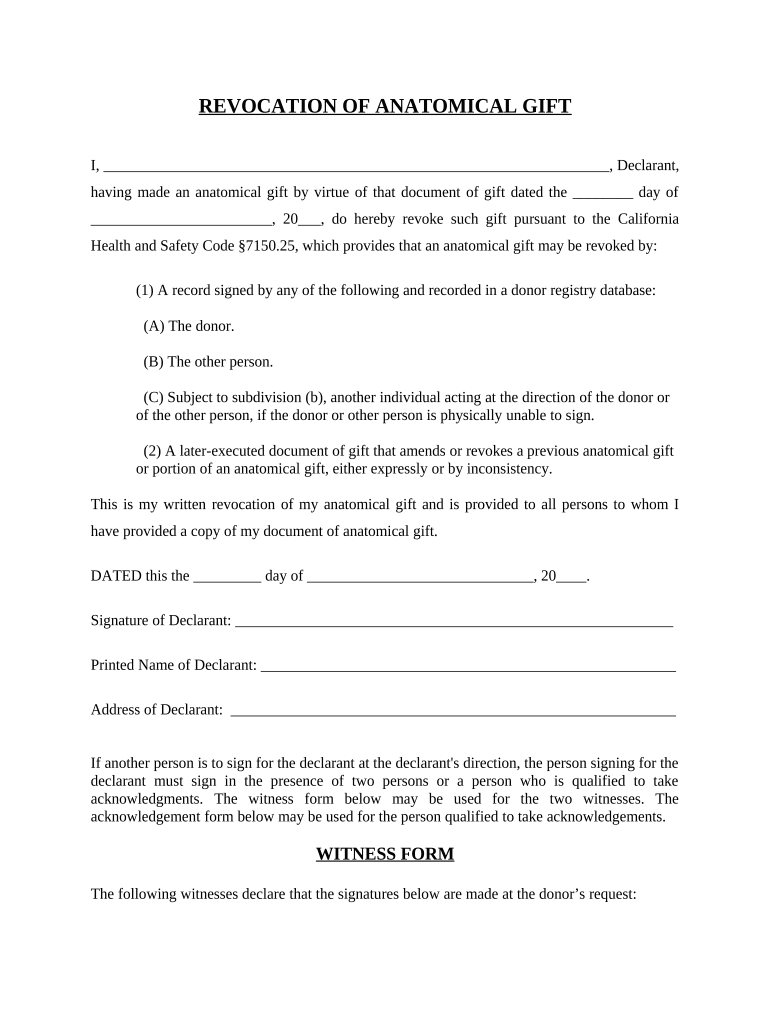
  1. Click ‘Get Form’ to open the anatomical gift revocation document in the editor.
  2. Begin by filling in your name as the Declarant at the top of the form. This identifies you as the individual revoking the anatomical gift.
  3. In the section that states 'document of gift dated', enter the date of your original anatomical gift. This provides context for your revocation.
  4. Sign and print your name in the designated areas to confirm your intent to revoke. Ensure that this is done clearly for legal purposes.
  5. If someone else is signing on your behalf, ensure they do so in front of two witnesses or a qualified individual, as specified in the form.
  6. Complete the witness section by having two individuals sign and provide their names and addresses, confirming they witnessed your signature.
  7. Finally, if required, complete any notary public section to validate your revocation legally.

Start using our platform today to easily manage and complete your anatomical gift forms for free!

be ready to get more

Complete this form in 5 minutes or less

Get form

Got questions?

We have answers to the most popular questions from our customers. If you can't find an answer to your question, please contact us.
Contact us
Any adult may make an anatomical gift in writing, including through a will, a donor card or by a statement imprinted or attached to a motor vehicle operators license. When a donor dies, family members should contact the Anatomical Donation Program immediately after the the pronouncement of death.
The Uniform Anatomical Gift Act of 1968 In 1968, Congress approved the UAGA and recommended that all states adopt it. The Act was the first legislation enacted by all states in United States to address the donation of organs, tissues, and eyes as gifts to someone who may be in need of an organ for survival.
(3) Anatomical gift means a donation of all or part of a human body to take effect after the donors death for the purpose of transplantation, therapy, research, or education.
An anatomical gift is a donation of organs and tissues to take effect on or after death. Organs that can be donated include the heart, intestines, kidneys, liver, lungs and pancreas.
The Anatomical Gift Program is a non-profit funded by the University at Buffalo and operated for the benefit of the Western New York community. Individuals who would like to donate their bodies can do so at no cost to them or their estate.
be ready to get more

Complete this form in 5 minutes or less

Get form

People also ask

Introduction. Organ and tissue donation occurs after a person has died. Transplantable organs and tissue can be donated to help the lives of individuals in need. Anatomical gift means a donation of all or part of a human body, after death, for the purpose of transplantation, therapy, research or education.

Related links