Type text, add images, blackout confidential details, add comments, highlights and more.
02. Sign it in a few clicks
Draw your signature, type it, upload its image, or use your mobile device as a signature pad.
03. Share your form with others
Send it via email, link, or fax. You can also download it, export it or print it out.
How to use or fill out affidavit party with our platform
Ease of Setup
DocHub User Ratings on G2
Ease of Use
DocHub User Ratings on G2
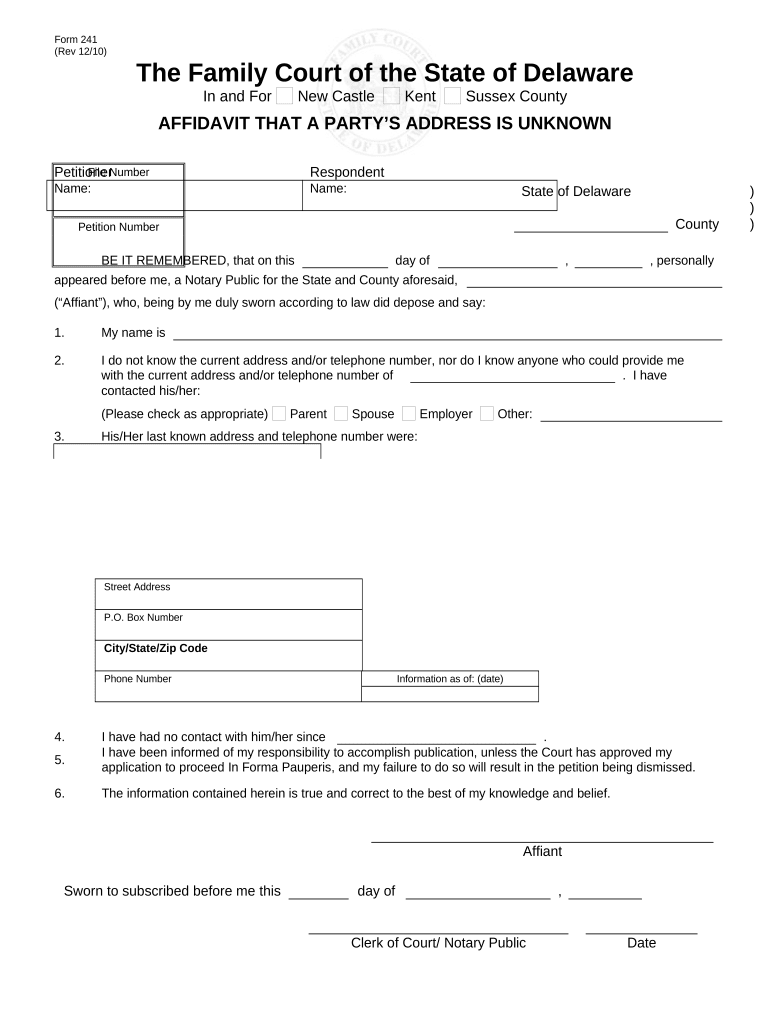
Click ‘Get Form’ to open the affidavit party in the editor.
Begin by entering the file number, petitioner, and respondent names at the top of the form. Ensure all names are spelled correctly for accuracy.
In section 1, provide your name as the affiant. This is crucial as it identifies who is making the affidavit.
For section 2, clearly state that you do not know the current address or telephone number of the individual in question. If applicable, check any relevant boxes indicating whom you have contacted for this information.
In section 3, fill in the last known address and phone number of the individual. Be as precise as possible to avoid any issues.
Complete sections 4 through 6 by providing additional details such as dates of last contact and acknowledging your responsibilities regarding publication if required.
Finally, sign and date where indicated to affirm that all information provided is true to the best of your knowledge.
Start using our platform today to easily complete your affidavit party online for free!
Free printable Affidavit form PDFWhere can i get an affidavit formAffidavit template WordFree Affidavit formWhat is an affidavit used forBlank affidavitPersonal affidavit exampleGeneral affidavit form
Security and compliance
At DocHub, your data security is our priority. We follow HIPAA, SOC2, GDPR, and other standards, so you can work on your documents with confidence.
An affidavit is a written declaration under oath made before some person who has authority to administer oaths, without notice to any adverse party that mayRead more
Third Party Nomination Paperwork | Department of State
Candidates Affidavit- you must file with your nomination paper(s) a completed and DocHubd Candidates Affidavit. If you are unable to obtain notarization onRead more
Cookie consent notice
This site uses cookies to enhance site navigation and personalize your experience.
By using this site you agree to our use of cookies as described in our Privacy Notice.
You can modify your selections by visiting our Cookie and Advertising Notice.