Type text, add images, blackout confidential details, add comments, highlights and more.
02. Sign it in a few clicks
Draw your signature, type it, upload its image, or use your mobile device as a signature pad.
03. Share your form with others
Send it via email, link, or fax. You can also download it, export it or print it out.
How to use or fill out Arizona Notice Intent with our platform
Ease of Setup
DocHub User Ratings on G2
Ease of Use
DocHub User Ratings on G2
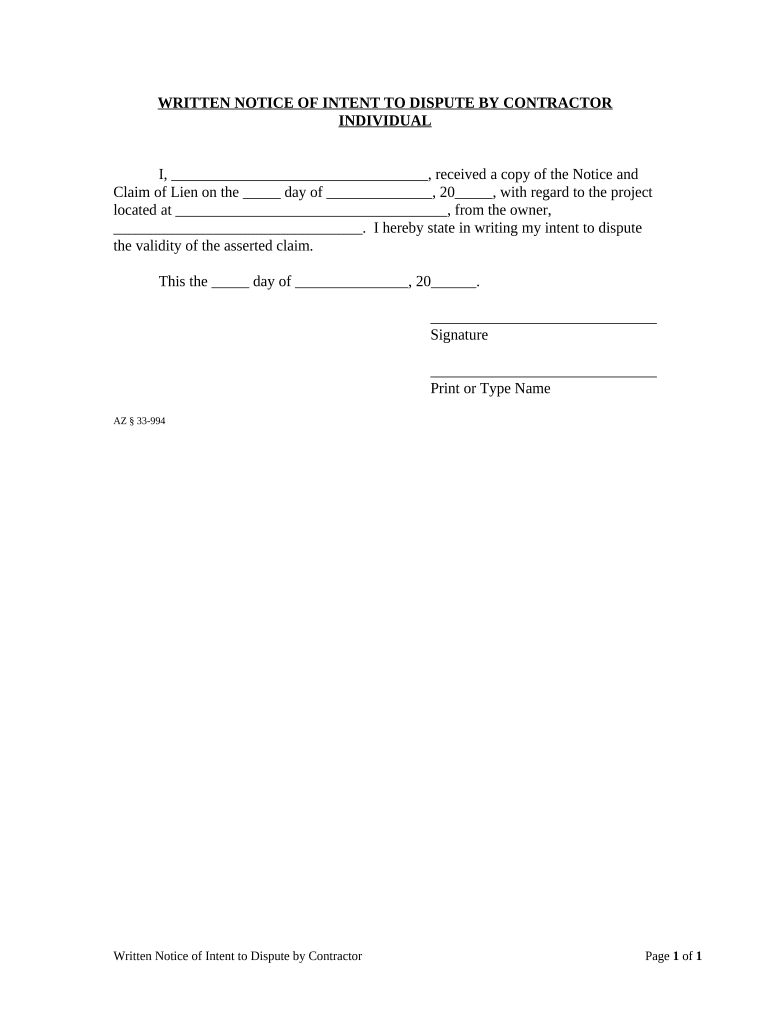
Click ‘Get Form’ to open the Arizona Notice Intent in the editor.
In the first field, enter your name as the contractor who received the notice. This personalizes the document and establishes your identity in relation to the claim.
Next, fill in the date you received the Notice and Claim of Lien. This is crucial for establishing timelines related to your dispute.
Provide the project location where the lien pertains. This helps clarify which project is being disputed.
Enter the owner's name from whom you received the notice. This identifies all parties involved in this dispute.
Finally, sign and print your name at the bottom of the form. Ensure that all information is accurate before submitting.
Start using our platform today to easily complete your Arizona Notice Intent for free!
5-day notice to Vacate az5-Day Notice to Vacate az template5-Day eviction notice Arizona PDF10-day notice of INTENT to terminate leaseWhat happens after a 5-day eviction notice AZNotice of intent adeqSample letter of intent for jobLetter of intent template
Security and compliance
At DocHub, your data security is our priority. We follow HIPAA, SOC2, GDPR, and other standards, so you can work on your documents with confidence.
Apr 30, 2021 In March of 2008 Alliant Energy based in Madison, Wisconsin received a notice of intent to sue from the Sierra Club. The notice claimed thatRead more
Cookie consent notice
This site uses cookies to enhance site navigation and personalize your experience.
By using this site you agree to our use of cookies as described in our Privacy Notice.
You can modify your selections by visiting our Cookie and Advertising Notice.