Name Change Notification Form - Utah 2026

Get Form
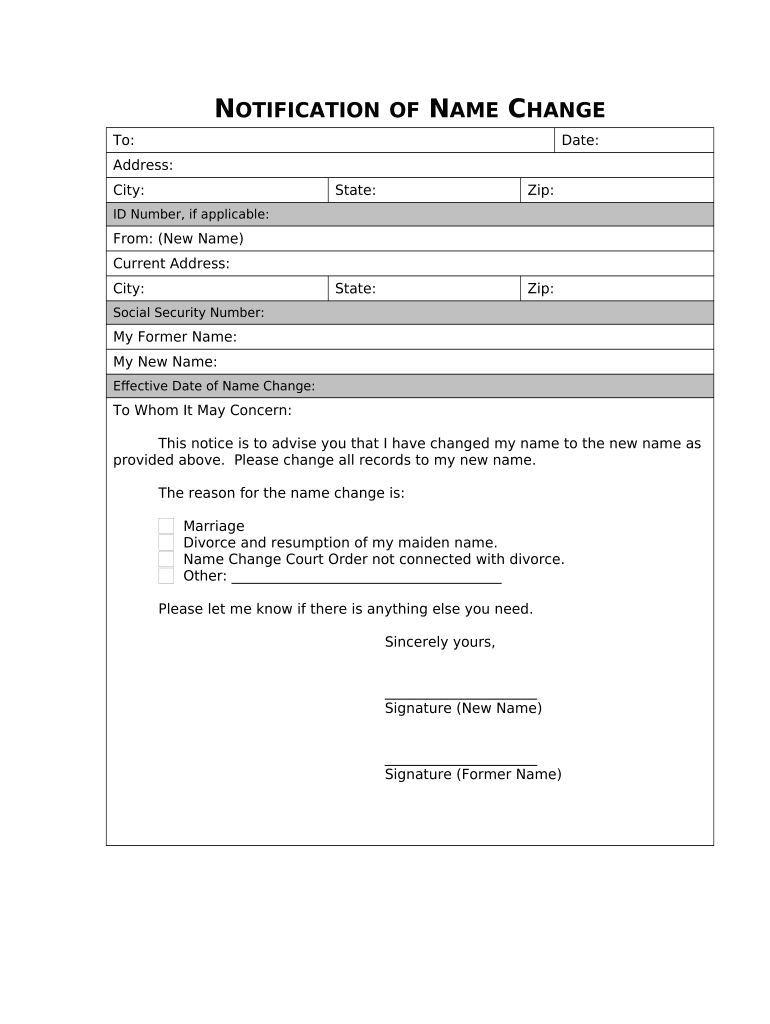
Name Change Notification Form - Utah Preview on Page 1

Here's how it works

01. Edit your form online
Type text, add images, blackout confidential details, add comments, highlights and more.
02. Sign it in a few clicks
Draw your signature, type it, upload its image, or use your mobile device as a signature pad.
03. Share your form with others
Send it via email, link, or fax. You can also download it, export it or print it out.

How to use or fill out Name Change Notification Form - Utah with our platform

Form edit decoration
9.5
Ease of Setup
DocHub User Ratings on G2
9.0
Ease of Use
DocHub User Ratings on G2
  1. Click ‘Get Form’ to open the Name Change Notification Form - Utah in the editor.
  2. Begin by filling in the 'To' section with the recipient's name, date, and address details including city, state, and zip code.
  3. In the 'From' section, enter your new name and current address along with your social security number if applicable.
  4. Provide your former name and new name clearly in the designated fields.
  5. Specify the effective date of your name change to ensure accurate record updates.
  6. Select the reason for your name change from the options provided or specify another reason in the space given.
  7. Conclude by signing both as your new name and former name to validate the notification.

Start using our platform today to easily complete your Name Change Notification Form - Utah for free!

be ready to get more

Complete this form in 5 minutes or less

Get form

Got questions?

We have answers to the most popular questions from our customers. If you can't find an answer to your question, please contact us.
Contact us
I wish to change my name from {Applicant Old Name} to {Applicant New Name}. Kindly note the same in Gazette of India (Part-IV). i have completed all the formalities in all respect. All the required documents and CD are attached with this letter.
Sample Email Templates for Name Change Announcements I am writing to inform you of a docHub personal change. Effective [Date], I have legally changed my name from [Old Name] to [New Name]. Please update your records accordingly. Effective immediately, my email address will also change to [New Email Address].
A formal announcement to colleagues I am writing to inform you of a docHub personal change. Effective [Date], I have legally changed my name from [Old Name] to [New Name]. Please update your records accordingly. Effective immediately, my email address will also change to [New Email Address].
banks, building societies, and credit unions - current accounts, credit cards, loan agreements, savings and ISAs. pension providers - current and previous. healthcare practitioners - doctors and dentist. utility providers - gas and electricity companies.
USPS. It is not mandatory to notify the United States Postal Service of a name change, but if you are moving, updating your address will save you some headaches. You can fill out the forwarding form on usps.com.

Security and compliance

At DocHub, your data security is our priority. We follow HIPAA, SOC2, GDPR, and other standards, so you can work on your documents with confidence.

Learn more
ccpa2
pci-dss
gdpr-compliance
hipaa
soc-compliance

People also ask

Since my name is now legally changed, I would like to request you to change my name from ARUSHI SHARMA to AYUSHI SHARMA. For your reference, I have attached the legal proof of my name change with this letter. I request you to do the needful at the earliest possible, and I shall be highly obliged for the same.
You might change your name through marriage, divorce, or court. Update your new name with Social Security, the motor vehicle office, and other government agencies.
Visit the district court for the county where you reside and file original copies of the name change forms. The court clerk will ask you to pay the filing fee and give you a hearing date. The fee is $375. Depending on your income, you could qualify for a fee waiver.

Related links