Type text, add images, blackout confidential details, add comments, highlights and more.
02. Sign it in a few clicks
Draw your signature, type it, upload its image, or use your mobile device as a signature pad.
03. Share your form with others
Send it via email, link, or fax. You can also download it, export it or print it out.
How to use or fill out wa waiver contract with our platform
Ease of Setup
DocHub User Ratings on G2
Ease of Use
DocHub User Ratings on G2
Click ‘Get Form’ to open the wa waiver contract in the editor.
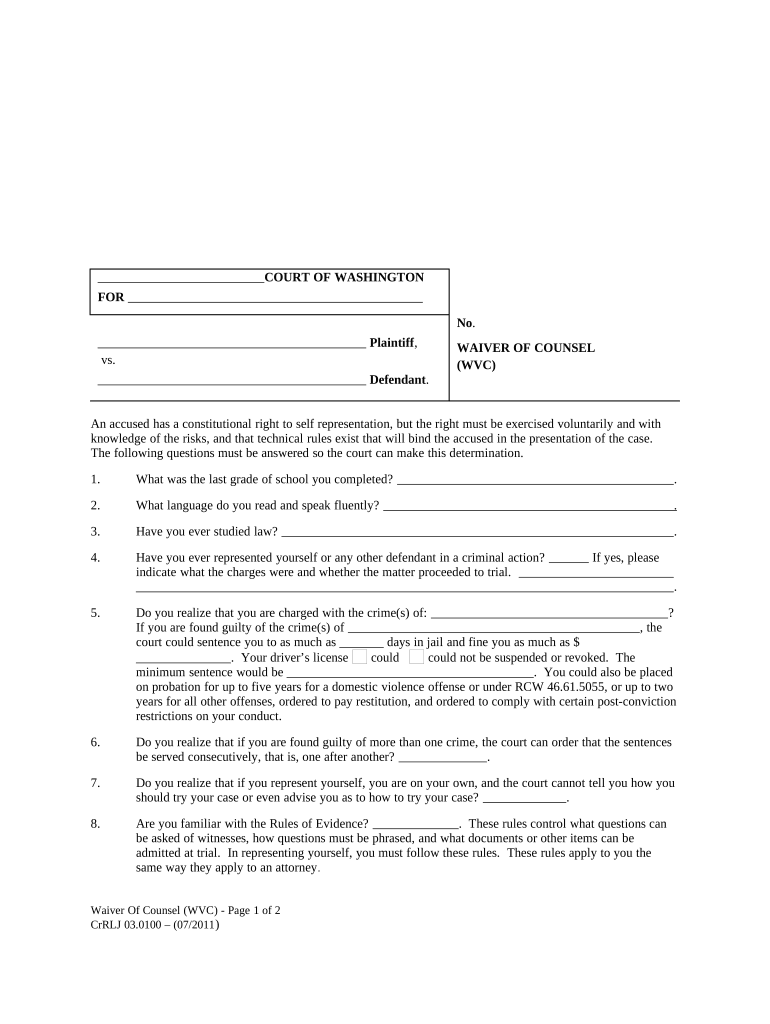
Begin by filling out your personal information at the top of the form, including your name and case number.
Answer the questions regarding your education, language proficiency, and any prior legal experience. This helps establish your understanding of self-representation.
Carefully read through each question about the charges against you and potential penalties. Fill in the blanks with accurate information regarding your situation.
Respond to questions about your familiarity with legal procedures and rules. This is crucial for demonstrating your awareness of what self-representation entails.
Finally, confirm that you wish to waive your right to counsel by signing and dating the form at the bottom. Ensure all fields are completed before submission.
Start using our platform today for free to complete your wa waiver contract efficiently!
Eligibility. To be eligible for the tuition waiver program, the participant must be employed as a permanent employee of the state of Washington working half-Read more
(5) A party who has made a waiver affecting an executory portion of the contract may retract the waiver by reasonable notification received by the other partyRead more
Cookie consent notice
This site uses cookies to enhance site navigation and personalize your experience.
By using this site you agree to our use of cookies as described in our Privacy Notice.
You can modify your selections by visiting our Cookie and Advertising Notice.