Name Affidavit of Buyer - Vermont 2026

Get Form
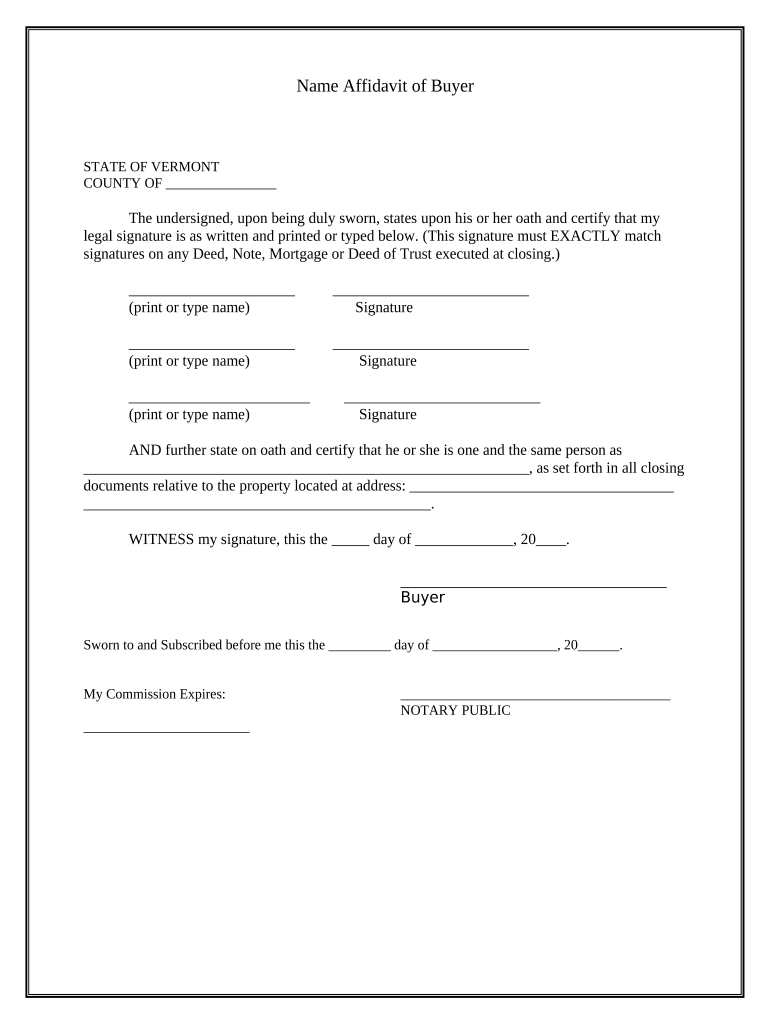
Name Affidavit of Buyer - Vermont Preview on Page 1

Here's how it works

01. Edit your form online
Type text, add images, blackout confidential details, add comments, highlights and more.
02. Sign it in a few clicks
Draw your signature, type it, upload its image, or use your mobile device as a signature pad.
03. Share your form with others
Send it via email, link, or fax. You can also download it, export it or print it out.

How to use or fill out Name Affidavit of Buyer - Vermont with our platform

Form edit decoration
9.5
Ease of Setup
DocHub User Ratings on G2
9.0
Ease of Use
DocHub User Ratings on G2
  1. Click ‘Get Form’ to open the Name Affidavit of Buyer - Vermont in the editor.
  2. Begin by entering your name in the first field, ensuring it matches your legal signature. This is crucial for consistency across all closing documents.
  3. In the next section, provide your signature. Make sure it aligns exactly with what appears on any Deed, Note, Mortgage, or Deed of Trust executed at closing.
  4. Repeat steps 2 and 3 for any additional buyers listed on the affidavit. Each buyer must print their name and provide a matching signature.
  5. Fill in the statement confirming that you are one and the same person as indicated in all closing documents related to the property. Include the property address clearly.
  6. Finally, date the document and sign as the buyer. Ensure that this is done before a Notary Public who will also complete their section.

Start using our platform today to easily fill out your Name Affidavit of Buyer - Vermont for free!

be ready to get more

Complete this form in 5 minutes or less

Get form

Got questions?

We have answers to the most popular questions from our customers. If you can't find an answer to your question, please contact us.
Contact us

With DocHub, you can easily sign your Name Affidavit of Buyer - Vermont or any other paperwork on iOS, even without installing additional applications. You can access your DocHub account from any web-connected browser and fill out and sign your form in any preferred method with just a few clicks.

As a comprehensive document editing platform, DocHub is accessible on mobile phones. Open DocHub in your choice of mobile internet browser and use our intelligent mobile-friendly toolset to fill out your Name Affidavit of Buyer - Vermont.

When a vehicle is financed, the lien is noted electronically on the title. Once the loan is paid off, the lienholder can electronically release their lien. The title can then be electronically transferred to the owner, or if the vehicle is sold, to the new owner.
You will need documentation from each of the 4 categories below: Identity and Date of Birth. Social Security Information. Vermont Residency and Current Address. Lawful Status in the United States (Only required for Real ID EDL)
Individuals gifting a vehicle need a formal document to record the transfer of ownership. This protects the donor from future liabilities associated with the vehicle once the gift is made.

Security and compliance

At DocHub, your data security is our priority. We follow HIPAA, SOC2, GDPR, and other standards, so you can work on your documents with confidence.

Learn more
ccpa2
pci-dss
gdpr-compliance
hipaa
soc-compliance

People also ask

What Do You Need To Transfer A Car Title? The original title signed and dated by both the buyer and seller. Accurate odometer reading that is witnessed and dated by both the buyer and seller. A completed Vermont Motor Vehicle Registration, Tax and Title Application (form #VD-119). Your drivers license.

Related links