Type text, add images, blackout confidential details, add comments, highlights and more.
02. Sign it in a few clicks
Draw your signature, type it, upload its image, or use your mobile device as a signature pad.
03. Share your form with others
Send it via email, link, or fax. You can also download it, export it or print it out.
How to use or fill out agreement auctions with our platform
Ease of Setup
DocHub User Ratings on G2
Ease of Use
DocHub User Ratings on G2
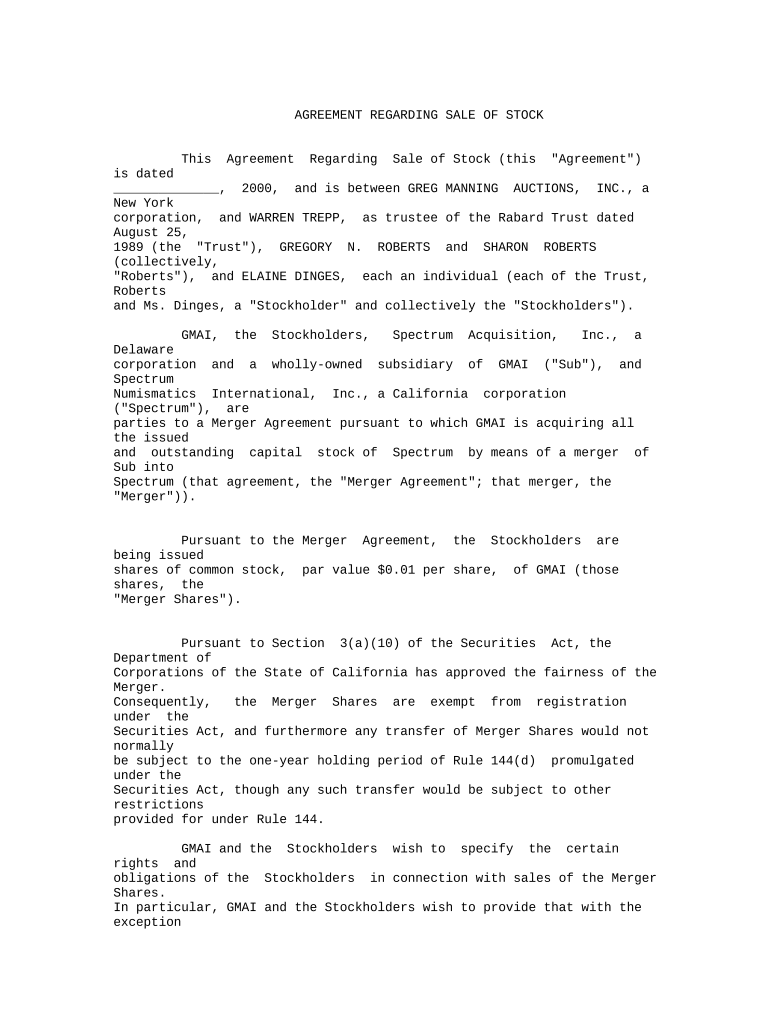
Click ‘Get Form’ to open the Agreement Regarding Sale of Stock in the editor.
Begin by filling in the date at the top of the document. This is crucial as it establishes when the agreement takes effect.
In Section 1, carefully review and define any terms that are relevant to your understanding of the agreement. Ensure all parties are correctly identified.
Proceed to Section 2, where you will need to input any restrictions on sales. Make sure to note the specific number of Merger Shares each Stockholder is allowed to sell.
In Section 6, provide accurate addresses for all parties involved for effective communication. This ensures that notices are delivered correctly.
Finally, have all parties sign at the bottom of the document. Use our platform’s signature feature for a seamless signing experience.
Start using our platform today for free and streamline your agreement auctions process!
Marble tablet with rental agreement found in Turkey
Oct 6, 2016 Excavations at the ancient Greek city of Teos on the west coast of Turkey, have yielded an inscribed marble tablet with a rental agreement.
Auctioneer hereby acknowledges receipt of Earnest Money in the amount of ($. ) Cash Check is attached to this agreement, unless otherwise noted hereinRead more
Understanding Auction Terms: The Importance of Knowing
Oct 1, 2025 Immediately upon the conclusion of the auction the high bidder(s) will enter into a real estate purchase agreement which is a legally bindingRead more
Cookie consent notice
This site uses cookies to enhance site navigation and personalize your experience.
By using this site you agree to our use of cookies as described in our Privacy Notice.
You can modify your selections by visiting our Cookie and Advertising Notice.