Letter Notifying Social Security Administration of Identity Theft of Minor 2026

Get Form
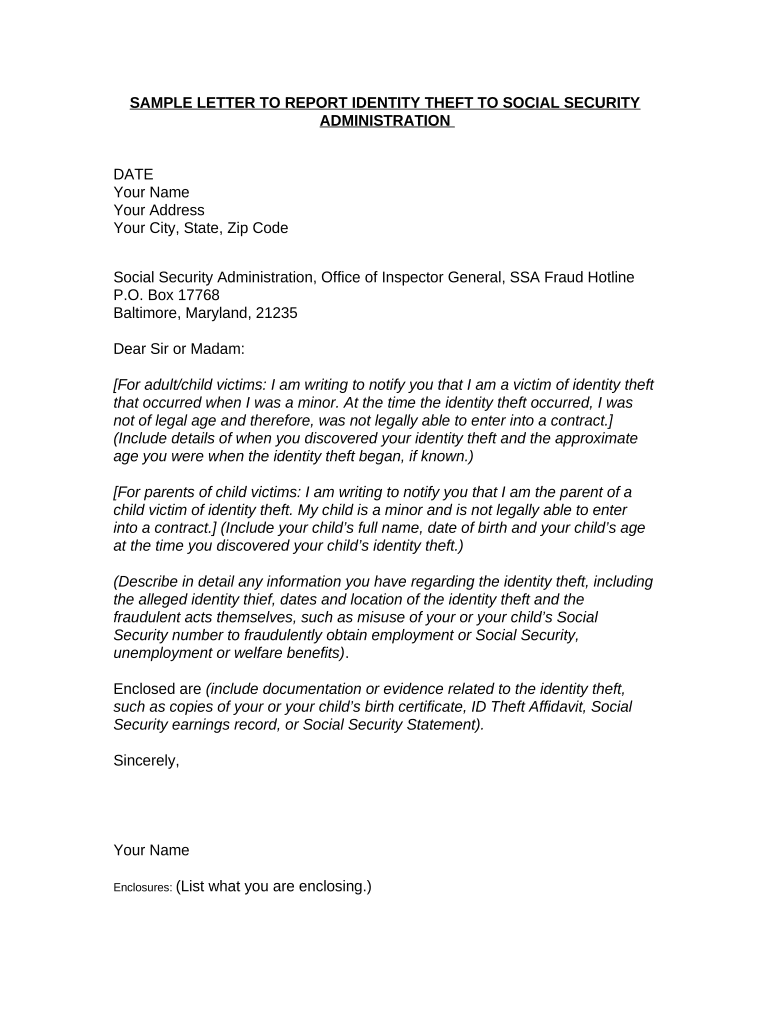
social security number code by state Preview on Page 1

Here's how it works

01. Edit your social security number code by state online
Type text, add images, blackout confidential details, add comments, highlights and more.
02. Sign it in a few clicks
Draw your signature, type it, upload its image, or use your mobile device as a signature pad.
03. Share your form with others
Send social security number state codes via email, link, or fax. You can also download it, export it or print it out.

How to use or fill out Letter Notifying Social Security Administration of Identity Theft of Minor

Form edit decoration
9.5
Ease of Setup
DocHub User Ratings on G2
9.0
Ease of Use
DocHub User Ratings on G2
  1. Click ‘Get Form’ to open it in the editor.
  2. Begin by entering the date at the top of the letter. This is important for record-keeping purposes.
  3. Fill in your name and address details, ensuring accuracy as this information will be used for correspondence.
  4. Address the letter to the Social Security Administration, including their full address provided in the template.
  5. In the body of the letter, clearly state whether you are a victim or a parent of a minor victim. Include relevant details about when you discovered the identity theft and any pertinent information regarding your or your child’s identity theft.
  6. Detail any known information about the identity theft, such as dates, locations, and fraudulent activities that occurred.
  7. Mention any enclosed documentation that supports your claim, like birth certificates or affidavits. List these enclosures at the end of your letter.
  8. Sign off with your name and ensure all sections are complete before saving or sending your document.

Start using our platform today to easily fill out and submit your Letter Notifying Social Security Administration of Identity Theft of Minor for free!

be ready to get more

Complete this form in 5 minutes or less

Get form

Got questions?

We have answers to the most popular questions from our customers. If you can't find an answer to your question, please contact us.
Contact us

Electronic document signing requires a software solution that complies with data security and eSignature laws. DocHub is a perfect tool for that, because it meets all the above mentioned requirements. Whatever method you prefer to sign your cp01e in DocHub, your electronic signature will be legally binding and court-admissible.

When you edit your cp01e notice with DocHub, you merely need a steady web connection and virtually any web browser installed on your device. No need to set up any third-party software or study guides. Simply open a tab with DocHub, drag and drop your file, and edit it on the spot.

Security and compliance

At DocHub, your data security is our priority. We follow HIPAA, SOC2, GDPR, and other standards, so you can work on your documents with confidence.

Learn more
ccpa2
pci-dss
gdpr-compliance
hipaa
soc-compliance
be ready to get more

Complete this form in 5 minutes or less

Get form