Type text, add images, blackout confidential details, add comments, highlights and more.
02. Sign it in a few clicks
Draw your signature, type it, upload its image, or use your mobile device as a signature pad.
03. Share your form with others
Send it via email, link, or fax. You can also download it, export it or print it out.
How to use or fill out la marriage with our platform
Ease of Setup
DocHub User Ratings on G2
Ease of Use
DocHub User Ratings on G2
Click ‘Get Form’ to open the la marriage document in the editor.
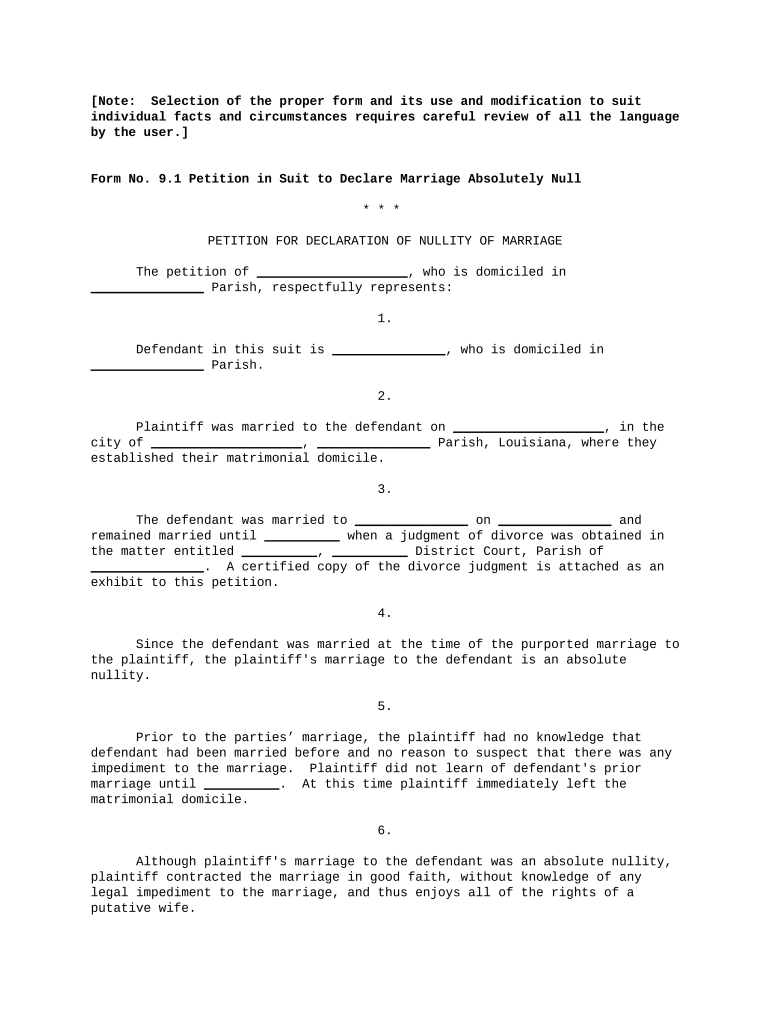
Begin by filling in your name and parish of residence in the first section. This identifies you as the petitioner.
In the next field, provide the defendant's name and their parish of residence. This is crucial for establishing jurisdiction.
Enter the date and location of your marriage to the defendant. Ensure accuracy as this information is vital for legal proceedings.
Detail any prior marriages of the defendant, including dates and relevant court judgments. Attach any necessary documents using our platform’s upload feature.
Indicate your knowledge regarding any previous marriages of the defendant, specifying when you learned about it.
Confirm that no children were born from this marriage by checking the appropriate box or writing 'none' if applicable.
Finally, review all entries for accuracy before submitting your petition for a judgment declaring nullity.
Start using our platform today to complete your la marriage form easily and efficiently!
La marriage certificateLa marriage ceremonyCourthouse marriage Los AngelesMarriage license CaliforniaTypes of marriage licenseLA County marriage license onlineMarriage license Los Angeles appointmentConfidential marriage license
Security and compliance
At DocHub, your data security is our priority. We follow HIPAA, SOC2, GDPR, and other standards, so you can work on your documents with confidence.
La Salles MFT degree prepares students for licensure as marriage and family therapists (LMFT) in Pennsylvania and most other states and for employment in manyRead more
Once the Marriage License application is completed, select an appointment for Marriage License and Express Ceremony. Appointments are set for 45 minutes andRead more
Napoleon and Josephines marriage certificate goes under the
Jul 11, 2014 The marriage certificate that preceded the tying of the knot between Napoleon Bonaparte and his first love, Josephine will go under the hammer.Read more
Cookie consent notice
This site uses cookies to enhance site navigation and personalize your experience.
By using this site you agree to our use of cookies as described in our Privacy Notice.
You can modify your selections by visiting our Cookie and Advertising Notice.