Search pursuant 2026

Get Form
search pursuant Preview on Page 1

Here's how it works

01. Edit your form online
Type text, add images, blackout confidential details, add comments, highlights and more.
02. Sign it in a few clicks
Draw your signature, type it, upload its image, or use your mobile device as a signature pad.
03. Share your form with others
Send it via email, link, or fax. You can also download it, export it or print it out.

How to use or fill out search pursuant with our platform

Form edit decoration
9.5
Ease of Setup
DocHub User Ratings on G2
9.0
Ease of Use
DocHub User Ratings on G2
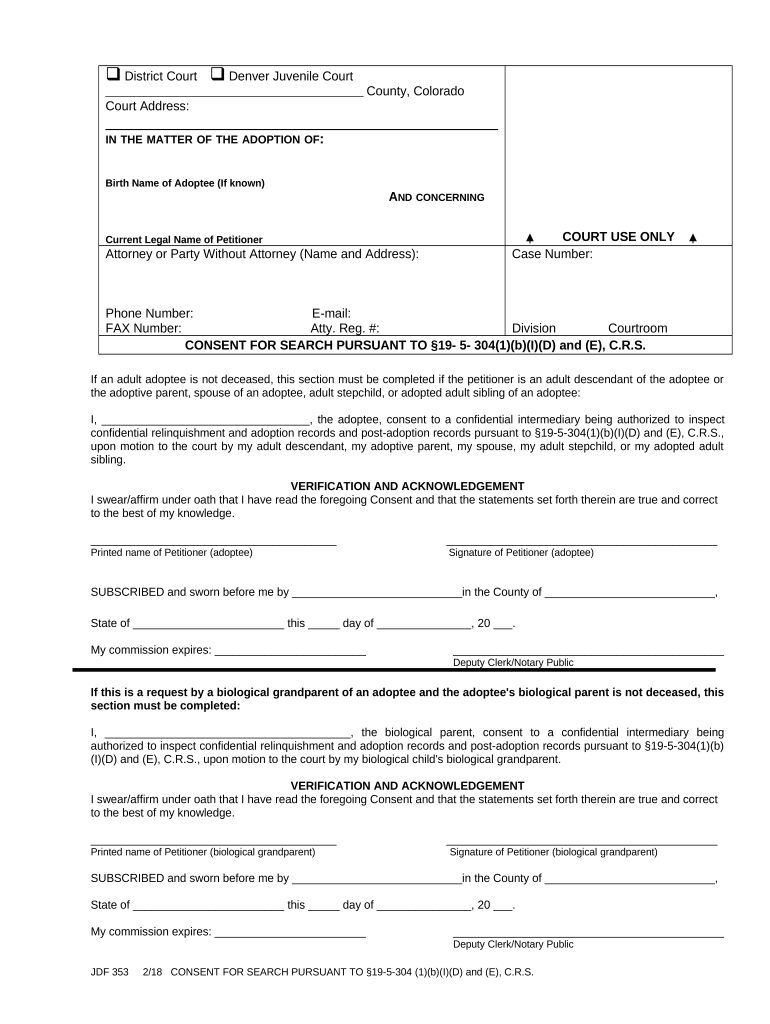
  1. Click ‘Get Form’ to open the search pursuant document in the editor.
  2. Begin by entering the County and Court Address at the top of the form. This information is essential for proper identification of your case.
  3. Fill in the Birth Name of Adoptee if known, followed by the Current Legal Name of Petitioner. Ensure accuracy as this information is crucial for processing.
  4. In the Attorney or Party Without Attorney section, provide your name and address. This identifies who is submitting the request.
  5. Complete the COURT USE ONLY section with Case Number, Phone Number, E-mail, FAX Number, Atty. Reg. #, Division, and Courtroom as applicable.
  6. For consent, clearly print your name in the designated area and sign where indicated. This confirms your agreement to allow a confidential intermediary access to records.
  7. Finally, ensure that all verification sections are completed accurately and signed before submission.

Start using our platform today to streamline your document editing and form completion process for free!

be ready to get more

Complete this form in 5 minutes or less

Get form

Got questions?

We have answers to the most popular questions from our customers. If you can't find an answer to your question, please contact us.
Contact us
A search involves law enforcement officers going through part or all of individuals property, and looking for specific items that are related to a crime that they have reason to believe has been committed. A seizure happens if the officers take possession of items during the search.
A search warrant is a warrant signed by a judge or magistrate authorizing a law enforcement officer to conduct a search on a certain person, a specified place, or an automobile for criminal evidence.
The 4th Amendment to the U.S. Constitution places limits on the power of the police to make arrests, search people and their property, and seize objects and contraband (such as illegal drugs or weapons). These limits are the bedrock of search and seizure law.
An unreasonable search and seizure is a search and seizure executed 1) without a legal search warrant signed by a judge or magistrate describing the place, person, or things to be searched or seized or 2) without probable cause to believe that certain person, specified place or automobile has criminal evidence or 3)
To obtain a search warrant or arrest warrant, the law enforcement officer must demonstrate probable cause that a search or seizure is justified. A court-authority, usually a magistrate, will consider the totality of circumstances to determine whether to issue the warrant.

Security and compliance

At DocHub, your data security is our priority. We follow HIPAA, SOC2, GDPR, and other standards, so you can work on your documents with confidence.

Learn more
ccpa2
pci-dss
gdpr-compliance
hipaa
soc-compliance

People also ask

Understanding the Two Types of DEA Search Warrants Criminal Search Warrants in DEA Investigations. DEA criminal search warrants must be obtained from a federal judge before entering your premises. DEA Administrative Inspection Warrants.

Related links