First Report Transmittal for Workers' Compensation - Colorado 2026

Get Form
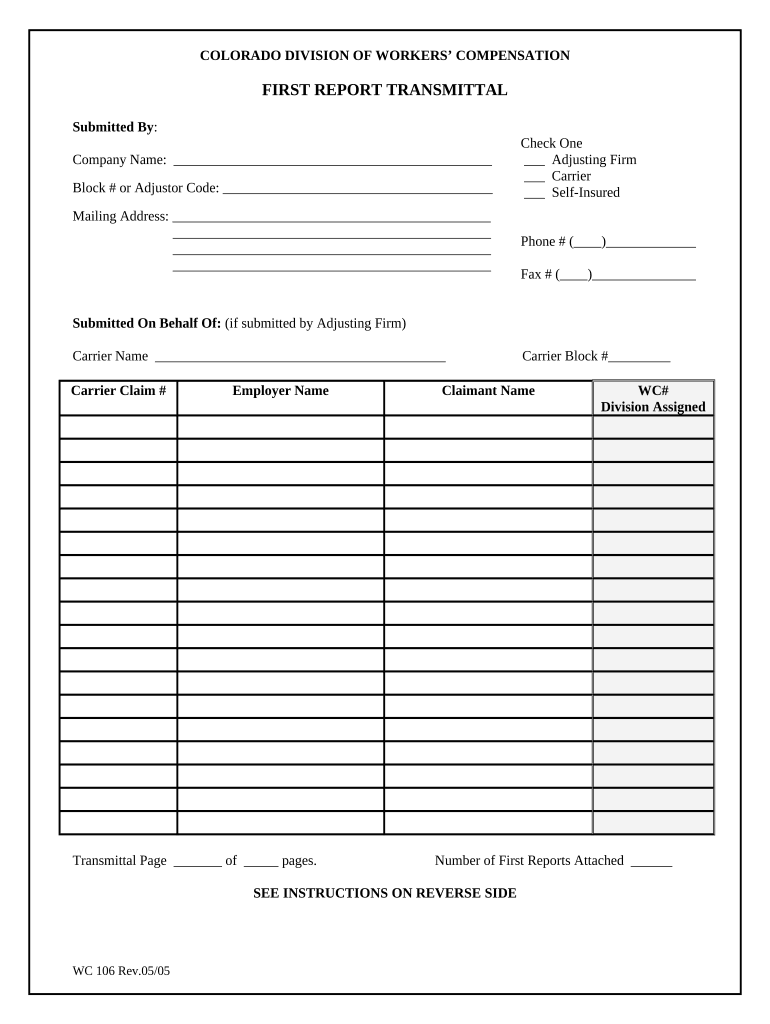
First Report Transmittal for Workers' Compensation - Colorado Preview on Page 1

Here's how it works

01. Edit your form online
Type text, add images, blackout confidential details, add comments, highlights and more.
02. Sign it in a few clicks
Draw your signature, type it, upload its image, or use your mobile device as a signature pad.
03. Share your form with others
Send it via email, link, or fax. You can also download it, export it or print it out.

How to use or fill out First Report Transmittal for Workers' Compensation - Colorado with DocHub

Form edit decoration
9.5
Ease of Setup
DocHub User Ratings on G2
9.0
Ease of Use
DocHub User Ratings on G2
  1. Click ‘Get Form’ to open the First Report Transmittal in our editor.
  2. Begin by entering the Company Name in the designated field. This should be the name of the adjusting firm, carrier, or self-insured entity submitting the form.
  3. In the 'Check One' section, select the appropriate box that identifies your entity type: Adjusting Firm, Carrier, or Self-Insured.
  4. Fill in the Block # or Adjustor Code based on your entity type. Carriers and self-insureds should provide their block number, while adjusting firms should enter their adjustor code.
  5. Complete the Mailing Address section with your full address including street, city, state, and zip code.
  6. Enter your Phone # and Fax # in the respective fields to ensure proper communication.
  7. If applicable, list the Carrier Name and Carrier Claim # if you are submitting on behalf of an adjusting firm.
  8. Provide the Employer Name and Claimant Name as required. Note that WC# and Division Assigned will be filled by the Division later.
  9. Indicate how many First Reports are attached to this transmittal by filling in that number in the designated field.

Start using our platform today to streamline your document editing and submission process for free!

be ready to get more

Complete this form in 5 minutes or less

Get form

Got questions?

We have answers to the most popular questions from our customers. If you can't find an answer to your question, please contact us.
Contact us

Approving documents on a mobile device is quick, simple, and doesn’t require software installation if you have an account with DocHub. Log in from any browser, complete your empty fields with your data, and click on Sign → Create your signature. You can draw your eSignature the same way you usually do on paper, add its picture to your First Report Transmittal for Workers' Compensation - Colorado, or type in your name and stylize its look. Whatever option you select, your paperwork will be valid.

It is a no-brainer on a computer or via a mobile phone to fill out a First Report Transmittal for Workers' Compensation - Colorado with DocHub. All you need to do is open any installed internet browser on your smartphone and proceed to the DocHub website. Once authenticated, add your file and open it in editing mode. Use our toolbar to make your edits and save modifications. Optionally, keep your file in your files or send it to a recipient immediately.

Form WC 1 Employers First Report of Injury. All injuries or occupational diseases that result in lost time from work in excess of three shifts or calendar days or from permanent physical impairment must be reported to EMPLOYERS on this form within 10 days after notice or knowledge of the injury or disease.
The statute of limitations for a workers compensation claim or the maximum time after an event that legal action can be initiated is 2 years in most cases. The only way for this deadline NOT to apply to you is to file a claim with the DOWC.
Form WC 1 Employers First Report of Injury. All injuries or occupational diseases that result in lost time from work in excess of three shifts or calendar days or from permanent physical impairment must be reported to EMPLOYERS on this form within 10 days after notice or knowledge of the injury or disease.

Security and compliance

At DocHub, your data security is our priority. We follow HIPAA, SOC2, GDPR, and other standards, so you can work on your documents with confidence.

Learn more
ccpa2
pci-dss
gdpr-compliance
hipaa
soc-compliance

People also ask

Failure to report within 10 working days may result in a penalty against the injured workers benefits. Injured workers are also encouraged to report their injured directly to the Division of Workers Compensation using the Workers Claim for Compensation form (WC 15).
How are we doing? Within 10 working days of your injury, you should let your employer know about the injury. This must be done in writing. If you were injured more than 10 days ago, you should still notify your employer in writing as soon as possible.
If its an emergency, call 911 or go to an emergency room right away. Tell the medical staff that your injury or illness is job-related. If you can safely do so, contact your employer for further instructions. If you dont need emergency treatment, make sure you get first aid and see a doctor if necessary.
A report must be received within 10 days of the incident. Find out more from the Health and Safety Executive (HSE) about what you must report.
File a Claim File a Workers Claim for Compensation (WC 15) with the Division within two years of your injury.

Related links