Type text, add images, blackout confidential details, add comments, highlights and more.
02. Sign it in a few clicks
Draw your signature, type it, upload its image, or use your mobile device as a signature pad.
03. Share your form with others
Send it via email, link, or fax. You can also download it, export it or print it out.
How to use or fill out vt appearance with our platform
Ease of Setup
DocHub User Ratings on G2
Ease of Use
DocHub User Ratings on G2
Click ‘Get Form’ to open the vt appearance document in the editor.
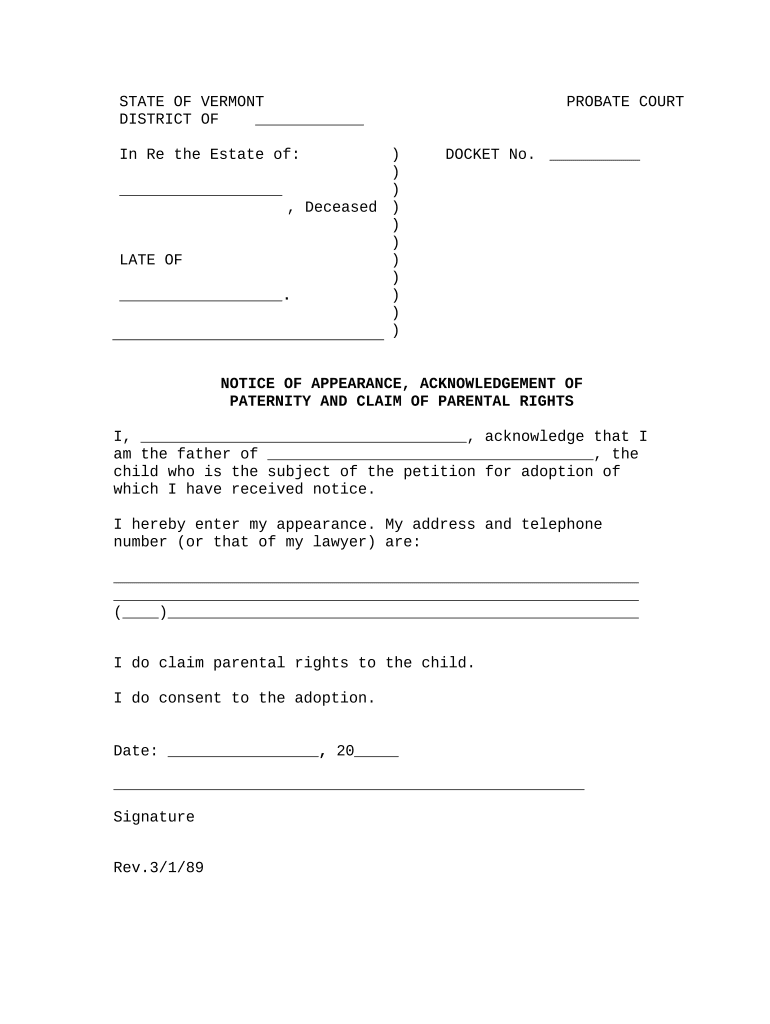
Begin by entering your name in the designated field where it states 'I, _________'. This identifies you as the father of the child mentioned.
Next, fill in the child's name in the space provided after 'the child who is the subject of the petition for adoption of which I have received notice.'
In the address section, provide your current address and telephone number or that of your lawyer. Ensure all details are accurate for effective communication.
Indicate your claim to parental rights by checking or marking 'I do claim parental rights to the child.'
If you consent to the adoption, ensure you mark 'I do consent to the adoption.'
Finally, enter today's date and sign at the bottom of the form to complete your submission.
Start using our platform today for free to streamline your document completion process!
New words appearing in Netflix. Netflix has used a lot of Klingon language for their international promotion of Star Trek: Discovery, which was mostlyRead more
Diagnosis and management of ventricular tachycardia - PMC
by J Whitaker 2023 Cited by 34 If the appearance is not consistent with any combination of bundle branch or fascicular blocks, then the diagnosis is most likely that of pre-excited SVT or VT.Read more
Cookie consent notice
This site uses cookies to enhance site navigation and personalize your experience.
By using this site you agree to our use of cookies as described in our Privacy Notice.
You can modify your selections by visiting our Cookie and Advertising Notice.