Type text, add images, blackout confidential details, add comments, highlights and more.
02. Sign it in a few clicks
Draw your signature, type it, upload its image, or use your mobile device as a signature pad.
03. Share your form with others
Send it via email, link, or fax. You can also download it, export it or print it out.
How to use or fill out Wisconsin Rights with our platform
Ease of Setup
DocHub User Ratings on G2
Ease of Use
DocHub User Ratings on G2
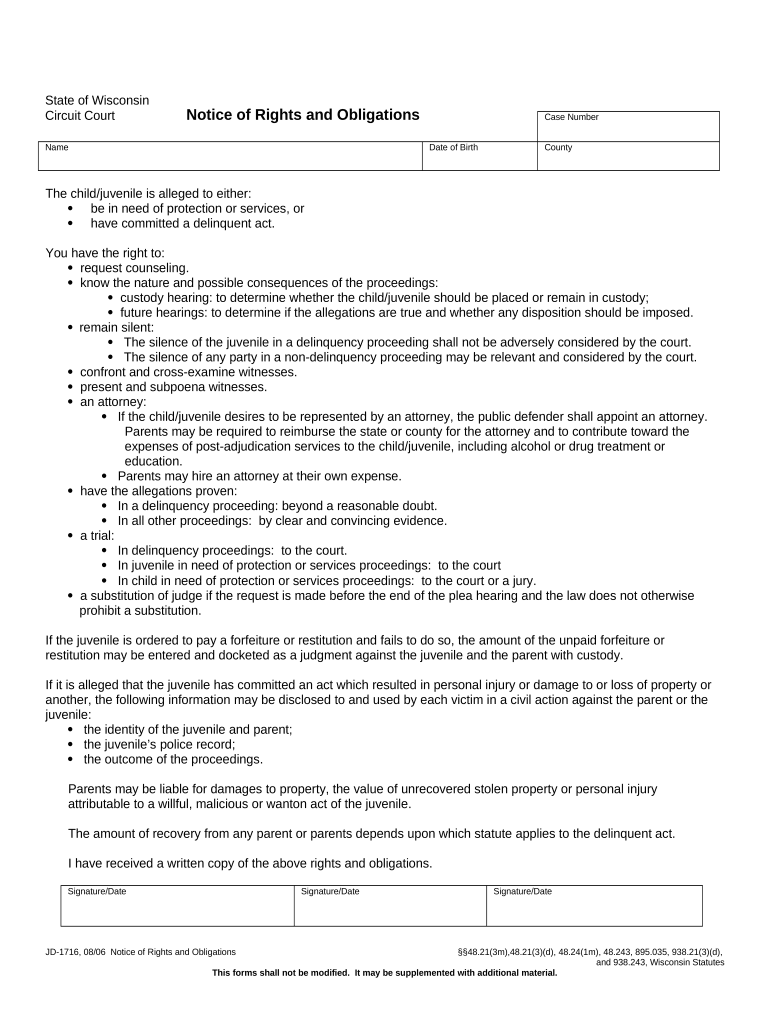
Click ‘Get Form’ to open the Wisconsin Rights document in the editor.
Begin by entering your name, case number, and date of birth in the designated fields. This information is crucial for identifying your case.
Indicate the county where the proceedings are taking place. This helps ensure that all relevant legal jurisdictions are considered.
Review the rights listed in the document carefully. You have rights such as requesting counseling and remaining silent during proceedings. Make sure you understand each right.
If applicable, sign and date the form at the bottom to acknowledge that you have received a written copy of these rights and obligations.
Start using our platform today to fill out your Wisconsin Rights form easily and for free!
Wisconsin StatutesWisconsin Civil Rights CommissionEqual Rights milwaukeeWisconsin Equal Rights DivisionDwd erd PortalWis stat 940Wisconsin rules of Civil ProcedureWis stat 971
Security and compliance
At DocHub, your data security is our priority. We follow HIPAA, SOC2, GDPR, and other standards, so you can work on your documents with confidence.
About the Program | University of Wisconsin Law School
The Human Rights Program (HRP) seeks to synergize existing resources in a way that creates a unique research platform for a wide range of scholars andRead more
Mar 12, 2026 On November 4, 2019, Wisconsin Public Television changed its name to PBS Wisconsin to align itself with the PBS national brand. ID (November 4,Read more
Cookie consent notice
This site uses cookies to enhance site navigation and personalize your experience.
By using this site you agree to our use of cookies as described in our Privacy Notice.
You can modify your selections by visiting our Cookie and Advertising Notice.