2015 FORM M APPENDIX - Home - IRAS - iras gov-2026

Get Form
sample of form m Preview on Page 1

Here's how it works

01. Edit your sample of form m online
Type text, add images, blackout confidential details, add comments, highlights and more.

02. Sign it in a few clicks
Draw your signature, type it, upload its image, or use your mobile device as a signature pad.

03. Share your form with others
Send it via email, link, or fax. You can also download it, export it or print it out.

How to use or fill out 2015 FORM M APPENDIX - Home - IRAS - iras gov with DocHub

Form edit decoration
9.5
Ease of Setup
DocHub User Ratings on G2
9.0
Ease of Use
DocHub User Ratings on G2
  1. Click ‘Get Form’ to open it in the editor.
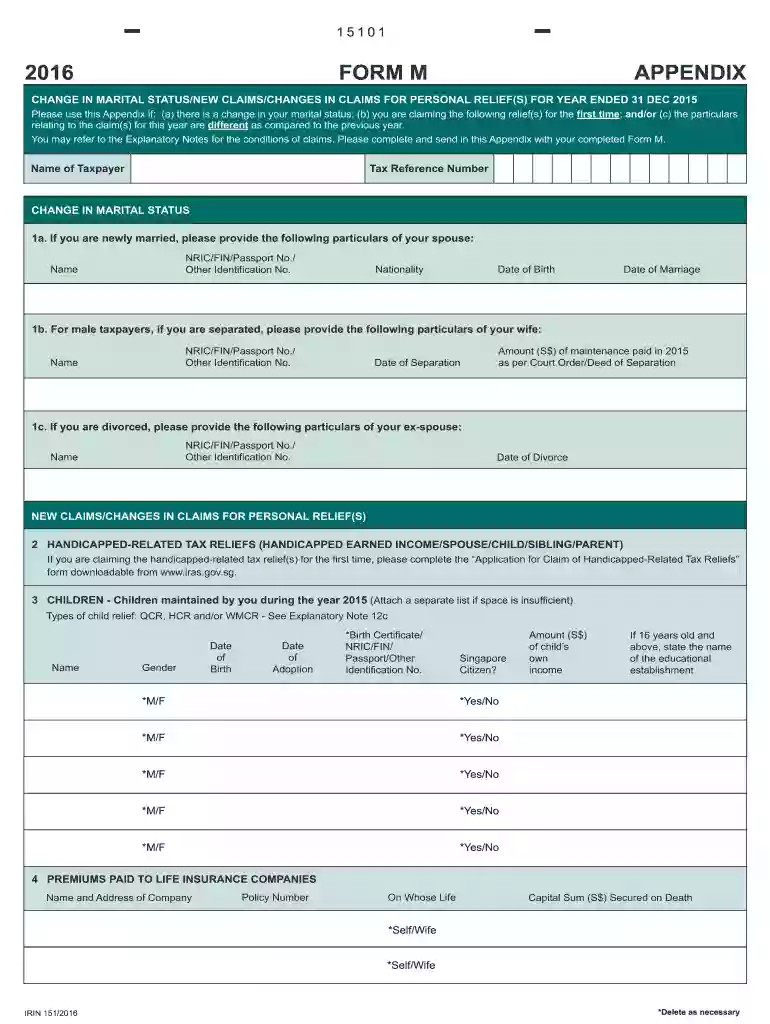
  2. Begin by entering your personal details, including your Name and Tax Reference Number at the top of the form.
  3. For changes in marital status, complete Section 1a by providing your spouse's particulars, including their NRIC/FIN/Passport No., Name, Nationality, Date of Birth, and Date of Marriage.
  4. If applicable, fill out Section 1b for separated male taxpayers by providing your wife's particulars and maintenance payment details.
  5. In Section 2, if claiming handicapped-related tax reliefs for the first time, ensure to download and complete the relevant application form from the IRAS website.
  6. List all children maintained during 2015 in Section 3. Include their names, genders, dates of birth/adoption, identification numbers, and income details as required.
  7. Complete Section 4 by providing information about premiums paid to life insurance companies. Include the name and address of the company along with policy details.

Start using our platform today to easily fill out your forms online for free!

See more 2015 FORM M APPENDIX - Home - IRAS - iras gov versions

We've got more versions of the 2015 FORM M APPENDIX - Home - IRAS - iras gov form. Select the right 2015 FORM M APPENDIX - Home - IRAS - iras gov version from the list and start editing it straight away!
Versions Form popularity Fillable & printable
2016 4.8 Satisfied (183 Votes)
be ready to get more

Complete this form in 5 minutes or less

Get form

Got questions?

We have answers to the most popular questions from our customers. If you can't find an answer to your question, please contact us.
Contact us
For Digital Copy Via myTax Portal Log in to the myTax portal using your SingPass ID or IRAS unique account (IUA) credentials. Go to the notices section and select view individual tax notices or view corporate tax notices as applicable. You can view, download, and print your NOA for the past 3 years.
Get federal tax forms for current and prior years Download them from IRS.gov. Order online and have them delivered by U.S. mail. Order by phone at 1-800-TAX-FORM (1-800-829-3676)
Step 1: Log in to the e-Filing portal using your user ID and password. Step 2: On your Dashboard, click Pending Actions e-Proceedings. Step 3: On the e-Proceedings page, click Self. Note: To View and Download Notice. Step 3: You will be able to view the notice issued to you. To Submit Response.
Log in to your myGov account linked to the ATO. Navigate to the My profile section, then go to Communication and History. From there, you can view and print past Notices of Assessment. If the document you need isnt available online, send a secure message to the ATO detailing your request.
Log onto eFiling. Step 1: Click on SARS Correspondence Request Historic IT Notices click on Next: Step 2: Select the tax year and click on Request: Step3: A link to the Notice of Assessment (ITA34) will display.

Security and compliance

At DocHub, your data security is our priority. We follow HIPAA, SOC2, GDPR, and other standards, so you can work on your documents with confidence.

Learn more
ccpa2
pci-dss
gdpr-compliance
hipaa
soc-compliance