







Understanding the Influenza Vaccine Administration Record and Consent
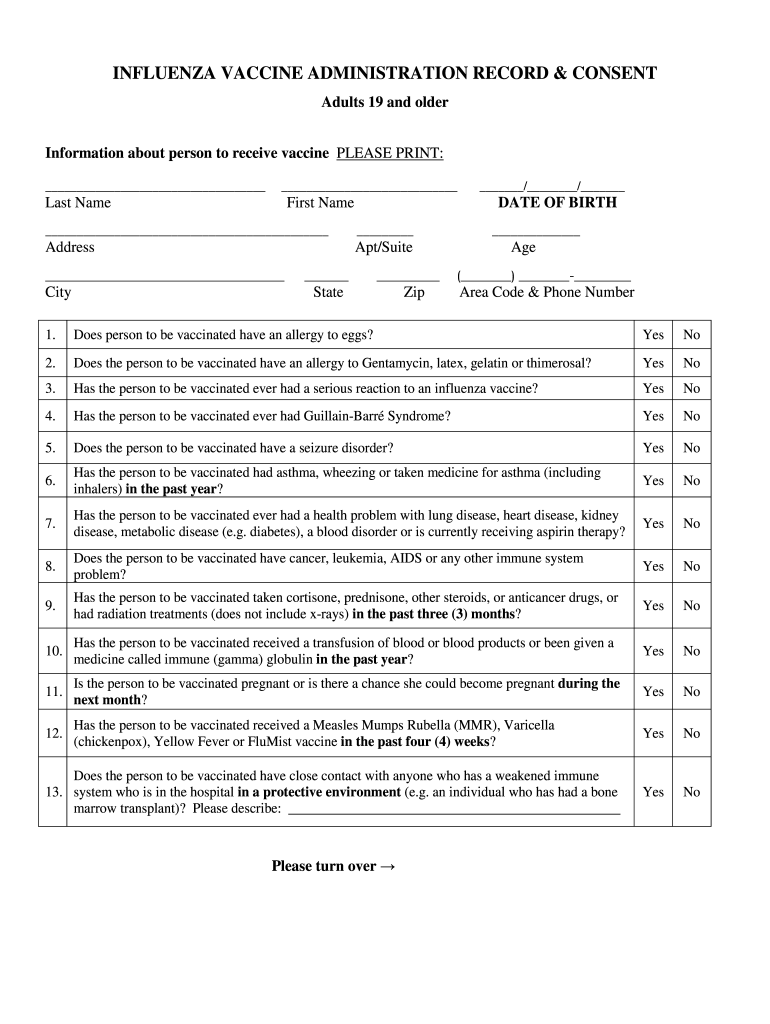
The Influenza Vaccine Administration Record and Consent form serves as an essential documentation tool for individuals receiving the flu vaccine. This form is designed for adults aged nineteen and older and facilitates the collection of critical personal information, medical history, and explicit consent for vaccination. It plays a crucial role in ensuring that recipients understand the implications of the vaccine and any associated risks.
Core Components of the Form
The form includes several key sections:
- Personal Information: This section gathers the recipient’s name, age, contact information, and address.
- Medical History: Recipients must disclose any allergies, previous vaccine reactions, and current health conditions. This information is vital for healthcare providers to assess eligibility and ensure safety.
- Insurance Information: Recipients provide details regarding their insurance coverage to ensure proper billing and coverage verification.
- Consent Section: A clear consent statement is included, where recipients acknowledge understanding the vaccine's benefits and risks. This section confirms they agree to receive the flu vaccine.
Procedural Steps to Complete the Form
Completing the Influenza Vaccine Administration Record and Consent form involves several straightforward steps:
- Provide Personal Information: Fill in comprehensive details accurately to ensure proper identification.
- Disclose Medical History: Answer all medical history questions truthfully for safety considerations.
- Enter Insurance Details: Include insurance information if applicable to facilitate payment processing.
- Read the Consent: Carefully review the consent information to understand what receiving the vaccine entails.
- Sign and Date: Sign the form to formally indicate consent and date it to establish the timeline of vaccination.
Importance of the Influenza Vaccine Administration Record and Consent
The form encompasses several important dimensions:
- Legal Protection: It protects both the healthcare provider and the recipient by documenting consent, potentially mitigating liability in case of adverse events.
- Health Monitoring: By detailing medical history and allergies, the form aids healthcare providers in monitoring any potential side effects or reactions post-vaccination.
- Financial Responsibility: Recipients acknowledge their financial responsibilities regarding vaccination, especially if their insurance denies coverage.
Target Users of the Form
The Influenza Vaccine Administration Record and Consent form is primarily used by:
- Healthcare Facilities: Clinics and hospitals require this documentation to maintain accurate records of vaccinations administered.
- Healthcare Providers: Physicians and nurses utilize this form to ensure informed consent before vaccination.
- Patients: Recipients of the flu vaccine use it to formalize their consent and provide necessary personal and medical information.
Legal Use of the Form
The Influenza Vaccine Administration Record and Consent form is legally binding under U.S. healthcare regulations. It satisfies legal requirements for informed consent by ensuring that all critical information is presented to the recipient. Providers must retain completed forms in line with state and federal guidelines for medical records, contributing to high standards in healthcare documentation.
Key Elements to Note
Several important aspects of the form stand out:
- Consent Validity: The consent captured in the form must be informed, meaning recipients should fully understand the information presented before signing.
- Privacy Considerations: Personal information collected is subject to HIPAA regulations, ensuring that confidentiality is maintained.
- Updates and Variations: The form may undergo revisions stemming from changing healthcare guidelines or public health directives. Recipients should ensure they have the most current version.
Examples of Form Application
The Influenza Vaccine Administration Record and Consent can be utilized in different contexts:
- Patient Check-ins: During flu season, healthcare facilities may incorporate the form into their standard check-in procedures for patients seeking vaccinations.
- Outreach Clinics: Community health initiatives may use the form in outreach programs where vaccines are administered in non-traditional settings, such as schools or workplaces.
Related Documentation
There are various related documents that may be required in conjunction with the Influenza Vaccine Administration Record and Consent form:
- Flu Vaccine Consent Form for 2023: An updated version that captures any new guidelines or recommendations.
- Flu Vaccine Exemption Letters: Documents that individuals may require if they have personal or medical reasons for refusing vaccination.
This comprehensive examination of the Influenza Vaccine Administration Record and Consent highlights its critical roles in healthcare, legal compliance, and public health management.


